
At a glance
- Service-area rule
- Google says a business that visits customers but does not serve them at its address should hide the address and can set up to 20 service areas. An HVAC business that works only at customers' properties fits that definition.
- Categories
- Google's Places type list carries no HVAC type in either of its tables. In a sample of 20 heating and cooling businesses across four United States cities, Google's data returned General contractor as the primary type for 17 and Services for 3, both of which the audit treats as generic, withholding 15 of the category's 100 points.
- Our benchmark
- The audit scores 150 or more reviews as the top band for an HVAC business and cites 5 to 10 photos as typical. 50 reviews is the Gold certificate gate.
- Local Services Ads
- HVAC (heating or air conditioning) is an eligible category in the United States, one of the five Google marks urgent, with business, owner, and service professional background checks, insurance, and license checks in its screening.
One profile for the area you serve
Google represents service businesses as either a service-area business or a hybrid business. Its own examples are plumbers, locksmiths, and pet walkers, and the definitions apply to an HVAC business by what it does, not by its trade. Three situations, each with Google's rule.
Technicians who go to the customer
Every job is done at the customer's property, and no customer is served at the business address. Google's definition of a service-area business is one that visits or delivers to customers directly but does not serve customers at its business address. An HVAC business that works only at customers' properties meets that definition. Google says a service-area business should hide its business address from customers, and that if you do not serve customers at your business location you should not add the address to the profile. Service-area businesses can only have one profile for the whole area they serve. The outcome is one profile with the address hidden and a service area set.
An office or showroom that also sends technicians out
Customers are received at the business address during stated hours, and technicians also travel to jobs. Google calls this a hybrid business: one that serves customers at its business address but also directly visits or delivers to them. Hybrid businesses can show their storefront address, set their hours for when their staff is available, and also have a service area. Google adds that if you serve customers at your address and want to set a service area, the location should be staffed by your team and able to receive customers during its stated hours, and that a business without permanent on-site signage is not eligible as a storefront and should be listed as a service-area business. The outcome is one profile showing the address, with hours and a service area.
An HVAC company with several branches
Separate locations, each with its own service area and its own staff. Google allows a business without a storefront one service-area profile, and allows one profile for each location where a service business has different locations with separate service areas and separate staff at each. The boundaries of a profile's overall service area should not extend farther than about 2 hours of driving time from where the business is based, though Google says larger service areas may be appropriate for some businesses. The outcome is one profile per location, each with its own service area.
Setting the service area
Under Edit profile, then Location, select Edit next to Service area. Google allows up to 20 service areas based on the cities, postal codes, or other areas you serve, and says approved edits may take up to 48 hours to show on the profile. A service area cannot be set as a radius around the business; Google asks for cities, postal codes, or another type of area, as specific and accurate as possible. To remove every service area, a business must be a storefront business with its address on the profile.
Hiding the address
The address on a Business Profile is public. To hide it, select Edit next to Business location and turn off Show business address to customers. Google says to choose this only for a service-area business, and that the profile then shows only the service area; if no service area is entered, Google chooses a local area that can be edited later. A rented mailing address the business does not operate from, which Google calls a virtual office, is not eligible for a profile, and a service-area business cannot list a virtual office unless that office is staffed during business hours.
The category Google's public data returns for an HVAC business
Google says the categories you select help connect the business with customers who search for its products or services, and that they affect local ranking. The category is chosen in the profile editor. What Google's public Places data reports for the listing is a different thing, and for an HVAC business the two do not match.
Google's rules for choosing categories
- Select a primary category that best describes the business, and pick the most specific category from the list. Google's own illustration is to choose "Nail salon" rather than "Salon".
- Use as few categories as possible to describe the overall core business. Categories should complete the statement "This business IS a" rather than "this business HAS a".
- Do not use categories solely as keywords or to describe attributes of the business, and do not select a category for every product or service. Individual jobs belong in the services editor.
- You cannot create your own category. If the specific category you want is not available, choose a more general one.
- Google's category page states that "The categories you select affect your local ranking on Google", and that adding or editing a category might trigger a request to verify the business again.
- An independent, separately owned and operated business inside your location should have its own profile rather than its category added to yours. Google's example is a health club with an independently operated cafe.
What Google publishes for the trade
- Places types
- Google's Places API type list has two tables. Its Services group carries electrician, locksmith, painter, plumber, and roofing contractor, and its table of additional type values carries general contractor. Neither table carries an HVAC, heating, or air conditioning type. Google's field reference says a place's primary type may be missing if the place's primary type is not a supported type, and that when a primary type is present it is always one of the types in the types field.
- Business Profile categories
- Google's Business Profile API returns the category list through a method Google says returns a list of business categories, matching a search on the category name. Google publishes no help page listing the categories it offers to an HVAC business.
- Local Services Ads categories
- Google's Local Services Ads list for the United States carries HVAC (heating or air conditioning) as a category, and its screening requirements page names the category HVAC.
- Our benchmark
- The GBPcentral audit scores a listing whose primary type is General contractor against its Home Services benchmark, thresholds set for the group that also holds plumbers, electricians, roofers, locksmiths, moving companies, painters, laundries, and pet care and pet boarding services. A listing whose primary type is Services, or that arrives with no primary type, is scored against its General Business thresholds, which use the same review figures.
What the audit does with an HVAC listing
The audit's Category Optimization category, the heaviest of its nine at 17 of 100 points, awards 40 of its own 100 points for a primary category being set and a further 15 for that category being specific. Google's data carries no HVAC type, so a heating and cooling business arrives under a broader one. In a sample of 20 such businesses across Denver, Phoenix, Chicago, and Minneapolis, Google returned General contractor as the primary type for 17 and Services for 3, the names Google shows for those types. The audit treats both types as generic: the listing keeps the 40 points for a primary category being set but not the 15 for a specific one, and the report recommends a more specific category that better describes the business. Google's reference also says a primary type may be missing when it is not a supported type; a listing that arrives that way is reported as having no primary category, with a recommendation that withholds 55 of the category's 100 points. The list shows each way a listing can arrive and what the report shows.
- General contractor
-
- In the sample:
- 17 of the 20 businesses
- Peer group in the report:
- Home Services
- Category points:
- 40 of the category's 100 points kept for a primary category being set, 15 withheld as generic, with the recommendation to choose a more specific category
- Photo range cited:
- 5 to 10 typical
- Services
-
- In the sample:
- 3 of the 20 businesses
- Peer group in the report:
- General Business, which uses the same review figures
- Category points:
- The same 40 kept and 15 withheld, with the same recommendation
- Photo range cited:
- 8 to 15 typical
- No primary type
-
- In the sample:
- None of the 20; a possibility Google documents
- Peer group in the report:
- General Business
- Category points:
- Primary category reported as missing, with a recommendation to set one that withholds 55 points
- Photo range cited:
- 8 to 15 typical
Note
In every case the finding describes Google's public data for the listing, which omits a category the Places API does not support, and not the category chosen in the profile editor. The remaining points in the category reward at least three additional categories and a category list with no generic entries.
Verifying an HVAC business without a shop
Google says video verification works for businesses with a physical storefront, service-area businesses, and hybrid businesses, and that the business type determines what the video must show. For a service-area business the evidence is the business address, the tools, and the vehicle rather than a signboard.
The methods Google documents
- Which methods you see
- Verification methods are automatically determined by Google and cannot be changed. The options depend on business type, public information, region, or business hours, and some businesses must verify with more than one method.
- Video recording
- Google recommends this option where it is offered. For a service-area business the video must show where the business operates, with street signs, nearby landmarks, or other identifiers at the business address; proof that the business exists, such as the professional tools, equipment, or products used for work, specialized machinery, the workspace, business cards, or branded apparel; and proof of management, such as performing a service, unlocking a van that carries the business branding, or a business permit, invoice, or utility bill that matches the name on the profile. An HVAC contractor who runs the business from home can record landmarks and signs in the immediate neighborhood. At least 30 seconds, recorded live on a mobile device, no faces of other people.
- Live video call
- Available only within the location's business hours. You show your current location, your business or equipment, such as branded equipment, marketing materials, or the tools used to serve customers, and proof that you manage the business.
- Phone or text, email
- A code by phone call or text message, or steps sent to the email address shown on the verification screen. Interactive voice response systems will not receive the code.
- Postcard
- Not available for all businesses. Most codes arrive within 14 days and expire after 30. Do not edit the name, address, or category while waiting, or the code will not work.
- After you submit
- Review takes up to 5 business days, and Google says it may take longer on rare occasions. Changes to business information later, including a category edit, may require re-verification.
- Several branches
- Bulk verification is not open to a service-area business however many profiles it holds: Google's conditions for a bulk request in Business Profile Manager include that the business is not a service-area business, so an HVAC company without storefronts verifies each profile on its own.
Eligibility comes first
Google's rules require a business to make in-person contact with customers during its stated hours. Lead generation agents or companies are not eligible, nor is any business whose address is listed as a P.O. box or mailbox in a remote location, and a business that operates online only with no in-person services cannot be verified. The verification video must be captured live; Google does not accept a pre-recorded video or one recorded offline and uploaded later.
The profile fields that matter for an HVAC contractor
Ten fields, each with Google's rule and the detail that matters for a heating and cooling business.
Name
The name should reflect the business's real-world name as used consistently on the storefront, website, and stationery. Not permitted: marketing taglines, service or product information, business hours information, phone numbers, or a website address. Google's own not-acceptable example for service information is "Midas Auto Service Experts", with "Midas" as the acceptable name, and Google says unnecessary information in the name could result in suspension.
The GBPcentral audit reads the name the same way: the first segment is treated as the brand and is never judged, so a name such as Summit Heating & Cooling produces no finding. Words such as HVAC, repair, or contractor in a segment after a separator such as a pipe, a spaced hyphen, a slash, or a comma are reported as service or category keywords appended to the business name, and other wording after a separator, such as Heating & Cooling, is reported as extra descriptive text to confirm against the signage. Neither finding changes the audit score.
Address and service area
Google asks for a precise, accurate address and/or service area, and says P.O. boxes or mailboxes at remote locations are not acceptable. A business that shows its address should maintain permanent fixed signage of its name there; a service-area business hides the address and sets the areas it serves, as described above. No keywords or URLs in address lines, and a suite or mailbox number goes in Address Line 2.
Hours, including around the clock
Google asks for regular customer-facing hours, allows current seasonal hours to serve as the regular hours, and says businesses that operate only by appointment should not provide hours. A business open around the clock sets that in the hours, not the name: Google's hours page says to select Opens at, then 24 hours, for each day of the week the business is open, and its guidelines give "Regal Pizzeria Open 24 hours" as a not-acceptable name, with "Regal Pizzeria" as the acceptable one.
For days with unusual hours, such as holidays, Google's hours page says Special hours cover a temporary change of hours or a closure of 6 days in a row or fewer; its closed-status page says a closure of 7 days or less uses special hours and a longer closure uses the Temporarily closed option. More hours are for specific services with different times, such as delivery, takeout, drive through, and pickup, and do not display until regular hours are set.
Phone and website
A phone number that connects to the individual location, under the direct control of the business, and a local number rather than a central call center wherever possible. Numbers or URLs that redirect or refer to other pages or numbers, including social media pages, are not allowed. Premium phone numbers are not acceptable.
Services
Google says businesses in certain categories, like service businesses, might have the option to showcase their offerings on the profile, with suggested options tailored to the business type; its own example is a plumbing business offered "Install faucet" or "Repair toilet". Services can be grouped into categories with descriptions and prices, and custom services can be added, but custom service names must not contain profanity, gibberish, personal information, prices, or phone numbers, or they are rejected automatically. On the Google Maps app, customers can view the full menu of services under Services, and the list is one source of the job types a reviewer can select.
Description
The description is for services and products offered and the mission and history of the business, and Google's seasonal-hours guidance names it as a place to say the business is open only for a specific seasonal period. Google does not allow it to focus on promotions, prices, or sales, to contain links of any type, or to carry irrelevant or low-quality content. Google offers an AI-written suggestion in some regions and tells you to review it for accuracy and update it as needed.
Attributes
Attributes show on the profile on Search and Maps, and Google says that if you add certain attributes the business might show up in searches for places with those attributes. Some attributes can only be changed in certain locations, countries, or business categories, their names may change over time, and edits usually take about 10 minutes to review but can take up to 30 days. The GBPcentral audit checks an HVAC business for accessibility, parking, and payment options.
Photos and videos of the work
Google says a business can add photos and videos of its storefront, products, and services. JPG or PNG, between 10 KB and 5 MB, 720 by 720 pixels recommended and 250 by 250 at minimum, in focus, well lit, and without significant alterations or heavy filters, so that the image represents reality. Videos up to 30 seconds, 75 MB, and 720p or higher. Photos and videos show on Google only after the profile is verified, and every upload is reviewed against Google's content policies before it goes live.
One policy reaches job-site photos directly: Google does not allow personal information posted without consent, which it defines to include a person's full name or last name and their face in a photograph or a video, so an installation photo that shows a customer's face falls under that rule.
Chat
A claimed and verified profile can add a WhatsApp or text message option to its contact information, in the regions where Google offers it. If both are added, only the text message option is shown to customers, and different profiles can use the same WhatsApp link. Conversations through messages are counted in the performance report.
Links
Google's local business links, the buttons for booking an appointment and similar actions, must lead to a dedicated landing page for the business, and for a business with several locations to a page for the specific location. Social media sites, messaging links, app store links, and link shorteners are not accepted, Google checks the links daily at most and may remove any it cannot crawl, performance data is not available for custom links, and links cannot be added through the API or a spreadsheet.
Reviews, job types, and the policies that reach an HVAC business
Google publishes its review policies once, for every business, in its prohibited and restricted content policy. What differs for a service business is that a customer may be asked which job was done, and that answer comes from the services list on the profile.
Asking for reviews
- On the profile, select Read reviews, then Get more reviews.
- Copy the review link or save the QR code, which Google generates on a computer browser only.
- Put it on receipts, in thank-you emails, at the end of a chat, or print the QR code.
Customers must be signed in to a Google Account to leave a review. Google says reviews are available only in certain countries or regions and for certain business categories.
Replying
- Verify the profile first; replies are not possible before that.
- Select Read reviews, then Reply next to the review, and enter the reply.
- Google reviews the reply against its content policies, usually within 10 minutes and sometimes up to 30 days, then posts it as the business without your personal name.
The reviewer is notified and can still change their review after reading the reply.
Reporting a review
- Only reviews that violate Google's policies are eligible for removal. Google says not to report a review because you disagree with it.
- Report from the profile or through the Reviews Management Tool, where you can track the status of the report.
- If a report is rejected, Google allows a one-time appeal of up to 10 reviews.
A sudden run of one and two star reviews followed by a demand for money is an extortion scam. Google's advice is not to engage or pay, and to report it through its merchant extortion form with screenshots and review links.
Google's lines a business must not cross
- No incentives. Offering payment, discounts, or free goods or services in exchange for posting, changing, or removing a review is fake engagement and, in Google's words, "strictly prohibited."
- No selective asking. Google prohibits discouraging negative reviews, selectively soliciting positive ones, and requiring or pressuring people to leave a review while on the premises.
- No staff quotas. Google names "Merchants requesting that staff solicit a certain number of reviews" and requests for reviews that include specific content, including content that identifies a staff member, as rating manipulation.
- The consequence. A profile found violating the fake engagement policy can be prevented from receiving new reviews or ratings for a set period, have its existing reviews or ratings unpublished for a set period, or display a warning that fake reviews were removed. Google notifies the owner by email and allows an appeal.
The job type in the review
When a customer reviews a service business, Google says they may be asked to choose the specific service provided, from the business's list of services and from common job types for similar businesses, and that selection shows in a written review. Available tasks come from the merchant's service list, the website where there is one, or a standard list for the business type, and Google says a missing job type can be added to the service list. For certain service businesses Google also collects ratings of individual aspects of the experience, such as price, and shows a combined rating under Review summary; the business cannot change the aspects customers are asked about.
Content rules that reach an HVAC business
Replying to a negative review
Google's own guidance is to never share a reviewer's private information or engage in personal attacks, to acknowledge mistakes without taking responsibility for things outside your control, to explain what you can and cannot do in the situation, and, where a situation is complex, to politely ask the reviewer to contact you by phone or email to resolve it privately.
Conflicts of interest
Google's prohibited content policy bars content based on a conflict of interest, which it says may include current or former employment, a contractual or consultory relationship, or other professional or personal affiliations. Reviews left by the business's own technicians or subcontractors sit under that rule.
Posts
Google does not allow post content to include a phone number, and a post with one in its description may be rejected; the Call now button uses the verified profile number instead. Offer posts require a title, dates, and time and carry a View Offer button, and posts older than six months are archived unless a date range is set.
Photos and videos
The prohibited and restricted content policies apply to every photo and video, and Google says the business is responsible for its imagery complying with all applicable laws and regulations. Each upload is reviewed and shows as Pending, Not approved, or Live.
Local Services Ads for HVAC contractors in the United States
Google's Local Services Ads help lists HVAC (heating or air conditioning) among the categories the program accepts in the United States, groups it under home services, and describes an HVAC professional as one who "installs, maintains, and repairs furnaces and central air conditioning systems, among other services." Google calls HVAC an urgent category, because consumers often call HVAC professionals for time-sensitive needs such as a heater that is broken in freezing temperatures, and applies an additional level of screening for that reason. Electrician, garage door, locksmith, and plumbing carry the same note.
Screening and verification requirements Google lists for HVAC
- Background checks
- A business check, an owner check, and a service professional check. Google says that in an applicable category every employee, independent contractor, temporary worker, or other worker who performs core services for the customer must complete a background check, while office managers, clerical workers, and customer support representatives who do not service customers directly need not. Local background check partners perform the checks, businesses are not charged, and a business that fails is not eligible for the program.
- Insurance
- General liability insurance and professional liability insurance. Google asks for a certificate of insurance, and says the minimum amount depends on the category and location and is shown on the upload screen.
- Licenses
- A business license and an owner license at state level, where applicable by local law. Google says the licenses it has verified are displayed on the provider profile.
- Business Profile
- Every Local Services advertiser must have a public, verified Google Business Profile. Google matches the ad account to the profile so that only authorized users manage the ads, calls, and messages, asks the advertiser to verify that they own or manage the profile or to request access, and tells a pure service-area business to verify at business.google.com.
What Google publishes about the program
- Leads
- Leads arrive as phone calls and messages through the ad, and Google says you pay only for leads related to your business and the services you offer.
- Timing
- Google says the screening and verification process takes 3 to 4 weeks on average after documents are submitted, and offers pre-badge ads, placed below fully verified providers, once the preliminary checks pass. Google's list of categories without pre-badge ads, garage door services, health care verticals, and locksmiths, does not name HVAC. Google also says select users in the United States go through a risk-based verification that may grant the badge quickly, with 14 days then to complete the remaining steps and keep the ad serving.
- Google Verified badge
- Issued once every verification requirement is met, shown on the Local Services Ads profile with the checks completed called out.
- Ranking
- An auction on bid and profile quality. Google names responsiveness, and says missed calls may count against it; profile quality includes the rating, the number of reviews, response time, images, and the verification checks completed. Message or booking leads add ways to be reached at night and on weekends.
- Reviews for the ad
- Google recommends 5 or more reviews and says a business may need 5 to show, depending on its type. The reviews are the profile's own: Google says they are managed through Business Profile Manager, not the Local Services Ads account.
- Profile details
- For an ad account created from the Business Profile, the business name, address, and location type are taken from the profile and can only be edited there.
Program rules that reach an HVAC business
Estimates and prices
Google's requirements for advertisers do not allow low estimates that trick customers into booking and then unusually high rates when the service is provided, or a higher price on arrival unless the scope of work or the circumstances are significantly different from what the customer described when the estimate was given. Diagnostic charges and trip fees must be disclosed, with the customer told they apply whether or not further services are provided.
Licence area and representation
An advertiser whose business license is geographically restricted should not advertise as serving outside that area, may only accept the type of work it is licensed, insured, and able to complete, and cannot use the license of a person who does not work for the business. Google names content that inaccurately represents the business location, equipment, vehicles, and employees as an example of misleading representation.
Lead selling
Leads received through the program are to be fulfilled only by the advertiser or the vetted technicians of its company. Selling or passing a lead to another business, advertising on behalf of call centers that re-route requests to businesses not listed in the ad, and communicating with customers under a name or branding different from the ad are not allowed.
Photos in the ad
Google says ad photos can show your team, work, or equipment, and that the ad may include images from the Business Profile. Not allowed: phone numbers anywhere in the image, including on vehicles, uniforms, or storefronts, email addresses, street addresses, screenshots, out-of-focus or badly lit images, duplicates, another business's watermark, or personally identifying photos. Google states a limit of 100 images per account and, from August 2, 2026, no AI-edited or AI-generated images in the European Union or New York state.
What our audit treats as good for an HVAC business
The free audit scores an HVAC business against thresholds set for Home Services, not the ones set for restaurants or shops. These are the review thresholds it applies and the photo range it reports for that group.
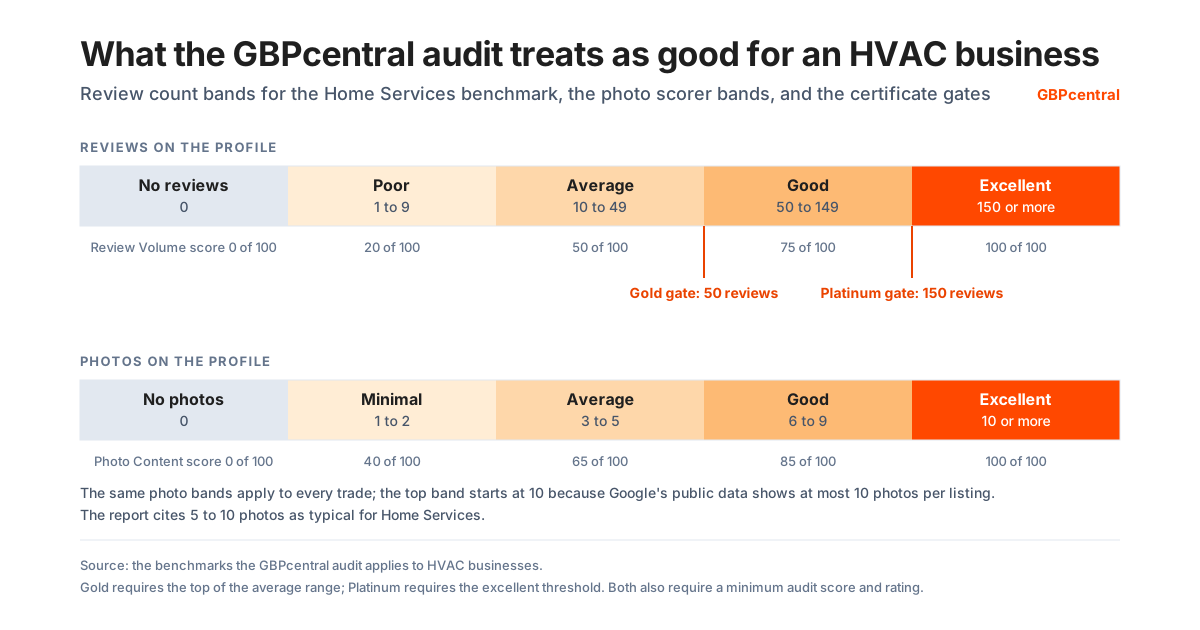
How the audit scores review volume
- No reviews on the profile: No reviews, scores 0 of 100.
- 1 to 9 reviews on the profile: Poor, scores 20 of 100.
- 10 to 49 reviews on the profile: Average, scores 50 of 100.
- 50 to 149 reviews on the profile: Good, scores 75 of 100.
- 150 or more reviews on the profile: Excellent, scores 100 of 100.
How the nine categories weigh in the score
- Category Optimization: 17 of 100 points.
- Profile Completeness: 16 of 100 points.
- Review Volume: 16 of 100 points.
- Website Presence: 16 of 100 points.
- Review Rating: 12 of 100 points.
- Review Sentiment: 8 of 100 points.
- Attributes and Services: 7 of 100 points.
- Business Hours: 5 of 100 points.
- Photo Content: 3 of 100 points.
Each category is scored out of 100 and then weighted as shown; the weights sum to 100. Photos are scored on count, the same way for every trade: no photos scores 0, one or two 40, three to five 65, six to nine 85, and ten or more 100. Google's public data shows at most 10 photos per listing, so ten or more earns full marks, and the report notes that Home Services businesses typically carry 5 to 10. Where Google's data returns service as the primary type, or no primary type, the report cites 8 to 15 photos as typical for General Business instead.
The certificate gates use the same numbers
- Gold
- An audit score of 90 or higher, a rating of 4.5 or higher, and at least 50 reviews, the top of the Home Services average range, plus the requirements every certificate shares, which include a review within the last 180 days, a phone number on the profile, an operational business status, and a name that meets the award naming standard.
- Platinum
- An audit score of 95 or higher, a rating of 4.7 or higher, and at least 150 reviews, the Home Services excellent threshold, with the same shared requirements. A name reported as carrying appended service keywords, or extra descriptive text after a separator, does not meet the naming standard, so an HVAC business with either finding corrects the name on Google and is audited again before either certificate is issued.
A service-area listing is not marked down for a missing address
Google's Places data marks a listing as a pure service-area business when it visits or delivers to customers but does not serve them at its business address. The audit reads that mark: such a listing receives the full address credit in the Profile Completeness category, shown as service area in the report, instead of a recommendation to add a street address.
Hours in the audit
If you run the audit on an HVAC business, expect the hours category to score 85 of 100 with regular hours published. The last 15 points require More hours, which Google offers for specific services such as delivery, takeout, drive through, and pickup, so a business with no such hours to set stops at 85. Holiday hours are reported when Google shows them and are not scored. Hours carries 5 of the audit's 100 points partly for that reason.
What the performance report tells an HVAC contractor
Performance data is available only for verified profiles, and Google says only the metrics that apply to your business appear. These are the ones Google documents.
What the report shows
- Interactions
- A summary of all your total interactions.
- Searches
- The search terms people used to find your business, updated at the start of each month and up to 5 days late.
- Views
- Unique visitors who viewed the profile on Search and Maps, counted once a day.
- Directions, Calls, Website clicks
- Direction requests, clicks on the call button (the phone number must be on the profile to track it), and clicks on the website link.
- Messages
- The number of different conversations through messages.
- Bookings
- Bookings people completed, reported only when bookings run through a booking provider.
- Booking clicks, Products, Menus, Offers
- Booking clicks apply to hotels only; products count views of products sold at the profile's location, not online; menus and offers count their own clicks and views.
What it does not show
- A rank
- None of the metrics is a position in the local results. Google's ranking page names relevance, distance, and prominence as the factors and says there is no way to request or pay for a better local ranking.
- Distance with a hidden address
- Google says distance is how far each business is from the customer who is searching. Google publishes no statement of how distance is judged for a profile whose address is hidden.
- Many locations
- A business with several profiles can download performance data for them at once as a spreadsheet to compare locations.
How GBPcentral fits an HVAC business
GBPcentral does not replace Google's profile, and ownership, verification, roles, and reviews stay with Google. It connects to the same account through the official Business Profile APIs and adds the work around the profile.
- A free audit scored for a service-area business
- Nine categories, the Home Services review benchmark and typical photo range, a service-area listing with no address treated as compliance rather than an omission, a generic primary type, a missing primary type, and a name with appended keywords each reported, and a projected score once the quick wins are done. No signup required.
- One review inbox
- Every review from every location, synced from Google, with alerts for new reviews on the ratings you choose and sentiment tracked over time, so a review left after a service call is not left to whoever remembers to check.
- Geo-grid rank tracking
- Scans the local results across a grid of points around the business on a daily or weekly schedule, the ranking view across a service area that Google's performance report does not give you.
- Posts on a calendar
- Draft, schedule, and auto-publish updates across every location, with recurring series and one calendar that shows what is queued.
- Health score and daily actions
- A daily health score for each profile and a prioritized to-do list built from posting, profile completeness, review, photo, ranking, engagement, and competitor signals.
- Roles for the office and the owner
- Owner, Admin, Member, and Viewer roles with per-capability permissions, finer than Google's owner and manager, so each person's access matches their job.
Every core feature is included on every plan; plans differ by volume and capacity. GBPcentral starts at $49 per month, and new customers get a 14-day free trial on Starter. See the plans, or read what GBP management involves before deciding who should do it.
Frequently asked questions about Google Business Profile for HVAC contractors
Straight answers on the hidden address, the category, verification, hours around the clock, the name, reviews, Local Services Ads, and the benchmarks.
Should an HVAC company show its address on Google Business Profile?
Only if customers are served there. Google defines a service-area business as one that visits or delivers to customers directly but does not serve customers at its business address, and says a service-area business should hide its business address from customers. An HVAC business that does every job at the customer's property and receives no customers at its own address meets that definition. The address on a Business Profile is public, and Google says you should only choose to not show it if the business is a service-area business. Once the address is hidden the profile shows only the service area, and if no service area is entered Google chooses a local area that can be edited later. An HVAC company that also receives customers at an office or showroom is what Google calls a hybrid business: it can show its address and set a service area, provided the location is staffed by the team and able to receive customers during its stated hours, and Google says a business without permanent on-site signage is not eligible as a storefront.
Which Google category should an HVAC contractor choose?
Google says to select a primary category that best describes the business, choose the most specific category available, and use as few categories as possible to describe the overall core business. Categories should complete the statement "This business IS a" rather than "this business HAS a", and Google says you cannot create your own category; if the specific category you want is not available, it says to choose a more general one. Google's Business Profile API returns the category list through a method Google says returns a list of business categories, and Google publishes no help page listing the categories it offers to an HVAC business. The category chosen in the profile editor is the one Google's rules judge. What Google's public Places data reports for the listing is a separate matter, covered in the next answer. Google warns that adding or editing a category might trigger a request to verify the business again.
Why does the free audit report an HVAC listing as a general contractor?
Because that is what Google's public data returns. The GBPcentral audit reads the listing through Google's Places API, and Google's list of place types for that API carries no HVAC type in either of its two tables. A heating and cooling business therefore reaches the audit under a broader type: in a sample of 20 such businesses across Denver, Phoenix, Chicago, and Minneapolis, Google returned General contractor as the primary type for 17 and Services for 3, the names Google shows for those types. The audit treats both as generic, so the report awards the 40 points for a primary category being set, withholds the 15 points for a specific one, and recommends a more specific category. A listing under General contractor is scored against the Home Services thresholds and one under Services against the General Business thresholds, and the review thresholds are the same figures in both cases, 10, 50, and 150 reviews. Google's reference also says a primary type may be missing when the place's primary type is not a supported type; a listing that arrives that way is reported as having no primary category, with a recommendation to set one. In every case the finding describes Google's public data for the listing, not the category chosen in the profile.
Can an HVAC company have more than one Google Business Profile?
Google allows a business without a storefront one service-area profile for the whole area it serves. An HVAC company with different locations, each with its own service area and its own staff, is allowed one profile for each location. Google's guidelines say not to create more than one page for each location of the business, its duplicate profile rules say a profile considered a duplicate does not show on Google Search or Maps, and Google tells a business that relocates to update the existing profile with the new address rather than create a new one. Google also says not to create a new profile because of a change in ownership, and that the reviews remain when a business keeps the same name under a new owner or manager.
How does an HVAC contractor set a service area on Google Business Profile?
On the profile, select Edit profile, then Location, then Edit next to Service area, choose a suggested service area or enter one, and save. Google allows up to 20 service areas based on the cities, postal codes, or other areas served, and says approved edits may take up to 48 hours to show on the profile. A service area cannot be set as a radius around the business, and Google says the boundaries of the overall area should not be more than about 2 hours of driving time from where the business is based, though larger service areas may be appropriate for some businesses. Google asks for the service area to be as specific and accurate as possible, and says to enter both an address and a service area only where customers are also served at the address; otherwise the address is removed and only the service area is entered.
How does an HVAC company verify a Google Business Profile without a shop?
Google determines which verification methods are offered and they cannot be changed; the options depend on business type, public information, region, and business hours. Video verification works for service-area businesses, and Google recommends it where it is offered. For a service-area business the video must show where the business operates, such as street signs or nearby landmarks at the business address, proof that the business exists, such as the professional tools, equipment, or products used for work, specialized machinery, or branded apparel, and proof of management, such as performing a service, unlocking a van that carries the business branding, or showing a business permit, invoice, or utility bill that matches the name on the profile. An HVAC contractor who runs the business from home can record landmarks and signs in the immediate neighborhood. Google says verification reviews take up to 5 business days and may take longer on rare occasions. Bulk verification is not available to service-area businesses.
How does an HVAC company show 24-hour service on Google Business Profile?
Through the hours, not the name. Google's hours page says that to set 24-hour business hours you select Opens at, then 24 hours, for each day of the week the business is open, and save. Google asks every business for its regular customer-facing hours, and its guidelines list business hours information among the things a name must not contain, with "Regal Pizzeria Open 24 hours" as the not-acceptable example and "Regal Pizzeria" as the acceptable one. For days with unusual hours, such as holidays, Google's hours page says Special hours cover a temporary change of hours or a closure of 6 days in a row or fewer, and its closed-status page says a closure of 7 days or less uses special hours while a longer closure uses the Temporarily closed option. More hours are for specific services with different times, such as delivery, takeout, drive through, and pickup, and Google says they do not display until regular hours are set. In the GBPcentral audit, expect the hours category to score 85 of 100 with regular hours published; the last 15 points require More hours, so an HVAC business with no such hours to set stops at 85. Holiday hours are reported when Google shows them and are not scored.
Can an HVAC company put HVAC or heating and cooling in its Google business name?
Only where it is part of the real-world name. Google says the name should reflect the business's real-world name as used consistently on the storefront, website, and stationery, and must not include service or product information, marketing taglines, business hours, phone numbers, or a website address; Google's own not-acceptable example for service information is "Midas Auto Service Experts", with "Midas" as the acceptable name. Google says unnecessary information in the name could result in the suspension of the profile. The GBPcentral audit reads the name the same way: the first segment of the name is treated as the brand and is never judged, so a name such as Summit Heating & Cooling produces no finding. Words such as HVAC, repair, or contractor in a segment after a separator such as a pipe, a spaced hyphen, a slash, or a comma are reported as service or category keywords appended to the business name, and other wording after a separator, such as Heating & Cooling, is reported as extra descriptive text to confirm against the signage. Neither finding changes the audit score. Both findings fall short of the naming standard the GBPcentral certificates require, because a certificate endorses the exact name it prints, so a business with either finding trims the name to the real-world brand on Google and is audited again.
Can an HVAC contractor ask customers for Google reviews?
Yes. Google provides a review link and a QR code under Read reviews, then Get more reviews, and suggests including it on receipts, in thank-you emails, at the end of a chat, and as a printed QR code. What Google prohibits is offering any incentive, such as payment, discounts, or free goods or services, in exchange for posting, changing, or removing a review, discouraging negative reviews or selectively soliciting positive ones, requiring or pressuring people to leave a review while on the premises, and asking staff to solicit a set number of reviews or reviews with specific content. A business that violates the fake engagement policy can be prevented from receiving new reviews or ratings for a set period, have its existing reviews or ratings unpublished for a set period, or display a warning that fake reviews were removed. Customers must be signed in to a Google Account to leave a review, and when a customer reviews a service business Google may ask them to choose the job performed from the business's service list.
Can HVAC contractors run Local Services Ads?
In the United States, yes. Google's Local Services Ads help lists HVAC (heating or air conditioning) among the eligible categories and describes an HVAC professional as one who installs, maintains, and repairs furnaces and central air conditioning systems, among other services. Google calls HVAC an urgent category because consumers often call HVAC professionals for time-sensitive needs such as a heater that is broken in freezing temperatures, so HVAC professionals undergo an additional level of screening that includes service professional background checks. The requirements Google lists for HVAC are a business check, an owner check, and a service professional check, general liability and professional liability insurance, and a business license and an owner license at state level where applicable by local law. Google says that in an applicable category every employee, independent contractor, temporary worker, or other worker who performs core services for the customer must complete a background check, and that office managers, clerical workers, and customer support representatives who do not service customers directly do not. Every Local Services advertiser must have a public, verified Google Business Profile, Google says the screening and verification process takes 3 to 4 weeks on average after documents are submitted, and Google's list of categories without pre-badge ads, garage door services, health care verticals, and locksmiths, does not name HVAC.
How many Google reviews does an HVAC company need?
Google publishes no review count target; its ranking page says more reviews and positive ratings can help a business's local ranking, and its Local Services Ads help recommends 5 or more reviews for an ad. The GBPcentral audit scores an HVAC business against thresholds set for Home Services, the group that also holds plumbers, electricians, roofers, locksmiths, painters, and movers. Under that benchmark, fewer than 10 reviews scores as poor, at least 10 but fewer than 50 scores as average, at least 50 but fewer than 150 scores as good, and 150 or more scores as excellent, and a listing that reaches the audit under the service type, or with no primary type, is scored against the same review figures. The same thresholds gate the GBPcentral certificates: Gold requires an audit score of 90 or higher, a rating of 4.5 or higher, and at least 50 reviews, and Platinum requires 95 or higher, 4.7 or higher, and at least 150 reviews.
How many photos should an HVAC company have?
Google's photo guidelines ask for JPG or PNG files between 10 KB and 5 MB, a recommended resolution of 720 by 720 pixels and a minimum of 250 by 250, in focus and well lit with no significant alterations or excessive filters. Photos and videos show on Google only after the profile is verified. Google's ranking tips list adding photos and videos among the actions that help a profile, and Google publishes no photo count target. The GBPcentral audit report notes that Home Services businesses typically carry 5 to 10 photos, cites the General Business range instead where Google's data returns service as the primary type or no primary type, and, because Google's public data shows at most ten photos per listing, awards full marks for photos at ten or more and says so in the report.
Does hiding the address lower an HVAC company's audit score?
Not when Google's Places data marks the listing as a pure service-area business, which Google defines as a business that visits or delivers to customers directly but does not serve them at its business address. The GBPcentral audit reads that mark, and a listing marked that way receives the full address credit in the profile completeness category, with the address shown as service area, instead of a recommendation to add a street address. The audit checks the accessibility, parking, and payment attributes for the trade. Hours score 85 of 100 with regular hours published; the last 15 points require More hours, which Google offers for delivery, takeout, drive through, and pickup, so an HVAC business with no such hours to set stops at 85. Holiday hours are reported when Google shows them and are not scored.
How does GBPcentral help an HVAC company?
GBPcentral connects to an HVAC company's Google account through Google's official Business Profile APIs and adds the work around the profile: a free audit that scores the profile across nine categories against the Home Services benchmark, treats a service-area listing with no address as compliance rather than an omission, and reports a generic primary type, a missing primary type, and a name with appended keywords, a review inbox synced from Google with alerts and sentiment tracked over time, geo-grid rank tracking that scans the local results from points around the business on a daily or weekly schedule, one calendar for posts across every location, and a daily health score with a prioritized action list. Ownership, verification, roles, and reviews stay with Google. Every core feature is included on every plan; GBP management software such as GBPcentral starts at $49 per month, and new customers get a 14-day free trial on the Starter plan.
Was this guide helpful?
Google's documentation references used in this guide
- Guidelines for representing your business on Google
- Manage your service areas for service-area and hybrid businesses
- Business Profile for service businesses overview
- Business eligibility and ownership guidelines
- Resolve duplicate profiles and ownership issues
- Move your reviews across Business Profiles
- Verify your business on Google
- Verify your business with a video recording
- Verify Business Profiles in bulk
- Manage your business address
- Manage your business category
- Places API place types
- Places API place fields (primaryType and pureServiceAreaBusiness)
- Business Profile API: categories.list
- Edit your business hours
- How to set More hours
- Mark your business as closed
- Manage your services on your Business Profile
- Manage your local business links
- Business links policies and guidelines
- Set up bookings through a provider
- Manage your business attributes
- Manage your Business Profile description
- Manage your Business Profile photos and videos
- Chat with customers from your Business Profile
- Manage customer reviews
- About reviews for service businesses
- Tips to get more reviews
- Create a Google link or QR code to request reviews
- Report inappropriate reviews on your Business Profile
- Report negative review extortion scams on your Business Profile
- Business Profile restrictions for policy violations
- Prohibited and restricted content
- Business Profile photos and videos policy and posts content policy
- Create and manage posts on your Business Profile
- Manage your Business Profile owners and managers
- Getting started with Local Services Ads (United States)
- Local Services Ads business screening and verification requirements (United States)
- Understand the Local Services Ads screening and verification process
- About Google Business Affiliation (Local Services Ads)
- About the Google Verified badge (Local Services Ads)
- About Local Services Ads rankings
- Improve your Local Services Ads performance
- Reviews and ratings on Local Services Ads
- Local Services Ads requirements
- Manage your business details between Google Business Profile and Local Services Ads
- Understand your Business Profile performance and insights
- Tips to improve your local ranking on Google
- Google Business Profile product page