
Google Business Profile Manager at a glance
- What it is
- Google's web dashboard for managing many Business Profiles in bulk, signed in at business.google.com.
- Who uses it
- Businesses with several locations, chains with ten or more, and agencies with an organization account.
- One location
- Edited on Google Search, in the Google Maps app, or through the Gemini web app.
- Cost
- Free. Google offers the Business Profile at no charge and publishes no price for the dashboard, business groups, or bulk verification.
Three things people mean by Google Business Profile manager
Google Business Profile manager means three different things: Google's Business Profile Manager dashboard, the Manager role on a profile, and the person or agency who runs the profile. Knowing which one you need saves a lot of clicking.
The tool: Google's Business Profile Manager dashboard
Business Profile Manager is Google's dashboard at business.google.com for businesses that manage several profiles. Google's Get Started guide says larger businesses with multiple locations should use it to manage their profiles in bulk. It holds business groups, spreadsheet imports, bulk verification, and the invitations that connect agencies to the profiles they manage.
The role: Manager on a Google Business Profile
On every Business Profile, Google grants access as Primary owner, Owner, or Manager. A Manager can edit the profile, respond to reviews, and publish posts, but cannot add or remove users or remove the profile. Business groups and agency organizations have their own owner, manager, and member roles.
The person or agency who manages the profile
In everyday use, a Google Business Profile manager is whoever runs the profile: the owner, an employee, a freelancer, or an agency. The work itself is Google Business Profile management, covered part by part in its own guide; this page stays with the dashboard and the roles. Google publishes rules for that relationship. No third party can promise a ranking, only owners control access, and the business has the right to see its own performance data.
Is there a Google Business Profile Manager app?
Google publishes no app called Business Profile Manager. Google's help pages send mobile users to the Google Maps app to edit a profile, and the dashboard for many locations is a website you open in a browser. The app called Business Profile Manager on Google Play is published by a third-party developer, not by Google, so treat it as you would any other third-party tool and never sign in to your Google Account through an app you have not checked.
What does Google Business Profile Manager do?
Google Business Profile Manager does six jobs that Google documents: business groups, spreadsheet imports, bulk verification, agency access requests, user and role management, and posting to several profiles at once. Each one is only worth the dashboard when there is more than one profile to manage.
Business groups in Business Profile Manager
Google describes business groups as "a more secure way to manage and share access to your Business Profiles with co-workers." The Create group option appears once you have two or more profiles. Google's rules: keep to one business group per business or brand, give each group its own import spreadsheet, and move or remove every profile before deleting a group, because deleting a group cannot be undone. A business group cannot act as a manager of other business groups.
Adding and updating Business Profiles from a spreadsheet
Download Google's template, fill one row per location, and import it through Add profile, then Import profiles. Every row needs a business code, a business name, a primary phone number or website, and a primary category. Accepted formats are .xls, .xlsx, .ods, and .csv. Reuse the same store codes on every import so Google does not create duplicates, preview the changes before applying them, and download the change details afterwards. Hotel attributes cannot be updated through the spreadsheet.
Bulk verification of Business Profiles for chains
Chains verify all of their locations in one request instead of one at a time. Google's conditions: the spreadsheet has ten or more profiles from the same business, the business is not a service-area business, the spreadsheet lists every profile you manage, no verified account for the business already exists, and the account has no errors. Duplicate, suspended, or disabled profiles do not count toward the ten. The request lives under Verifications, then Chain, then Start. Google verifies two kinds of account this way: an individual user account, where every eligible profile in the account that nobody else has claimed is verified, and a business group, where verifying the main owner verifies every eligible profile in the group. Verification is not permanent: Google says it may de-verify accounts that do not actively manage their profiles, and that it revokes bulk verification from an account that abuses it, so the way to stay verified is to review the account for errors and keep the profiles updated. Google states that locations are not eligible to appear on Search, Maps and its other properties until they are verified, which puts losing verification alongside the other problems that stop a profile appearing.
Agency organization accounts and Business Profile access requests
An agency registers an organization account, which Google calls "the top level profile that's associated with your agency," and uses Manage invites to request access to a client's profile, to watch the Requests sent tab, and to approve or decline invitations that arrive. Google's advice is that "third party agencies should use a single organization account to manage all of its profile groups."
Managing users and roles across many Business Profiles
Group settings, then Manage users, is where a business group's owners and managers are added, changed, and removed. Agencies can also create user groups, which Google describes as teams of people who manage specific locations or location groups, so one change sets a person's access across many locations at once. Only organization users can create user groups and business groups, and someone can join a user group only if their account holds no locations or business groups; if it holds any, they remove that access before accepting the invitation.
Publishing posts across several Business Profiles
Google's posts help page says that to post across multiple Business Profiles you select the profiles where you want to share the post, then select Post. A post can be scheduled for a later date and time with the Schedule this post switch, and the Repeats menu can publish it weekly, monthly, or on a custom schedule.
Business Profile Manager in the Google Workspace Admin console
For organizations on Google Workspace, Business Profile Manager is also a service in the Admin console under Apps, then Additional Google services, where an administrator can turn it on or off for everyone or for an organizational unit. Google notes that when it is off, "your users are still able to access Business Profile via Google Maps and Google Search, unless those services are also turned off."
Where do you sign in and manage a Google Business Profile?
You sign in at business.google.com, and where you manage a Google Business Profile after that depends on how many profiles you hold and whether you hold them for yourself or for clients. The dashboard is one of several places Google documents for managing profiles for many locations.
Signing in to Business Profile Manager at business.google.com
Sign in to Google Business Profile Manager at business.google.com with the Google Account that owns or manages the profiles. Google's own help pages link to that address with the words "Go to your Business Profile". The dashboard is a website, so open it in a browser rather than looking for an app to download. Google's guidance is that each user needs their own Google Account, so profiles are managed without anyone sharing a password, which means access is granted to people rather than to a single login.
Where to manage a Business Profile, by situation
Where you manage a Business Profile depends on the situation, and Google names the place to use for each of the six below, from a single profile through to an agency holding many clients. Three of the six are Business Profile Manager itself.
- One profile
-
- Where to manage it:
- Google Search or the Google Maps app.
- What Google says:
- Search for your business name and city, or the phrase my business, while signed in, then select Edit profile. On a phone, open the Google Maps app and tap Edit profile.
- One profile, conversationally
-
- Where to manage it:
- The Gemini web app.
- What Google says:
- Available only to an owner or manager of exactly one verified profile, aged 18 or over, on a personal Google Account with Keep Activity on. Not offered in the European Economic Area or the United Kingdom.
- Two or more profiles
-
- Where to manage it:
- Business Profile Manager with a business group.
- What Google says:
- The Create group option appears with two or more profiles. For anyone new to Business Profile who needs to manage multiple businesses, Google recommends creating a group first and using it to add, verify, and manage the profiles.
- Ten or more locations
-
- Where to manage it:
- Business Profile Manager with spreadsheet import and bulk verification.
- What Google says:
- Add, verify, and manage the locations in bulk. Bulk verification needs ten or more profiles from the same business and excludes service-area businesses.
- An agency managing clients
-
- Where to manage it:
- An organization account inside Business Profile Manager.
- What Google says:
- Register at business.google.com/agencysignup with a company email account that does not already own or manage any profiles, and keep every client's profile group under one organization.
- A software platform
-
- Where to manage it:
- The Business Profile APIs.
- What Google says:
- Applicants must have a valid Google Account, a valid business reason, a valid Google Cloud project, and a valid business website.
Owner, manager, and primary owner on a Google Business Profile
Google uses the same three role names on a single profile and on a business group, with slightly different powers in each place. Everything below, including Google's own capability list and the limits on a new user, comes from Google's help pages, and the wider question of who can manage a Google Business Profile is covered alongside the work itself.
What each role can do on a single Business Profile
- Edit business information, photos, and posts, and reply to reviews: the primary owner, owners, and managers.
- Add or remove users: the primary owner and owners, not managers.
- Remove the profile: the primary owner and owners, not managers.
- Leave the profile without first transferring primary ownership: owners and managers, not the primary owner.
- How many a profile can have: one primary owner, several owners, and several managers.
Google's wording: managers "have mostly the same access to the profile as owners. The only exception is they can't add or remove users or remove the profile." Managers were formerly called site managers, and only owners can remove other owners and managers.
What owners and managers can each do, in Google's own list
Google's owners and managers page carries a list of twenty-two capabilities. Owners are marked for all twenty-two. Managers are marked for all but two, adding and removing users and removing Business Profiles, which is the same rule stated above in Google's own words. The groups below cover what Google marks for both roles, apart from one row for answering questions, a feature whose API Google's deprecation schedule lists as discontinued on November 3, 2025.
- Business information
- Edit the main business information, such as hours and address, plus the phone number, the services, the attributes, all URLs, and the food delivery link, and accept all Google updates.
- Posts, photos, and products
- Create, manage, and publish posts, and add, delete, and edit cover photos, additional photos, logos, and products.
- Reviews, messages, and bookings
- Respond to reviews, use Messaging, and opt in or out of Bookings.
- Reporting and advertising links
- Download insights and manage Google Ads account links.
- Location settings and labels
- Update location settings, which Google lists as editing the name, category, or website on a location, closing a location, and creating location groups, and add custom labels that make particular groups of locations easy to find. A manager can also work on the profile directly on Google Search and Google Maps.
What each role can do on a business group
- Add, edit, and delete every profile in the group: the primary owner, owners, and managers.
- Transfer a profile to a different group: the primary owner, owners, and managers.
- Add or remove the group's owners and managers: the primary owner and owners, not managers.
- Delete the business group: the primary owner and owners, not managers.
- Leave the group without first transferring primary ownership: owners and managers, not the primary owner.
Agencies get two more layers. An organization account has owners and members, and inside it, user groups have their own owners and members. Google describes user groups as a way to "create teams of people to manage specific locations or location groups."
The seven-day limit on a new Business Profile owner or manager
A new owner or manager of a Google Business Profile cannot use all of its features straight away. Google's wording is that you "have to wait 7 days before you can manage some profile features." During those seven days Google returns an error for three actions:
- Deleting or undeleting a Business Profile.
- Removing other owners or managers from the profile.
- Transferring primary ownership, which includes an existing owner trying to make someone else the primary owner inside their own first seven days.
Google's owners and managers page adds that someone who deletes their account inside the first seven days is removed from the profile and has to be added back. The limit matters most when an agency is replaced: an incoming owner cannot remove the outgoing one until the seven days have passed, and a manager cannot remove users at any point.
Who should keep primary ownership of the Business Profile?
The business itself should keep primary ownership of its Business Profile. An agency, an employee, or a piece of software can do everything a manager can do, but primary ownership is the role Google requires to be transferred deliberately rather than dropped. Google's third-party guidance puts it plainly: "Only profile owners can control who has access."
How to get and grant access to a Google Business Profile
Access to a Google Business Profile is granted by an owner. An owner invites a person to become an Owner or a Manager, and an agency is either invited as a business group or requests access for its organization. Below are Google's own steps for the six procedures that come up most, from adding a user to transferring primary ownership, and the four rights Google says a business keeps when someone else manages the profile.
How to add an owner or manager to a Google Business Profile
- Open the Business Profile while signed in as an owner.
- Select More, then Business Profile settings, then People and access.
- At the top left, select Add.
- Enter an email address.
- Under Access, select Owner or Manager.
- Select Invite.
Invited users can accept the invite and become users right away, and you get an email when they do. Every current user and every pending invitation is listed on that same People and access page, and users in the account can see the names and email addresses of the owners and managers. A Google Group cannot be added as an owner or a manager.
How to change a role or remove someone from a Business Profile
Changing someone's role on a Business Profile and removing them both start in the same place. Open the profile, select More, then Business Profile settings, then People and access. Only owners can change access roles for other owners and managers.
- To change a role: select the user, then next to Access select Edit, choose the new role, and select Save.
- To remove someone: select the user, then Remove person. Google's note is that if you cannot select the user, you may only have manager-level access.
- To remove yourself: select yourself, then Stop managing, then Confirm. A manager can remove themselves, and a primary owner cannot until primary ownership has been transferred to someone else.
A pending invitation is cancelled from the same page: under PENDING, find the person and select Cancel invitation. When someone is removed Google emails them, and their replies to reviews, posts, and comments stay on the Business Profile.
How to request ownership of a Business Profile someone else owns
If a verified Business Profile for your business is owned by someone else, Google lets you request ownership from the current owner. These are Google's steps for a storefront or hybrid business.
- Go to business.google.com/add.
- Enter the name and address of your business.
- Choose your business from the list.
- Read the message that says "Someone else may manage this Business Profile."
- Select Request Access.
- Fill out the form.
- Select Submit.
Google emails you a confirmation, notifies the current owner, and gives that owner three days to respond. An approved request lets you manage the profile. A denied request still leaves you able to suggest an edit to the profile, and you can appeal. If no response arrives after three days, Google says you may have the option to claim the profile, and that the option to claim is not always available. A service-area business that works at the customer's location and has no shop or office uses a different path: Google asks you to contact it and enter Transfer ownership of listing as the issue. An account that is already bulk verified can request ownership through the bulk upload spreadsheet instead.
How to transfer primary ownership of a Business Profile
Only the primary owner can transfer primary ownership, and the profile must already have at least one other owner or manager to transfer it to.
- Open the Business Profile, then select More, then Business Profile settings, then People and access.
- Select the user you want to transfer primary ownership to.
- Next to Access, select Edit.
- Select Primary owner.
- Select Save.
If you are the only user on the profile, add an owner or a manager first. Google's reason for handling a sale or handover this way is that transferring primary ownership to the new owner keeps all of the business information, reviews included. An owner who is still inside their own first seven days on the profile gets an error when they try, as set out above.
How an agency requests access to a client's Business Profile
- Sign in to Business Profile Manager with the organization account.
- Select Manage invites, then Request access.
- Search by business name and choose the profile.
- Choose which of your business groups the profile should join.
- Select Continue and follow the prompts.
- Track the request under the Requests sent tab.
The client can also invite the agency directly: "The profile owner can invite a business group" or "the business group owner can invite your organization."
How to move Business Profiles into an organization account
- In the personal account, move all the profiles into one group.
- Add the organization as an owner of that group by entering its ten-digit organization ID.
- In the organization account, accept the invitation.
For a single profile, the organization requests access, picks a group for it, and the personal account accepts.
What Google says a business is entitled to from any third party
- "Third parties can't promise nor directly influence your business's ranking on Google Search or Maps through any special means."
- "Third parties can't remove your business from Google or access your profile without your permission. Only profile owners can control who has access and can update permissions at any time."
- "You have the right to know your profile's performance, such as how many users interact with, view, and click on your Business Profile."
- If someone claims to work for Google, ask them to email you from an @google.com address. Google also advises working with one third party at a time so results can be judged fairly.
- Deceptive pricing is on Google's list of warning signs: a third party might charge more than the price agreed, so get an official copy of the agreement, setting out the services and their costs, before you agree to work with one.
How to add and verify many Business Profiles in bulk, step by step
Adding and verifying many Business Profiles in bulk runs in seven steps that Google sets out for a business with ten or more locations, from creating the account to keeping the business information current. The primary category and the attributes a chain enters for each location depend on its trade, which the guides by industry set out. The details below decide whether an import goes through cleanly.
Google's sequence for adding and verifying locations in bulk
- Create a Google Account for the business. Use an email address on the business domain if you have one.
- Create a business group to hold the locations. Google previously called this a business account. One group per business or brand.
- Build the spreadsheet from Google's template. One row per location, with every location you manage on it.
- Upload it in Business Profile Manager. Preview the changes before you apply them.
- Review the locations and fix the errors. Work through the import summary until every row is clean.
- Request bulk verification. Under Verifications, then Chain, then Start. If the Verifications tab is missing, you may not have enough eligible profiles.
- Keep the business information current. Use the same spreadsheet and store codes for every later update.
What decides a clean bulk import of Business Profiles
- Required in every row
- A business code, the business name, a primary phone number or website, and a primary category.
- File formats
- .xls, .xlsx, .ods, or .csv.
- Store codes
- Use the same store codes and location details as before, so Google does not create duplicate businesses.
- Bulk verification threshold
- Ten or more profiles from the same business. Duplicate, suspended, or disabled profiles do not count. Service-area businesses are not eligible.
- Empty columns erase information
- A column heading with nothing under it deletes the existing information for that column. When you are updating only some fields, delete the columns you are not using rather than leaving them blank. The business code column is always required.
- Cannot be done by spreadsheet
- Hotel attributes.
- After each import
- Download the change details, which list the import status, the updated fields, and any errors for every row.
The Google Business Profile APIs behind the dashboard
Software that manages profiles for many locations, GBPcentral included, works through the Google Business Profile APIs rather than the dashboard. Google publishes nine of them.
The nine Google Business Profile APIs and what each covers
- Account Management API
- Business accounts on Google and the users who have access to accounts and locations.
- Business Information API
- The interface for managing business information on a location.
- Business Profile Performance API
- Performance insights about a listing on Google.
- Verifications API
- Verifying locations and checking whether a location has the voice of merchant.
- Notifications API
- Notification settings for specified accounts.
- Place Actions API
- Place action links such as booking, reservations, and food ordering.
- Lodging API
- Lodging data such as property amenities and policies.
- Business Calls API
- Business Calls and insights such as the number of missed calls to a location.
- Google My Business v4.9 API
- Everything else, including posts, reviews, and media.
Who Google grants Business Profile API access to
Google requires applicants for API access to have a valid Google Account, a valid business reason, a valid Google Cloud project, and a valid business website. Agencies and platforms sign up through Google's partner page, which gives agencies an organization account and a dashboard for agency use, and lets platforms integrate Business Profile features into their products.
How Business Profile Manager maps to the API's account types
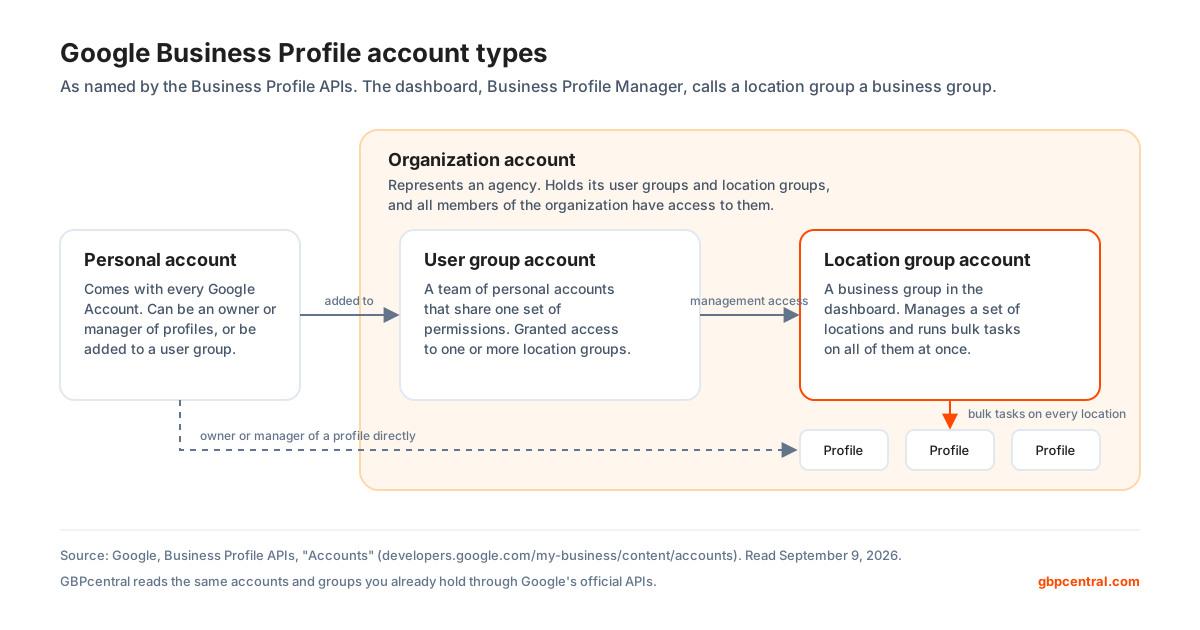
Google's APIs use four account types to manage users and locations. A personal account is the one every Google Account has. An organization account "represents your agency." A location group is "used to manage a group of individual locations" and to "perform bulk tasks to multiple locations," which is what the dashboard calls a business group. A user group grants management access to multiple location groups in the organization.
Which Business Profile APIs Google has retired
Google's deprecation schedule lists the My Business Q&A API as discontinued on November 3, 2025, after support ended on September 15, 2025. Any tool that still promises question and answer management through the API is describing something Google no longer provides. The same schedule records three earlier retirements: the My Business Business Calls API, deprecated on May 30, 2023; two location association methods in the Business Information API, deprecated the same day; and the insurance network and health provider attribute methods in the Google My Business v4.9 API, deprecated on June 17, 2024. Google separates the two words on that page. Support ending means a version keeps working but may get no new features or fixes. Discontinuation means it returns errors and is shut down. Google also asks developers to move to the new Business Profile Performance API to keep receiving performance data.
Four limits of Google Business Profile Manager
Google Business Profile Manager has four limits worth knowing before you rely on it: the performance report measures activity rather than rank, Google's roles stop at owner and manager, management through the Gemini web app covers only one profile, and bulk verification is only for chains with a storefront. None of these is a flaw in the dashboard. They are the edges of what Google has built, and they decide when a business needs something alongside it.
Business Profile performance data measures activity, not rank
Google's performance report covers interactions, searches, views, directions, calls, website clicks, messages, bookings, booking clicks, products, menus, and offers. None of those is a position on the map. To know where a profile ranks for a search from a given street, you need a rank tracker that scans the results from points around the location.
Google Business Profile roles stop at owner and manager
Google publishes three roles for a Business Profile and no finer permission levels. A manager can change the primary category just as easily as reply to a review. If one person should only answer reviews, or only see reports, that distinction has to live in the software your team uses.
Gemini management stops at one Business Profile
Google's conversational management through the Gemini web app is limited to people who are an owner or manager of only one verified Business Profile, and it is not offered in the European Economic Area or the United Kingdom.
Business Profile bulk verification is only for chains with a storefront
Ten or more locations of the same business, and no service-area businesses. Google's bulk verification page states that agencies with more than one business in one account cannot bulk verify, so a service-area business with twelve territories, such as a plumbing company or a roofing company, or an agency with twelve unrelated clients verifies each profile on its own.
How GBPcentral works alongside Google Business Profile Manager
GBPcentral does not replace Google's dashboard, and ownership, verification, and roles stay with Google. It connects to the same account through the official APIs and adds the work that a team with many locations does every day.
- Connects with your Google account
- Sign in with Google once. GBPcentral reads the accounts, business groups, and locations you already own or manage through the Account Management and Business Information APIs. You need Owner or Manager access on Google's side first.
- One calendar for every location
- Draft, schedule, and auto-publish posts across every profile, with recurring series and a calendar that shows every queued post.
- Geo-grid rank tracking
- Scans the local pack across a grid around each location on a daily or weekly schedule, the ranking view the performance report does not give you.
- Review inbox
- Every review from every location in one inbox, synced from Google, with alerts and sentiment tracked over time.
- Health score and daily actions
- A daily health score for each profile and a prioritized to-do list built from rank, review, health, and analytics data.
- Four team roles, groups, and white label
- Owner, Admin, Member, and Viewer roles for the people who do the work, account groups for the locations, and on the Agency plan, your own logo, palette, and domain on what clients see.
Every core feature is included on every plan; plans differ by volume and capacity. GBPcentral starts at $49 per month, and new customers get a 14-day free trial on Starter. See the plans and pricing, or run a free GBP audit on any profile first, no account needed.
Frequently asked questions about Google Business Profile Manager
Straight answers about Google Business Profile Manager: the dashboard, the roles, access, bulk verification, and where GBPcentral fits.
What is Google Business Profile Manager?
Google Business Profile Manager is the web dashboard at business.google.com that Google provides for managing several Business Profiles at once. Google's Get Started guide tells larger businesses with multiple locations to use it to manage their profiles in bulk, while a single profile is edited directly on Google Search or in the Google Maps app. Inside the dashboard you can create business groups, add or update locations from a spreadsheet, request bulk verification for chains with ten or more locations, and handle the access requests that connect agencies to the profiles they manage. The same phrase is also used for the Manager role on a profile and for the person or agency who does the work.
Is Google Business Profile Manager the same as Google My Business?
Google Business Profile is the current name of the product. Google's own definition says it is also formerly known as Google My Business or Google Places, and Google's developer documentation still uses the earlier name for the Google My Business API. Business Profile Manager is the dashboard inside the product for managing many profiles. In Google's current help pages a single profile is edited on Google Search or in the Google Maps app, and Business Profile Manager is the tool for businesses and agencies that manage several profiles.
Where do I sign in to Google Business Profile Manager?
Go to business.google.com in a web browser and sign in with the Google Account that owns or manages the profiles. The dashboard is a website, so open it in a browser rather than looking for an app to download. If you manage one location you do not need the dashboard: search for your business name and city, or the phrase my business, on Google Search while signed in, or open the Google Maps app, and select Edit profile. In an organization that uses Google Workspace, an administrator can switch the Google Business Profile Manager service on or off, and when it is off people can still reach their profile through Google Maps and Google Search.
Do I need Business Profile Manager if I have only one location?
No. Google's help pages show a single profile being edited directly on Google Search and in the Google Maps app: search for your business name and city or the phrase my business on Google Search, or open the Google Maps app, then select Edit profile. Business Profile Manager is what Google recommends for larger businesses with multiple locations. A single-location owner can also connect the profile to the Gemini web app, which Google restricts to people who are an owner or manager of only one verified Business Profile.
What is a business group in Business Profile Manager?
A business group is a set of Business Profiles managed together under one account inside Business Profile Manager. Google describes business groups as a more secure way to manage and share access to your profiles with co-workers, and the option to create one appears once you have two or more profiles. Google's guidance is to limit business groups to one account per business or brand, and each group needs its own spreadsheet when you import locations. Business groups were previously called business accounts, and in the Business Profile APIs they appear as location group accounts.
How many locations do I need for bulk verification?
Ten. Google's bulk verification is available when your spreadsheet has ten or more profiles from the same business, the business is not a service-area business, the spreadsheet lists every profile you manage, no verified account already exists for the business, and the account has no errors. Duplicate, suspended, or disabled profiles do not count toward the ten. You submit the request in Business Profile Manager under Verifications, then Chain, then Start.
What is the difference between an owner and a manager on a Google Business Profile?
An owner has full control of the profile and can add or remove users, manage the profile information, and even delete the profile. A manager has mostly the same access as an owner, with one exception: managers cannot add or remove users or remove the profile. Every profile has exactly one primary owner, who must transfer primary ownership to someone else before leaving the profile. Google notes that managers were formerly called site managers.
How do I add or remove a manager on my Google Business Profile?
Open the Business Profile while signed in as an owner, select More, then Business Profile settings, then People and access. To add someone, select Add at the top left, enter an email address, choose Owner or Manager under Access, and select Invite. Invited users can accept and become users right away. To remove someone, open the same People and access page and select Remove person. Only owners can remove other owners and managers, and a manager can remove themselves. When someone is removed they get an email, and their replies to reviews, posts, and comments stay on the profile.
How does an agency get access to a client's Business Profile?
Google's route for agencies is an organization account, created at business.google.com/agencysignup with a Google Account tied to the agency's own email that does not already own or manage any profiles. Google recommends a single organization account for all of an agency's profile groups. From Business Profile Manager the agency selects Manage invites, then Request access, searches for the client's business, chooses which business group the profile should join, and continues through the prompts. The request then appears under the Requests sent tab until it is answered. The alternative is for the business to add the agency's account as a manager directly. In every case the business itself should stay the primary owner.
How do I get access to a Google Business Profile that someone else manages?
If a verified Business Profile for your business is owned by someone else, go to business.google.com/add, enter your business name and address, choose your business from the list, and select Request Access when Google says someone else may manage the profile. Google emails you a confirmation and gives the current owner three days to respond. An approved request lets you manage the profile, a denied one still leaves you able to suggest an edit and to appeal, and if no response arrives after three days Google says you may have the option to claim the profile, though that option is not always available. A service-area business with no shop or office contacts Google instead and enters Transfer ownership of listing as the issue.
Does Google Business Profile Manager cost anything?
No. Google describes the Business Profile as free, and it publishes no price for Business Profile Manager, business groups, spreadsheet import, bulk verification, or an agency organization account. Google also states that there is no way to request or pay for a better local ranking. What costs money is the work: the time to keep every location accurate and active, and any software or agency you pay to do it. GBP management software such as GBPcentral starts at $49 per month, and new customers get a 14-day free trial on the Starter plan.
Does GBPcentral replace Google Business Profile Manager?
No, and it is not meant to. GBPcentral connects to the same Google Account through Google's official Business Profile APIs, reads the profiles and business groups that account already has access to, and adds what it is built for: one calendar for posts across every location, a shared review inbox, geo-grid rank tracking, a daily health score, team roles, and your own branding on the Agency plan. Ownership, verification, roles, and bulk verification stay with Google, and you need to be an owner or manager of a profile on Google's side before GBPcentral can manage it.
Can Gemini manage my Google Business Profile?
Yes, within limits Google sets. Google's help page says that once you connect your Business Profile to the Gemini web app, Gemini can update details such as business hours, contact information, and action links, draft replies to reviews, create posts, summarize customer feedback from reviews, and show performance metrics and search keywords. To use it you must be an owner or manager of only one verified Business Profile, be 18 or over, sign in with a personal Google Account associated with the profile, and keep the Keep Activity setting on. It is not available in the European Economic Area or the United Kingdom, and Google offers it in only twelve languages. Businesses with more than one profile still use Business Profile Manager or third-party software.
Was this guide helpful?
Google's documentation references used in this guide
- Get started with Google Business Profile
- Bulk location management overview
- Create and manage business groups
- Create a bulk upload spreadsheet for Business Profiles
- Import and update Business Profiles in bulk
- Verify Business Profiles in bulk
- Manage your Business Profile owners and managers
- Request ownership of a Business Profile
- Transfer primary ownership of a Business Profile
- Manage business group owners and managers
- Overview for agencies
- Register your agency for Business Profiles
- Manage agency invites
- Manage agency business groups
- Manage agency user groups
- Move a profile to an organization account
- Tips for working with third parties to manage your Business Profile
- Find your business on Google
- Edit your Business Profile
- Create and manage posts on your Business Profile
- Understand your Business Profile performance and insights
- Tips to improve your local ranking on Google
- Manage your Business Profile on Google with the Gemini web app
- Business Profile: Definition (Google Ads Help)
- Turn Google Business Profile Manager on or off for users (Google Workspace)
- Google Business Profile APIs reference overview
- Business Profile APIs overview and eligibility
- Business Profile account types
- Business Profile APIs deprecation schedule
- Sign up to be a Business Profile third party agency or platform