
Google Business Profile management at a glance
- What it is
- Keeping a verified Business Profile accurate, active and in the right hands on Google Search and Maps: hours, photos, posts, reviews, access, and the performance report.
- Where it is done
- On Google Search or in the Google Maps app for one profile, in Business Profile Manager for several, or in the Gemini web app for one verified profile.
- Who may do it
- The business owner or an authorized representative, holding an owner or manager role on the profile. Google's policy keeps ownership with the business at all times.
- What it costs
- Nothing from Google, which says the profile is free. Third parties often charge a fee to manage it, and software is a monthly subscription.
What is Google Business Profile management?
Google Business Profile management is the work that starts once a Business Profile is verified, and it does not end. Google's get-started page lists what a profile lets a business do: keep accurate information online, interact with customers through photos, videos and reviews, and attract new ones. Doing those things on purpose, week after week, is management.
The work Google Business Profile management covers
The work of Google Business Profile management falls into six parts, and Google documents each one. The parts below link to the full reference for each, which carries Google's rule field by field.
- Business information: the name, categories, address or service area, hours, phone, website and description, each with a rule Google publishes for it.
- Content: the photos, videos and posts that show the business is open and active.
- Reviews: replying to each one, asking customers for new ones within Google's rules, and reporting the ones that break policy.
- Access: who holds the owner and manager roles, and who no longer should.
- Checking what Google and the public have changed on the profile.
- Reading the performance report and acting on it.
Why a verified Google Business Profile still needs managing
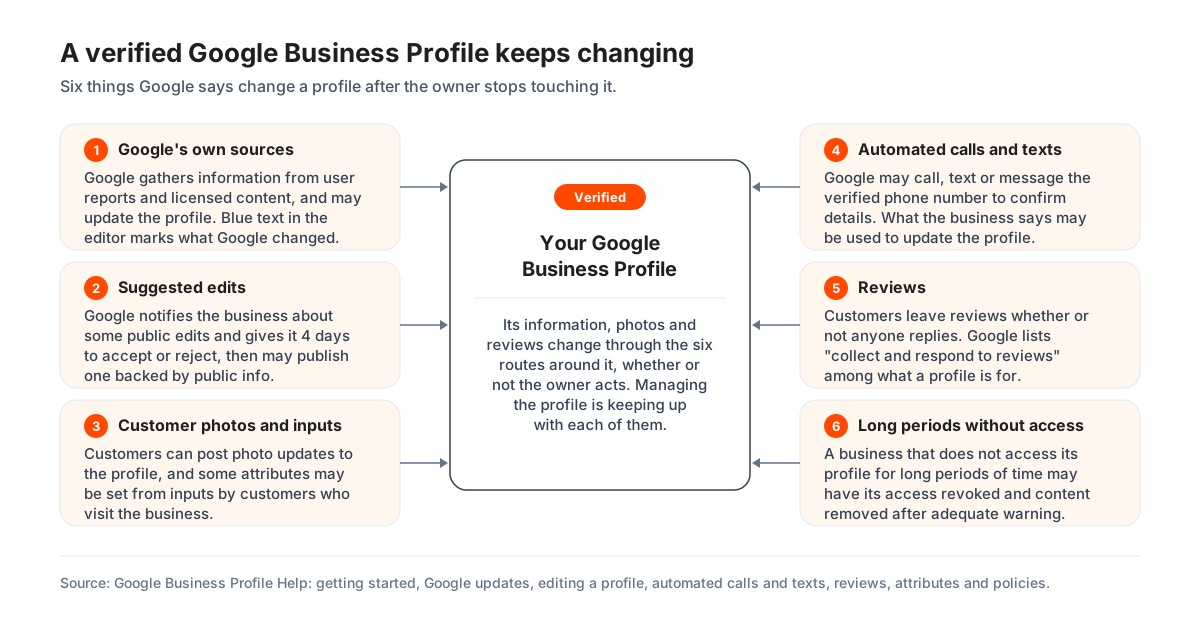
A verified Google Business Profile keeps changing after the owner stops touching it, which is why it needs managing. Google says it gathers information "from different sources, like user reports and licensed content". When sources report the profile is wrong, "Google may update your profile". Text shown in blue in the profile editor is information Google changed.
Members of the public suggest edits too. Google notifies the business about some of them and gives it 4 days to accept or reject. After that, Google "may automatically publish the update if it is supported by other publicly available information, such as your business website". Customers can post photo updates to the profile. Google may also call, text or message the verified phone number to confirm details. What the business says "may be used to update your profile".
Reviews arrive whether or not anyone replies, and Google's policy overview says a business that does not access its profile "for long periods of time may have their access revoked and content removed after adequate warning". An unmanaged profile is not a frozen one.
Google My Business management and the other names for this work
Google My Business management is the same work under the product's former name. Google's own definition says "Google Business Profile was formerly known as Google My Business". People who do the work for a living shorten the phrase to GBP management. The guide of that name is the full reference. It carries every part of a profile with Google's rule for it, how often each part is done, and what a day, a week, a month and a quarter of the work contain. This page stays with the owner's questions.
Shorter searches such as Google business management, and older ones such as Google My Business profile management, mean the same work. Whatever the words, the profile, the rules and the routine are the ones set out on this page.
Where Google Business Profile management is done
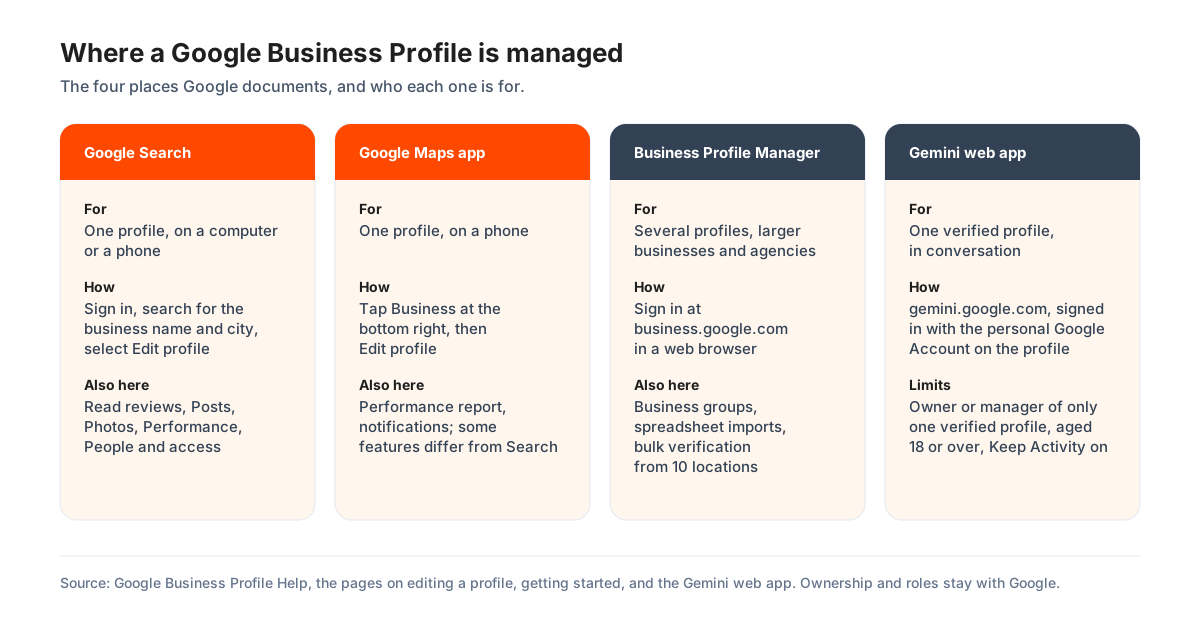
Google Business Profile management is done in four places, and Google names the one to use for each situation. How to manage a Google Business Profile day to day therefore depends on how many profiles you hold. One profile is edited on Google Search or in the Google Maps app. Several profiles are managed in Business Profile Manager. One verified profile can also be managed in conversation through the Gemini web app.
Managing a Google Business Profile on Google Search
Managing a Google Business Profile on Google Search starts with finding it. Google's instruction is to sign in to the Google Account linked to the profile, which is the login for the profile. Then search for the business name and city, or for the words "my business". The profile's own controls then appear with the results: Edit profile, Read reviews, Posts, Photos and Performance.
To change something, select Edit profile, make the change, and select Save. Google says "we review your changes before we update them live on your profile". A review usually takes up to 10 minutes but can take up to 30 days. Edits to an unverified profile are limited to the name, category, address, hours, phone number and website.
Managing a Google Business Profile in the Google Maps app
Managing a Google Business Profile in the Google Maps app is Google's route for a phone. Open the app, tap Business at the bottom right, tap Edit profile, make the change, and tap Save. The same Business tab holds the performance report and the notifications.
Google notes that "certain features to manage your profile may differ between Search and Maps and your device's operating system". A control that is missing on the phone is usually there on a computer. Review QR codes, for example, can only be generated in a computer browser.
Business Profile Manager for several Google Business Profiles
Business Profile Manager is Google's dashboard at business.google.com for a business with several profiles. Google's get-started page tells "larger businesses with multiple locations" to use it "to manage your profiles in bulk". It holds business groups, which Google describes as "like a shared folder for your profiles", spreadsheet imports, and bulk verification for ten or more locations.
The dashboard, the roles inside it and every access procedure have their own guide on this site. It runs from where to sign in to Google's sequence for adding and verifying locations in bulk.
Managing a Google Business Profile with the Gemini web app
The Gemini web app can manage one Google Business Profile in conversation, within limits Google sets. The owner or manager must hold only one verified profile and be 18 or over. They sign in with a personal Google Account rather than a work or school account, with Keep Activity on. Google says the feature is "only available in the Gemini web app at gemini.google.com". How to connect it, and what Google requires first, is set out under managing a profile with the Gemini web app.
Google lists what Gemini can do on the profile. It is "not available to owners or managers who have access to more than one verified Business Profile".
- Change the regular weekly hours and set special hours for holidays and events.
- Create, update or delete food menus, for food businesses.
- Add photos from a public web address, and show the photos the business or its customers uploaded.
- Change attributes such as outdoor seating or Wi-Fi.
- Change the website and social media links, and the action links for ordering, reservations or appointments.
- Draft or delete replies to reviews, and create, schedule, publish or delete posts.
- Read the performance metrics and the search keywords customers used.
Gemini can also create a business notebook for the profile. Google says it holds suggested actions, such as adding missing hours or a description, adding an exterior photo, and reviewing the profile's performance.
Is there a Google Business Profile management app?
Google's instructions for managing a Google Business Profile on a phone use the Google Maps app, and its dashboard for several profiles is a website opened in a browser. Any other app that asks for the Google Account is a third-party product. Check who publishes it before signing in, because Google's rule is that "only profile owners can control who has access", and an app signed in as the owner has that control.
Who can manage a Google Business Profile
Google allows the business owner or an authorized representative to manage a Google Business Profile, and it defines both. The rule on its eligibility page is one sentence. "Only business owners or authorized representatives may verify and manage their business information on a Business Profile". The rest follows from the roles Google grants and the way access is given.
Who Google allows to manage a Google Business Profile
Google allows a profile for a business that "must make in-person contact with customers during its stated hours". It allows that business's owner or an authorized representative to manage it. An authorized representative is "any individual or company that manages business information for a Business Profile that they don't own". Google's examples are an SEO company, a friend of the owner, a booking provider and an affiliate network.
The rule is about in-person contact and the right to speak for the business. Google adds that it can take ownership away. That happens when the owner has not signed in for a while. It happens when the business says a person or agency no longer acts for it. It also happens when Google cannot reach the owner by email after several tries, or when a profile owner deleted the profile.
Primary owner, owner and manager on a Google Business Profile
A Google Business Profile has one primary owner and can have further owners and managers. Google says owners have "full control over the profile". They can add or remove users, manage the information and delete the profile. Managers "have mostly the same access to the profile as owners. The only exception is they can't add or remove users or remove the profile".
A business can therefore give an employee or an agency everything the daily work needs as a manager. It keeps the power to add, remove and delete for itself. Anyone newly added waits 7 days before they can delete the profile, remove other users or transfer primary ownership. Google returns an error if they try sooner.
How to check and change who has access to a Google Business Profile
Who has access to a Google Business Profile is listed on one screen. Signed in as an owner, open the profile and select More, then Business Profile settings, then People and access. Google says the page shows "all current users and pending invites". Users in the account can see one another's names and email addresses.
A person is added with Add, an email address, a choice of Owner or Manager, and Invite. A person is removed with Remove person. Google notes that if you cannot select the user, you may only have manager access yourself. The step-by-step procedures, from adding an owner or manager to transferring primary ownership, are set out in the Manager guide.
Why the business keeps primary ownership of its Google Business Profile
The business keeps primary ownership of its Google Business Profile because Google's rules for third parties require it. The policy says "all end customers must retain ownership or co-ownership of their Business Profile at all times", and Google's advice to an agency is to make the business owner the owner and itself the manager. Google also warns that "owners can edit and transfer ownership of your business, so add them with extra care".
The monthly routine of Google Business Profile management
The monthly routine of Google Business Profile management is six recurring jobs, each with a rule Google publishes. Hours and closures are kept current. Posts and photos keep the profile visibly active. Every review gets a reply. What Google has changed is checked, and the performance report is read. Google's advice to a business that uses an agency is to "spend time each month to review your profile's performance". That is a fair minimum for an owner doing it alone.
Business hours, special hours and closures on the profile
Business hours are the first thing a customer reads and the first thing Google asks about, so they lead the routine. Regular hours are set under Edit profile, then Hours. For a holiday or an event, Google says to use special hours. They cover a temporary change or a closure of "6 days in a row or fewer". Google also says to confirm the hours for official holidays even when they do not change.
A closure of 7 days or more, or of unknown length, is marked Temporarily closed instead. Google adds that for broad searches "temporarily-closed businesses can rank after open businesses". When hours change, Google adds a post to the profile confirming the change, which the business can edit or delete.
Posts on a Google Business Profile
Posts on a Google Business Profile are the owner's own announcements, and Google offers three kinds: Updates, Offers and Events. An Offer needs a title, dates and times and carries a View Offer button; an Event needs a title and start and end dates. A post can be scheduled, and the Repeats menu publishes it weekly, monthly or on a custom schedule.
Google reviews every post against its content policy. "Posts older than 6 months are archived unless a date range is set", so a profile with nothing newer looks idle. A phone number in the description "might get rejected" if Google cannot tie it to the business.
Photos and videos on a Google Business Profile
Photos and videos on a Google Business Profile appear only after verification, and Google reviews each one. Its guidance: JPG or PNG between 10 KB and 5 MB, 720 pixels square recommended and 250 the minimum, in focus and without heavy filters; videos up to 30 seconds and 75 MB at 720p or better. Uploads can take 24 to 48 hours to show.
An exterior photo "helps customers recognize your business when they visit". Customers add their own photos too, and Google may choose one of theirs as the cover when the business's choice is low quality. That is one more reason to look at the profile as a customer sees it each month.
Replying to Google reviews and asking for new ones
Replying to Google reviews is the part of the routine customers see most, and Google reviews each reply before it posts. Replies are written under Read reviews. They appear "like your business replied", without the writer's personal name, and the reviewer is notified. Google's tips: be polite, keep it short, make each reply count, and "be conversational, not promotional".
Asking for reviews is allowed, with the link or QR code under Read reviews, then Get more reviews. Offering "free or discounted goods or services" for a review is "strictly prohibited". A review that breaks policy can be reported, but Google says not to report one "just because you disagree with it". The full review rules, from replying to appeals, are in the reference guide.
Checking the business information Google holds about you
The business information Google holds about a profile can change without the owner, so the routine includes a check of it. In Edit profile, text in blue "shows info changed by Google". A notification at the top of the profile flags Google updates and suggested edits that await a decision.
Under Edit profile, then Collected info, Google shows what it gathered through automated calls and messages. Each item carries its source and date, and the business can delete it. The Profile Strength indicator, shown for verified profiles, points to missing details, to consistency across Search, Maps and Shopping, and to content worth adding.
Reading the Google Business Profile performance report
The Google Business Profile performance report shows how people found the profile and what they did, for verified profiles only. Google's metrics include interactions, searches, views, directions, calls, website clicks, messages, bookings, products, menus and offers. The searches list "is updated at the start of each month" and can take 5 days to appear, which makes a monthly read the natural pace.
Views count unique visitors, once a day each. That is why the figure runs lower than the counts shown on the profile itself. The report does not say where the profile ranks for a search. That needs a rank tracker, as the guide explains under measuring where a Business Profile ranks.
Three ways to get Google Business Profile management done
Google Business Profile management gets done in one of three ways. The owner does it, software helps the owner or a team do it, or a managed service does it for them. Google's third-party page states the terms of the choice. The profile "can be used at no charge", third parties "often charge a fee to manage your profile", and the business should "evaluate your return on investment".
Managing the Google Business Profile yourself
Managing the Google Business Profile yourself costs nothing but time, and Google built its tools for it. Everything in the routine above is done on Google Search, in the Maps app, or through Gemini for a single profile. Google's own advice is that "it doesn't take long to understand how Business Profile works". It offers a learning center, a help center and a community forum.
- Doing it yourself
-
- Cost:
- Nothing. Google says the profile is free to use.
- Control:
- Complete. The owner holds the primary owner role and sees every change.
- The limit:
- Attention. Replies are expected promptly, hours and posts need keeping up, and only the notifications the owner has turned on will say when something changed.
Google Business Profile management software
Google Business Profile management software, sometimes sold as a Google Business Profile management tool, connects to the profile through Google's official interfaces and puts the routine in one place. It gives a calendar for posts across every location, one inbox for reviews, and the performance data kept over time. A map-grid rank tracker covers the one thing Google's report leaves out. Software suits a business with several locations or a team that shares the work.
- Software
-
- Cost:
- A monthly subscription. GBPcentral starts at $49 per month, with a 14-day free trial on Starter.
- Control:
- Stays with the business. Ownership, verification and roles remain on Google's side, and the software works with the access it is given.
- The limit:
- Software does not do the work. Someone still writes the posts and the replies and decides what the report means. What the software does is set out feature by feature.
A Google Business Profile management service
A Google Business Profile management service does the routine for the business under Google's rules for third parties. It writes the posts, adds the photos, replies to reviews, checks the listing and sends a monthly report. Google requires the business to keep ownership and to be told about fees in writing before the work starts. The business must also be able to leave within 7 business days of giving notice.
- A managed service
-
- Cost:
- A monthly fee set by each provider. GBPcentral's own Google Business Profile management service starts at $549 per location per month.
- Control:
- The business stays the owner and the provider works as a manager. Google's policy requires it, and the provider must give the business its performance data.
- The limit:
- No service can promise a position. Google says "third parties can't promise nor directly influence your business's ranking on Google Search or Maps through any special means".
How to hire someone for Google Business Profile management
Hiring someone for Google Business Profile management is a decision Google has written guidance for, from the questions to ask to the warning signs to watch. Its page on working with third parties is short and worth reading in full. The points below are Google's, with the policy that binds the agency set beside them.
The questions Google says to ask a third party
The questions Google says to ask a third party come under five headings on its own page. The first of them is addressed to the owner rather than the agency.
- Educate yourself. Google's words: "It doesn't take long to understand how Business Profile works and use its features". An owner who knows the basics can judge the work.
- Be selective. Ask whether they have managed Business Profiles before, whether they have worked with businesses of similar budget and audience, and what other services they offer.
- Work with one third party at a time. A business "can only appear once on Google", so two providers at once cannot be compared.
- Trust experience. Speak with their staff about the businesses they have managed on Google before hiring them.
- Evaluate your profile performance. Each month, check the performance report, the photos, the hours and how customers find the business.
The warning signs Google lists for a third party
The warning signs Google lists for a third party are five. Each one is also a breach of the policy Google holds agencies to.
- Lack of transparency. "You have the right to know your profile's performance, such as how many users interact with, view, and click on your Business Profile."
- A guarantee of placement. "Third parties can't promise nor directly influence your business's ranking on Google Search or Maps through any special means."
- A claim to work for Google. Ask for the person's name and an email from an "@google.com" address; Google says that without it "they likely don't work for Google".
- Threats. "Third parties can't remove your business from Google or access your profile without your permission."
- Deceptive pricing. Get "an official copy of your agreement that clearly details the services and their costs" before agreeing to anything.
What a business keeps when a third party manages its profile
A business keeps a set of rights when a third party manages its profile. Google's third-party policy spells them out. They are worth having in front of you when an agreement is signed.
- Ownership. The business "must retain ownership or co-ownership of their Business Profile at all times", and decides whether the agency gets co-owner, manager or no access.
- Notice of every change. Changing or disabling a profile feature "without the business owner's consent is prohibited".
- A way out. Within 7 business days of notice, the agency must let the business disassociate the account used to manage the profile "and regain exclusive control of it".
- Fees in writing. The agency must say that the profile "is a service provided at no extra cost", tell new customers about its fee "in writing before you manage their profile", and show the fee on invoices.
- The disclosure notice. An agency serving small and medium businesses must link Google's "Working with a third party" notice somewhere discoverable on its website and point customers to it at the start and at each renewal.
- Its own data. Business Profile performance data must be reported separately from other platforms' data, and must not be compared with or shared among the agency's other customers.
- Approval of replies. "To respond to reviews on behalf of the end customer, you must have an explicit approval. Verbal consent isn't sufficient."
- A say on Google's updates. An agency that takes "automated actions to discard suggested updates without consulting the merchant" breaks the policy; it must check with the business that the information is still right.
How to report a third party to Google
Reporting a third party to Google is done through its third-party violation complaint form. Both its tips page and its policy page link to it. Google says it "might not respond personally" but investigates and takes action if necessary. The actions it lists start with a compliance review and a request for correction. They run to suspension from Google's partner programmes and of the agency's own Google Account. In serious cases Google says it may contact the agency's customers.
Mistakes that get a Google Business Profile restricted or hidden
Mistakes in Google Business Profile management are mostly breaches of rules Google publishes. The price is a profile that is changed, restricted, hidden or suspended. Google's guidelines say they "can help you avoid common problems, including changes to your information or, in some cases, removal of your business information from Google". Six come up most often.
Extra words in the business name
Extra words in the business name are the first thing Google's naming rule forbids. The name must be the real-world name "as used consistently on your storefront, website, stationery, and as known to customers". Google says including unnecessary information "could result in the suspension of your Business Profile".
Google's list of what a name must not include runs to eleven items. Legal terms stay only with real-world proof that the branding carries them.
- Marketing taglines.
- Store codes.
- Trademark or registered signs.
- Fully capitalized words.
- Business hours information.
- Phone numbers or website addresses.
- Special characters, or irrelevant legal terms such as LLC, LTD and INC.
- Service or product information.
- Location information.
- Containment information, such as "inside Best Buy".
- The same name repeated in a second language or script, even when the storefront sign shows it that way.
An address the business does not work from
An address the business does not work from breaks Google's address rule in several ways. A P.O. box or a remote mailbox is not acceptable. Google's policy overview says a business that uses one "will have their profile suspended". A rented mailing address with nobody working there, which Google calls a virtual office, "isn't eligible for a Business Profile".
A co-working office qualifies only with clear signage, customers received during business hours, and the business's own staff present. A business that travels to its customers should hide its address and set a service area. Google says the area should not extend "farther than about 2 hours of driving time" from its base. The address and service area rules are set out in full in the reference guide.
Business categories used as keywords
Business categories used as keywords are a mistake Google names directly. "Do not use categories solely as keywords or to describe attributes of your business". The rule is to choose "the fewest number of categories it takes to describe your overall core business". Each should be as specific as possible. Google's test is that a category completes the statement "This business IS a" rather than "this business HAS a".
Google says the categories "affect your local ranking on Google". Adding or editing one may mean verifying the business again. Up to nine more categories can sit behind the primary one. Google's advice is to skip any that a more specific category already covers.
Incentives and other breaches of the review rules
Incentives for reviews break Google's fake engagement policy, and the penalty reaches beyond the reviews themselves. Google forbids offering "payment, discounts, free goods and/or services" for a review, for a change to one, or for the removal of a negative one. It also forbids putting people off negative reviews, asking only happy customers, and telling staff to collect a set number.
Google lists three restrictions for a breach. The profile may be unable to receive new reviews for a period. Its existing reviews may be unpublished for a period. A warning may show on the profile that fake reviews were removed. Google says it emails the business before it applies a restriction, and the business can appeal.
A second Google Business Profile for the same business
A second Google Business Profile for the same business is against policy, and Google says a duplicate "won't show on Google Search or Maps". One profile per business is the rule. Different services at one business are listed as services on the one profile, not as separate profiles.
A move is handled on the existing profile. Google's duplicate-profiles page says to update it with the new address rather than create a new one. Google's policy overview adds a narrower rule for businesses whose physical identity is tied to the customer experience, such as dining, lodging or entertainment venues. For those, location edits are rejected. The business marks the old profile permanently closed and creates a new one.
Profile descriptions and posts that break the content rules
Profile descriptions and posts that break the content rules are rejected rather than published. The business description takes up to 750 characters, may not contain links of any kind, and should not focus on "special promotions, prices, and offer sales". Posts may not promote restricted goods such as alcohol, tobacco, gambling or weapons.
A custom service name that carries a price or a phone number is "automatically rejected". Google reviews edits and replies alike, usually within 10 minutes and sometimes over as long as 30 days, and it reviews every photo and video before it shows. An edit it cannot confirm is marked Not approved. The rule for the business description and for posts is set out field by field in the reference guide.
What interrupts Google Business Profile management, and what to do
Google Business Profile management is interrupted by five things, and Google documents a route out of each. They are verification, suspension, a profile owned by someone else, impersonation scams and review extortion. Each has a Google tool or form. In each case Google's first instruction is the same: do not create a second profile.
Verification and re-verification of a Google Business Profile
Verification of a Google Business Profile is required before edits, replies, photos and the performance report work, and it can be required again. Google chooses the method. It may be a phone call or text, an email, a live video call, a video recording or a postcard, and the methods "can't be changed". The code is never shared, "even with those who manage your Business Profile". Review takes up to 5 business days.
A changed name "might" need the business to verify again. A changed address requires it, and a changed category may prompt it. The Get verified button reappearing means Google could not fully verify the business. A business that would rather have the process handled can use our verification service, which is billed only when the profile is verified.
A suspended or disabled Google Business Profile
A suspended or disabled Google Business Profile is appealed through Google's appeals tool, once. Before appealing, Google says to make sure the profile follows every guideline. Evidence that helps is a business registration, a business licence, tax certificates or utility bills. Google's tip is to check that each shows the business name and address as the profile states them.
"Appeals can only be submitted once", and the decision comes by email. Google says a denied appeal may get one more review, with evidence that was not in the original. While a profile is removed, Google says the public cannot reach it and its owners and managers cannot act on it. Our reinstatement service prepares the appeal and is billed on success.
A Google Business Profile that someone else owns
A Google Business Profile that someone else owns, a former agency or a former employee, is recovered by requesting ownership. Google's route for a storefront business runs through business.google.com/add. The message "Someone else may manage this Business Profile" appears, with a Request Access button. The current owner then has 3 days to respond.
A denial can be appealed. With no response, the business may be able to claim the profile, though Google says that option "isn't always available". A service-area business contacts Google instead. The seven-day limit on a new owner applies once access is granted. The full procedure is under requesting ownership of a Business Profile in the Manager guide.
Calls and messages that claim to be from Google
Calls and messages that claim to be from Google are common enough that Google publishes tests for them. Google "will never ask for payment, credit card information, or account passwords". It never asks for a one-time password or PIN. It "will never try to convince you to pay to maintain your Business Profile", and that includes verifying or reinstating it. Someone who says they work for Google can be asked to write from an @google.com address.
Google's own automated calls announce themselves as Google and ask only to confirm business details. A verified business can switch them off under Advanced settings. For a suspicious call, Google says to hang up and "do not press any buttons". Google also asks owners to use strong passwords and to turn on 2-Step Verification. The ways to protect a Business Profile from hijacking are in the reference guide.
A sudden run of negative reviews with a demand for money
A sudden run of negative reviews followed by a demand for money is what Google calls a review extortion scam, and it has a dedicated report form. Google's instructions are plain. Do not pay or engage, gather evidence at once, and report every communication. The form asks for the profile, links to the suspicious reviews, the scammer's contact details, and screenshots that show dates, times and the sender.
A review that breaks policy for some other reason is reported in the normal way, under Read reviews. Google allows a one-time appeal when it decides a reported review stays.
Managing more than one Google Business Profile
Managing more than one Google Business Profile is a different job with its own tools, and Google provides them inside Business Profile Manager. A business group is "like a shared folder for your profiles". It lets several people manage a set of profiles without sharing a password. Google recommends creating one before adding a second profile.
From ten locations, a spreadsheet adds and updates profiles in bulk, and bulk verification covers them in one request. Service-area businesses are not eligible for it. Nor is an agency with several clients' businesses in one account. An agency uses an organization account instead, which Google says "cannot directly own an individual profile".
The dashboard, the groups and the bulk procedures are covered step by step under what Business Profile Manager does. The practice of running many profiles well, with one source of truth per location and rankings tracked per location, is under managing Google Business Profiles for many locations.
How to tell whether a Google Business Profile is managed well
A Google Business Profile is managed well when it meets the tests Google itself publishes. Most of them can be checked from outside in a few minutes. Google's ranking page says businesses "with complete and accurate info are more likely to show up in local search results", and it lists what complete means.
The signs of a well-managed Google Business Profile
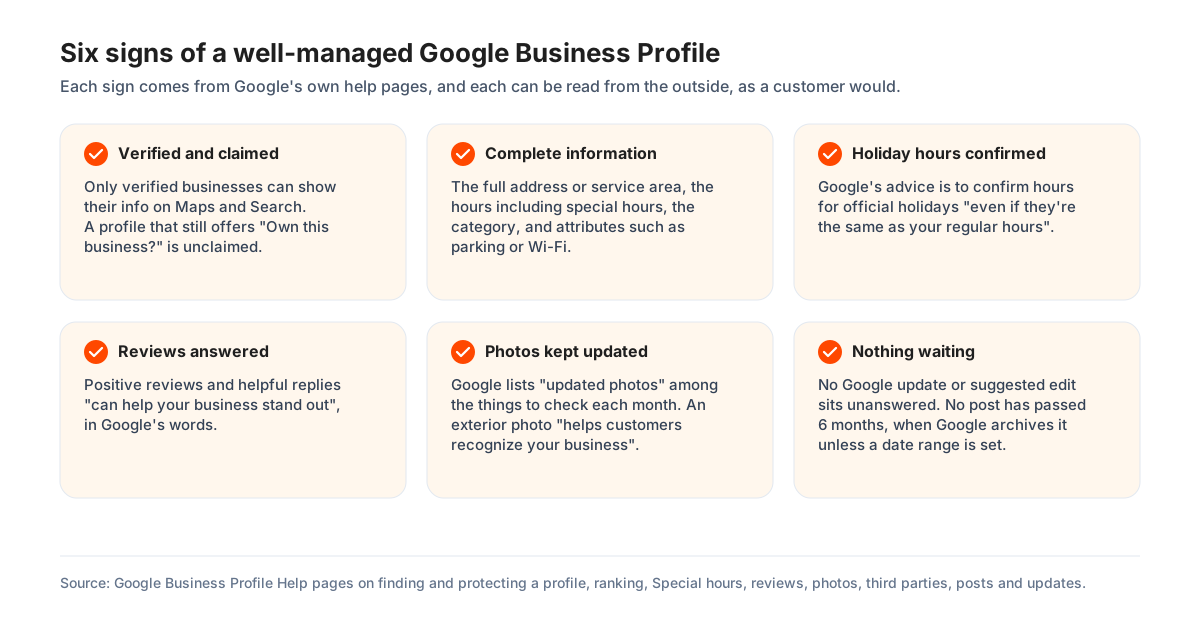
The signs of a well-managed Google Business Profile come from Google's own help pages. Read them from the outside, as a customer would.
- It is verified and claimed. Google says only verified businesses show their information on Maps and Search, and a profile that still offers "Own this business?" is unclaimed and, in Google's words, "more vulnerable and prone to hijacks".
- The information is complete: the full address or service area, the hours including special hours, the category, and attributes such as parking or Wi-Fi.
- Holiday hours are confirmed. Google says to confirm them "even if they're the same as your regular hours".
- Reviews get replies. Google says positive reviews and helpful replies "can help your business stand out".
- The photos are kept updated, with an exterior shot customers can recognise. Google lists "updated photos" among the things to check each month.
- Nothing is waiting: no Google update or suggested edit sits unanswered, and no post has gone past six months.
A verified owner sees more from the inside. The Profile Strength indicator lists what is missing, and the performance report shows whether the searches, views and actions move. For a profile that is not yours, the free audit reads the public profile and scores it against Google's rules in nine categories.
What the free audit finds on Google Business Profiles
The free audit on this site has checked 1,626 Google Business Profiles between March 28, 2026 and October 30, 2026, counting the latest audit of each profile. The figures below are refreshed daily as new audits are run.
- No regular hours published: 117 of 1,626 profiles.
- No website link on the profile: 334 of 1,626 profiles.
- Fewer than ten reviews: 236 of 1,626 profiles.
- A business name that breaks Google's naming rule as the audit reads it: 163 of 1,626 profiles.
Each of those is a management gap rather than a Google problem. Hours, a website link and a compliant name are set by the business, and reviews come from asking. The median score across the audited profiles is 76 out of 100.
Getting help from Google with a Google Business Profile
Google helps with a Google Business Profile through its Help Center, its community forum, and a support form for a signed-in owner or manager. The appeals tool handles suspensions everywhere. For businesses in the UK and the European Economic Area it also handles rejected edits and restricted media. Elsewhere those go through the contact form.
Google's advice to agencies on support requests holds for anyone. Fill the form in completely. Attach screenshots with the time showing. Leave out unrelated personal information, and "do not submit duplicate requests". Google also says appeal decisions can take up to 5 business days. It asks that nobody files a second appeal for the same issue before the first is decided.
Two things Google states it does not do: it does not charge for the profile, and it does not charge to verify or reinstate one. Anyone asking for money for either is not Google.
How GBPcentral fits into Google Business Profile management
GBPcentral fits into Google Business Profile management at three points. There is a free audit of any profile, software for a business or team that does the work itself, and a managed service that does it for them. Ownership, verification and roles stay with Google in every case.
- The free audit
- Reads a public profile and scores it against Google's rules in nine categories, with the checks listed on the audit checklist. No account is needed.
- Posts on a calendar
- Drafts, schedules and publishes posts to every connected profile, with recurring series and one calendar for everything queued.
- One review inbox
- Every review from every profile in one place, synced from Google, with alerts for the ratings you choose.
- Map-grid rank tracking
- Scans the local results across a grid of points around each location on a daily or weekly schedule, which is the view Google's performance report does not give.
- A health score and a daily list
- A daily score for each profile and a list of what to do next, built from the rank, review, health and performance data.
- The managed service
- Monthly packages per location that do the routine for you under Google's rules for third parties, with a one-time optimization for a profile that needs setting right first.
Every core feature is included on every plan; plans differ by volume and capacity. GBPcentral starts at $49 per month, and new customers get a 14-day free trial on Starter. See the plans and pricing.
Frequently asked questions about Google Business Profile management
Straight answers about Google Business Profile management. What it is, where to find the profile, who has access, what it costs, and what happens when nobody does the work.
What is Google Business Profile management?
Google Business Profile management is the work of keeping a business's free profile on Google Search and Google Maps accurate, active and in the right hands. It covers the business details, the photos and posts, the replies to reviews, and who has owner or manager access. It also covers the performance report. Google checks every edit and adds updates from other sources, so the work carries on after the profile is verified.
Is a Google Business Profile free to manage?
Yes. Google's product page says creating a Business Profile and listing a business on Google is free, and its help pages describe the profile as a tool that can be used at no charge. What costs money is help with the work. Google says third parties often charge a fee to manage a profile, and management software is sold as a monthly subscription. Google Business Profile management software such as GBPcentral starts at $49 per month, and GBPcentral's own managed service starts at $549 per location per month.
How do I get to my Google Business Profile to manage it?
Sign in to the Google Account linked to the profile, then search Google for the business name and city, or for the words my business. That Google Account is the login for the profile. The profile's controls appear with the results: Edit profile, Read reviews, Posts, Photos and Performance. On a phone, open the Google Maps app, tap Business at the bottom right, and tap Edit profile. A business with several profiles signs in to Business Profile Manager at business.google.com.
Who has access to my Google Business Profile, and how do I check?
Open the profile while signed in, select More, then Business Profile settings, then People and access. Google says the page lists all current users and pending invites, with the role each person holds. Only an owner can add or remove people. Google advises keeping access to the people who need it, removing former employees, and making sure the business itself keeps an owner role when an agency is added.
Is there an app for Google Business Profile management?
Google's instructions for managing a profile on a phone use the Google Maps app. Tap Business, then Edit profile. On a computer the profile is managed on Google Search. Several profiles are managed in Business Profile Manager, which is a website. An app that is not Google Maps and asks for the Google Account comes from a third party. Check who publishes it before signing in.
Can Gemini manage my Google Business Profile?
Yes, within limits Google sets. The Gemini web app at gemini.google.com can update hours, menus, photos, attributes, links and action links, draft review replies, create and schedule posts, and read performance metrics and search keywords. It works only for an owner or manager of one verified profile, aged 18 or over, signed in with a personal Google Account with Keep Activity on. Google says it is not available to anyone with access to more than one verified profile.
Do I need an LLC or a registered company to have a Google Business Profile?
Google's rule is that the business must make in-person contact with customers during its stated hours. Only the owner, or someone the owner allows to act for the business, may verify and manage the profile. Google's naming rule treats LLC, LTD and INC as legal terms that stay out of the profile name, unless the real-world branding carries them. When Google asks for proof in an appeal, it lists a business registration, a licence, tax papers or utility bills.
Is Google Business Profile management the same as Google My Business management?
Yes. Google's own definition says Google Business Profile was formerly known as Google My Business, so the two names describe one product and one job. Older articles, tools and agency pages still use the old name. The work is the same: keep the information accurate, publish posts and photos, reply to reviews, manage access, and read the performance report.
How often should a Google Business Profile be managed?
Often enough that nothing waits. Google reviews a reply or an edit within about 10 minutes in most cases. A suggested edit gives the business 4 days to respond, posts are archived after 6 months, and the searches list in the performance report updates monthly. In practice that means replies within a day or two, hours checked whenever they change, a post and new photos each month, and a monthly read of the report. Google's own advice to a business that uses an agency is to review performance each month.
What does a Google Business Profile management service include, and what may it never do?
A service does the routine for the business. That means the posts, the photos, the review replies, the listing checks and a monthly report. Under Google's third-party policy it must leave ownership with the business. It must tell the business about its fee in writing before the work starts. It must report the profile's performance data on its own, get clear approval before replying to reviews, and let the business leave within 7 business days of notice. It may never promise a ranking, claim to work for Google, or change a profile feature without consent.
How much does Google Business Profile management cost?
Google charges nothing for the profile, and doing the work yourself costs time. Google Business Profile management software such as GBPcentral starts at $49 per month, with a 14-day free trial on Starter. GBPcentral's own managed service starts at $549 per location per month. Other providers set their own monthly fees. Google says a fee must be disclosed in writing before the work begins and shown on invoices.
Can one person manage several Google Business Profiles?
Yes. Google's dashboard for that is Business Profile Manager at business.google.com, where a business group acts like a shared folder for a set of profiles and lets several people work on them without sharing a password. From ten locations, a spreadsheet adds and updates profiles in bulk and one request verifies them all. The Gemini web app is the exception: it works only for someone with access to one verified profile.
What happens if nobody manages a Google Business Profile?
The profile keeps changing without the business. Google says it may update a profile from user reports and licensed content. It may publish a suggested edit after 4 days if other public information supports it. It may call or message the business to confirm details. Customers keep adding photos and reviews, and unanswered reviews stay public. Google's policy overview also says an owner who does not open the profile for a long time may lose access, with content removed after adequate warning.
Was this guide helpful?
Google's documentation references used in this guide
- Get started with Google Business Profile
- Business Profile: Definition (Google Ads Help)
- Get Listed on Google (the Business Profile product page)
- Edit your Business Profile
- Find your business on Google
- Understand what happens to your Business Profile edits
- Understand Google updates on your Business Profile
- Understand how Google sources and uses info in Business Profiles
- About automated calls and texts from Google to your business
- Manage your Business Profile on Google with the Gemini web app
- Create and manage business groups
- Bulk location management overview
- Verify Business Profiles in bulk
- Overview for agencies
- Business eligibility and ownership guidelines
- Manage your Business Profile owners and managers
- Transfer primary ownership of a Business Profile
- Request ownership of a Business Profile
- Tips for working with third parties to manage your Business Profile
- Business Profile third-party policies
- Help protect your Google Business Profile
- Help protect against fraudulent calls and texts
- Edit your business hours
- How to set Special hours
- Mark your business as closed
- Create and manage posts on your Business Profile
- Manage your Business Profile photos and videos
- Manage customer reviews
- Tips to get more reviews
- Create a Google link or QR code to request reviews
- Report inappropriate reviews on your Business Profile
- Report negative review extortion scams on your Business Profile
- Business Profile restrictions for policy violations
- Manage your Profile Strength
- Understand your Business Profile performance and insights
- Tips to improve your local ranking on Google
- Guidelines for representing your business on Google
- Prohibited and restricted content
- Overview of Google Business Profile policies
- Manage your business category
- Manage your service areas for service-area and hybrid businesses
- Manage your services on your Business Profile
- Resolve duplicate profiles and ownership issues
- Verify your business on Google
- Fix suspended or disabled profiles
- Appeal Business Profile content and profile restrictions