
GBP management at a glance
- Scope
- Listing accuracy, posts, photos, reviews, rankings, performance data, health checks, and problem handling.
- How often the work is done
- Reviews daily, posts weekly, photos and the performance report monthly, a full audit each quarter.
- Who does it
- The owner, an in-house marketer, or an agency, with the business kept as Primary owner.
- How
- Google's own tools (the dashboard, or Gemini for a single profile), GBP management software, or a managed service.
- Cost
- Nothing from Google for the profile itself, a monthly subscription for software, and a monthly retainer set by each agency for a managed service.
- Also called
- Google My Business management, or GMB management for short, from the name Google used before Google Business Profile.
What is GBP management?
GBP management is the day-to-day work behind a Google Business Profile, and it has five kinds of task.
The first is keeping every field of the listing within Google's rules: the name, categories, address or service area, hours, contact details, description, services, attributes, and photos. The second is publishing, so the profile stays visibly active: posts on a schedule and current photos. The third is reviews: answering every one, asking customers for new ones within Google's policies, and reporting the ones that break them.
The fourth is measurement: where the profile ranks for the searches that matter, and what Google's performance report says customers did. The fifth is handling what interrupts a profile: verification requests, suspensions, duplicate listings, and changes of access.
The work is done by the owner, an in-house marketer, or an agency, using Google's own dashboard, GBP management software, or a managed service, with the business kept as the profile's primary owner. Every one of those tasks acts on the profile itself.
So the rest of this section sets out what a Business Profile is and who is allowed to have one. It also covers where the profile is managed, what Google changes on it without you, and what Google counts as complete.
What is a Google Business Profile?
A Google Business Profile is Google's listing for a business on Google Search and Maps. In Google's words, a Business Profile lets you manage how your business shows up on Maps and Search at no charge. Google's definition page adds that the product was formerly known as Google My Business. A page or an agency that still says GMB is describing the same listing.
Google lists three things the profile lets a business do. The first is to maintain accurate information online: the business hours, website, phone number, and location. The second is to interact with customers, by posting photos and videos and by collecting and responding to reviews. The third is to attract new customers, by improving how the business appears online and directing customers to the website, social media, booking links, and more. GBP management is the work of doing those three things well and keeping them done.
A Business Profile is not a brand profile. Google keeps the two apart. A Business Profile is for businesses that interact with customers face-to-face during operating hours. A brand profile is for businesses that sell products online. A business with both a physical store and an e-commerce store is eligible for both.
Who is eligible for a Google Business Profile?
To qualify for a Google Business Profile, a business must make in-person contact with customers during its stated hours. That is Google's eligibility rule, and it is a single test. Google names the exceptions. ATMs, video-rental kiosks, and express mail drop boxes are allowed. They must include contact information for customers to get help. Seasonal businesses are eligible if they display permanent signage at the location year-round. Google's example is an ice-skating rink open only in winter. Delivery-only food services are allowed, but Google sets conditions on them.
Google's examples of businesses that are not eligible start with rental or for-sale properties. It names vacation homes, model homes, and vacant apartments. Sales or leasing offices are eligible.
The list continues with an ongoing service, class, or meeting at a location you do not own or have the authority to represent. It also names lead generation agents or companies. Brands, organizations, artists, and other online-only businesses are on the list too. A business that sells age-restricted products cannot be a service-area business without a storefront. Google's examples are alcohol, cannabis, and weapons. Any business whose address is a P.O. box or a mailbox in a remote location is on the list as well.
Only two kinds of people may verify a profile and manage the business information on it: business owners and authorized representatives. Google states that you can add or claim your business at no charge.
Google also lists the reasons it can take ownership away. One is not having signed in to the account recently. Another is the business telling Google that you or your agency is no longer authorized to manage the page. A third is Google being unable to reach you by email. Google says it makes multiple attempts to confirm your affiliation first.
What to check: that every profile you manage represents a location that meets the in-person test. A profile that does not meet it can be suspended or disabled.
Where is a Google Business Profile managed?
An individual Google Business Profile is managed directly on Google Search and Maps. To manage multiple profiles in bulk at once, Google says you can use Business Profile Manager, the tool it points larger businesses with multiple locations to. Google also offers the Business Profile APIs. It describes them as designed for developers who represent large, tech-savvy businesses and third parties. Our Google Business Profile Manager guide covers the dashboard itself, what each role can do on a profile, and the APIs behind it, step by step.
Google also lets one profile be managed by talking to Gemini. Once a Business Profile is connected to the Gemini web app, Google says Gemini can update details such as business hours, contact info, and action links. It can draft replies to reviews, create, schedule, publish, or delete Update, Offer, and Event posts, and summarize customer feedback from reviews.
It can also read the profile's performance figures, which Google lists as impressions, website clicks, direction requests, and bookings, and the search keywords customers used to find the business.
Google limits this to a person who is an owner or manager of only one verified Business Profile and is 18 or over. That person must be signed in with a personal Google Account associated with the profile, rather than a work or school account. The Gemini setting Keep Activity must also be on, and Google says Gemini cannot connect to a Business Profile when it is off.
GBP management software such as GBPcentral sits on top of these. It works through the official Business Profile APIs with the same Google Account. It adds the scheduling calendar, the rank tracking, and the team roles that the dashboard does not have. That option is weighed against the others under How to do GBP management: Google's own tools, software, or a managed service.
What does Google change on a Google Business Profile without you?
Google changes a Google Business Profile without being asked, because a profile is never only what the business enters. Google says it gathers information from different sources to help keep a Business Profile accurate. Its examples are user reports and licensed content. If sources report that the profile information is incorrect or outdated, Google may update the profile.
Google's page on how it sources business information lists where that information comes from. It names publicly available information, such as crawled web content from the business's official website. It names licensed data from third parties. It names users who contribute factual information, such as addresses and phone numbers, and content such as photos and reviews. The last source is information based on Google's own interactions with the place.
Members of the public can suggest an edit to a profile they do not manage. Customers can post photo updates from the Google Maps app, which the business cannot stop but can report. For a food or drink business Google may also transcribe menu data from the business website, so that it appears accurately on the profile. The menus part below covers that. Every edit the business makes is itself reviewed by Google before it shows. That review usually takes up to 10 minutes but can take up to 30 days.
Google also applies one label that changes nothing. It may identify a Business Profile as a particularly personal place. Maps applies that designation automatically, from data from websites, users, and businesses. Some places are added by hand. Google says the designation does not affect how visible the profile is. Nor does it reduce a user's ability to interact with the profile on Maps and Search.
This is why the work is ongoing rather than a setup task: the listing changes between visits whether or not anyone from the business touched it.
What does Google count as a complete Google Business Profile?
Google's own measure of a complete Google Business Profile is the Profile Strength Indicator. Google says it is only available for verified listings. It helps you identify and fill in missing information, including the business description, hours of operation, and contact information. It helps you make sure the profile is consistent across Google Search, Google Maps, and Google Shopping. And it helps you add content such as photos, videos, and posts.
Google also publishes figures for what completeness is worth. On its page about completing a profile, Google states that customers are 2.7 times more likely to consider a business reputable if they find a complete Business Profile on Google Search and Maps. It also states that customers are 70% more likely to visit and 50% more likely to consider purchasing from businesses with a complete Business Profile. Those are Google's figures, reported here as Google's statements. What to check: every field the indicator names, which Every part of a profile and the rule for each takes one at a time.
The eight areas of Google Business Profile management
Google Business Profile management breaks into eight areas of work, each on its own schedule: the listing, posts, photos, reviews, rankings, performance data, health checks, and problems. Every one of them is visible in the profile itself, so you can check where you stand today before you change anything. This list is the map; the sections that follow carry Google's rule for each part.
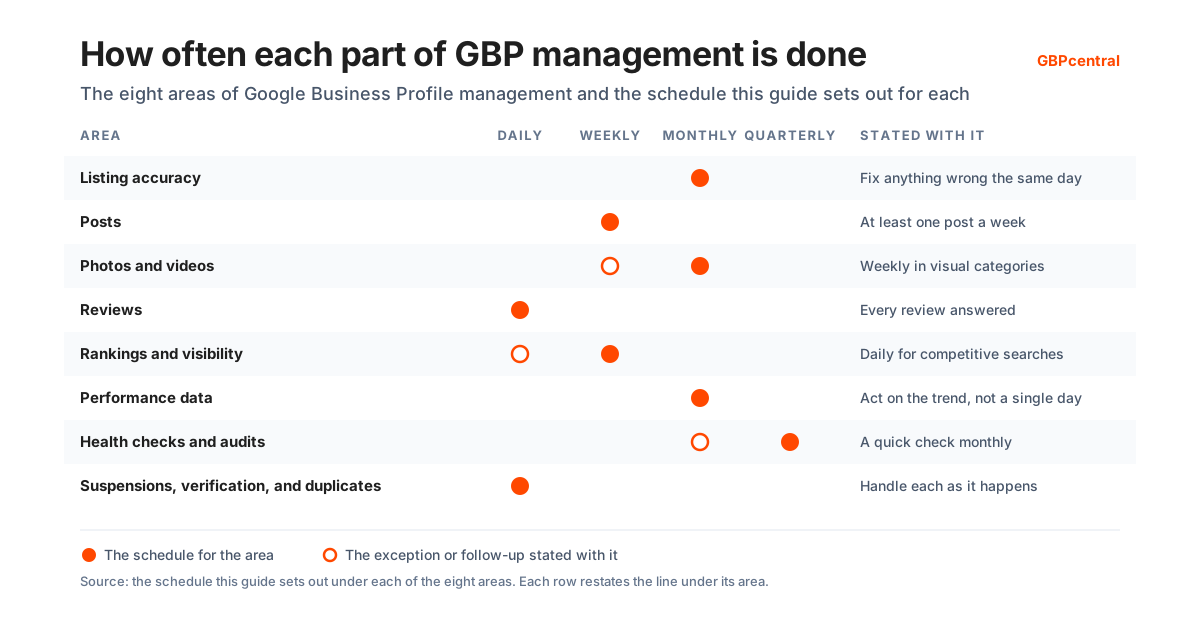
- Listing accuracy. Business name, address, phone, website, primary and secondary categories, attributes, services, and hours, including holiday hours. Google accepts edits suggested by the public and updates listings from its own data sources, so a listing nobody watches drifts on its own. The rule for each field is under Every part of a Google Business Profile, and Google's rule for each. How often to check the listing: monthly, and fix anything wrong the same day.
- Posts. Updates, offers, and events, with dates and a button where they make sense. Posts keep the profile visibly active and give a customer a reason to act now. Post on a schedule so the profile never goes quiet. Google's post types and rules are under Google Business Profile posts. How often to post: at least once a week.
- Photos and videos. Current photos of the storefront, the team, and the work, added on a schedule, plus a look at what customers have uploaded, because their photos show on your profile too. Google's standards are under Business Profile photos and videos. How often to add photos and videos: monthly, weekly in visual categories.
- Reviews. Every review answered, positive and negative, in a voice that sounds like the business. Watch the rating, the pace of new reviews, and report the ones that break Google's policies instead of arguing with them in public. Google's rules for replying, asking, and reporting are under Managing Google reviews on a Business Profile. How often to check and reply to reviews: daily.
- Rankings and visibility. Where the profile appears for the searches that matter, measured from different points around the location, because the local pack changes with where the searcher is standing. A scan from a grid of points shows what each searcher sees. What Google says decides ranking is under What decides where a Google Business Profile ranks. How often to scan rankings: weekly, daily for competitive searches.
- Performance data. Google reports how people found the profile and what they did next: calls, direction requests, website clicks, and the search terms that brought up the listing. Read it monthly and act on the trend, not on a single day. Every metric and how Google counts it is under Google Business Profile performance data. How often to read the performance report: monthly.
- Health checks and audits. A regular check of completeness, categories, attributes, photos, reviews, and the linked website against a fixed checklist, so nothing decays quietly between the moments somebody happens to look. What the free audit checks and finds is under What a Google Business Profile audit checks and what it finds. How often to audit the profile: a full audit quarterly, a quick check monthly.
- Suspensions, verification, and duplicates. Profiles get suspended, Google asks for verification again, and duplicate listings appear. The management job is to notice within days, keep the evidence Google asks for on file, and resolve it through Google's process. Google's processes are under Google Business Profile verification, suspensions, and duplicate profiles. How often to watch for suspensions, verification requests, and duplicates: daily, and handle each as it happens.
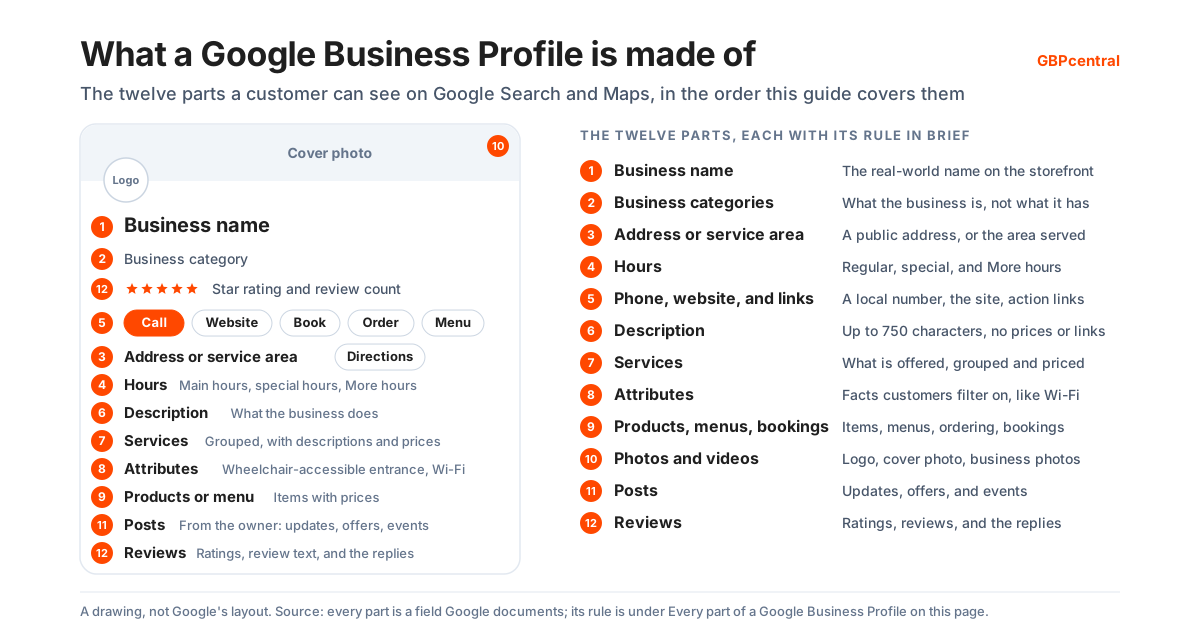
Every part of a Google Business Profile, and Google's rule for each
A Google Business Profile is a set of fields, and Google publishes a rule for every one of them. Managing the profile means keeping each field within its rule. Each part below carries Google's rule in Google's words, what to check on your own profile, and how often. Google reviews every edit before it shows. That usually takes up to 10 minutes and sometimes as long as 30 days, so a change that is not showing yet may still be pending review.
Business name
Google's rule: your name should reflect your business's real-world name, as used consistently on your storefront, website, stationery, and as known to customers. Everything else belongs in other fields. Google states that including unnecessary information in the business name is not allowed. It could result in the suspension of the profile.
Google lists what a name must not include. Marketing taglines, store codes, and trademark or registered signs are out. So are words in full capitals, business hours information, and phone numbers or website URLs.
Special characters and irrelevant legal terms such as LLC or LTD are out as well. They can stay only with real-world proof that shows them consistently, such as signage, business cards, or invoices. So is service or product information, and so is location information. So is containment information, such as the store a business sits inside.
Google's own examples are Regal Pizzeria Open 24 hours, Verizon Wireless 4G LTE, and Holiday Inn (I-93 at Exit 2). The forms Google accepts are Regal Pizzeria, Verizon Wireless, and Holiday Inn Salem.
For chains Google publishes two rules and states them separately. Its chains and brands guidance is that all locations must have the same name. The one exception is where the business's real-world representation consistently varies from location to location. Its name consistency rule is narrower: all business locations within the same country must have the same name. Its example is that every Home Depot location should use The Home Depot rather than Home Depot or The Home Depot at Springfield.
Google names two exceptions to that country rule. A business with several types of operation, sub-brands, or departments may give each a distinct name, as long as it is applied consistently across all locations of that business. Google's acceptable pairs are Walmart Supercenter and Walmart Express, Nordstrom and Nordstrom Rack, and Gap and babyGap. And where some locations consistently use a different name on their storefront, website, or stationery, those locations may use it. Google's examples are Intercontinental Mark Hopkins San Francisco beside Intercontinental New York Barclay, and PFK in Quebec beside KFC elsewhere.
A minor name change can be made as a rebrand when the proper nouns and services in the name and the business category all stay the same. A change that does not meet those criteria is a new business. Google says to mark the existing profile as closed and create a new Business Profile with the new name.
What to check: the name field against the signage and the website, word for word, and the same on every location. Practitioners and departments follow their own naming rules, and our dentists guide sets out which name belongs to the practice and which to each practitioner.
How often to check the business name: quarterly, and the same day any branding changes.
Business categories
Google says the categories you select affect your local ranking on Google. If you add or edit a category, you might be asked to verify your business again.
Google's rules start with the primary category. Select the one that best describes the business. Then choose a specific category from the list rather than a general one, so Nail salon rather than Salon. Use as few categories as possible to describe the overall core business. Pick categories that complete the statement this business IS a rather than this business HAS a.
Do not use categories only as keywords, or to describe attributes. Do not use categories that belong to a business contained within yours or to one that contains you. You cannot create your own category.
Google adds that a specific category implicitly includes more general ones. Its example is Golf Resort, which covers Resort Hotel, Hotel, and Golf Course. It can also detect category information from your website and from mentions of the business across the web.
Google's worked examples make the rule concrete. Take a pizza business that offers takeout and delivery but has no on-premises dining. It is Pizza Delivery and Pizza Takeout, not Delivery Restaurant or Takeout Restaurant. A motel with a pool is Motel, not Hotel and Swimming Pool. A fast food hamburger restaurant with some desserts on the menu is Fast Food Restaurant and Hamburger Restaurant, not Dessert Restaurant.
Categories also switch on features on the profile. In Google's examples, hotels show class ratings and amenities. Restaurants add links for online orders, reservations, and menus. Health and beauty businesses add a booking button and a list of services.
Across several locations Google adds one more rule. All locations of a business must share the one category that best represents the business. Some businesses have several types of location, such as sub-brands, departments, or a mix of retail, distribution center, and office. There the rule applies within each of those groups rather than across all of them.
In Google's examples, every Gap Kids carries Children's Clothing Store. Every Goodyear Auto Service Center carries Tire Shop and also Auto Repair Shop. Which category a trade should choose is where the general rule meets a specific trade, and our guides work it through for a roofing business and for a heating and cooling business.
What to check: the primary category first. Then whether every extra category still describes what the business is. Then that all locations of a chain that provide the same service share the same category.
How often to review the categories: quarterly, primary category first, and the same day the business changes what it does.
Business address and service area
Business address
The address on a profile is public. Google's guidance is to enter a complete street address with building, suite, and floor numbers, containing only information that is part of the official address. Where the official address is not accurate, Google allows nearby cross-streets or landmarks to be added, but says to avoid showing the address as a description. Its examples of what to avoid are Corner of Main St. and Broadway Ave. and Across from Central Park.
P.O. boxes or mailboxes at remote locations are not acceptable. A rented mailing address that the business does not operate from, a virtual office, is not eligible. An office at a co-working space can only be listed if it maintains clear signage, receives customers during business hours, and is staffed by the business's own staff. Businesses showing their address should maintain permanent fixed signage of the business name there.
If the address has no street number or Google cannot find it, the location can be pinned on the map. Google says there should be only one profile per business and not more than one page for each location. Individual practitioners and departments may have separate pages.
Service area for a service-area or hybrid business
A business that visits or delivers to customers and does not serve them at its address is a service-area business. Google's rule is to hide the address and list the service area instead; its example is a plumber who runs the business from a residential address. Google says the address should only be hidden if the business is a service-area business, and that a profile with the address hidden shows only the service area. If no service area is entered, Google chooses a local area for the profile, and it can be edited later.
A service-area business can only have one profile for the whole area it serves. It can set up to 20 service areas by city, postal code, or another type of area, and cannot set the area as a radius. Google says the boundaries of the overall area should not be more than about 2 hours of driving time from where the business is based. If approved, service area edits may take up to 48 hours to show.
A hybrid business serves customers at its address and also visits or delivers to them; it shows its address and sets a service area. Businesses with products or services that have an age requirement, like alcohol, cannabis, or weapons, need to have a storefront.
Street View imagery and driving directions to the business
Street View imagery and driving directions are the parts of a location a customer actually sees and follows, and Google documents how to change both. Where Street View is available for a business it can be reviewed in Google Maps, under Street View and 360 in the profile's photo section. On Google Search it is the photo labeled See outside.
Google gives two ways to change it. Move the map pin so it is tied to a more accurate Street View image, or add imagery of your own. Google says your own imagery can be created and published as Photo Spheres through Street View Studio, or captured indoors by a professional photographer.
Imagery that is simply out of date is reported to Google on a form, though Google says it cannot commit to a specific timeline to review and update it.
Driving directions are separate. Google says accurate driving directions help customers find and arrive at a business, and that directions that are wrong in Google Maps should be reported.
Location description and the address check
Google may add a location description such as a landmark or a nearby business. It cannot be edited on Search or Maps. Google decides how to display the address from the profile information and other sources.
What to check: the address against the official one, the map pin against the front door, and the service areas against where the business actually goes. Also the address hidden on every service-area profile, a service area set on every profile whose address is hidden, and the driving directions Maps gives to the front door. Our plumbers guide goes through hiding the address on a service-area listing, and our HVAC guide through the hybrid case, where an office or showroom also sends technicians out.
How often to check the address and service area: quarterly, and the same day a location moves, opens, or closes.
Business hours, closures, and the opening date
Regular business hours
Google asks for the regular customer-facing hours of operation for a normal week, set as Open with main hours or Open with no main hours. A break is set as two entries for the same day. A day can be marked open 24 hours.
Google says certain types of business should not provide hours. That includes those with varied hours, such as showtimes, worship services, or classes, and those that operate only by appointment. Its examples are hotels and motels, schools and universities, movie theaters, transportation services and airports, and event venues.
Where a business has several sets of hours, Google says which to use. Banks use lobby hours. Car dealerships use car sales hours, and the new-car hours where those differ. Gas stations use the hours of the pumps. Restaurants use the hours diners can sit down. Storage facilities use office hours.
Special hours, holiday hours, and More hours
Special hours cover a brief change. Google says they apply when a business temporarily adjusts its hours or remains closed for up to 6 days in a row, for holidays, special events, and other exceptional circumstances. They only show when the main hours are set to Open with main hours.
Google recommends confirming hours for official holidays even when they are the same as the regular hours. On the holidays it lists, a warning may appear on the profile telling users the hours might differ. A closure of 7 or more days, or of unknown length, is marked Temporarily closed instead.
More hours are for specific services such as delivery, takeout, drive-through, pickup, or senior hours. They do not display until regular hours are set, and Google says they should generally be a subset of the primary hours.
Marking a profile temporarily closed, permanently closed, or reopened
A profile can be marked temporarily closed, permanently closed, or reopened, and Google publishes what each state does to the listing. A profile marked Permanently closed may still appear on Search and Maps for people who search for it, and clearly shows the business is closed.
Google notes that for broad queries temporarily closed businesses can rank after open businesses. That depends on the category, the query type, and how many matching businesses are temporarily closed.
Google's guidance for seasonal businesses is that during the season they set their regular hours of operation. During the off-season the business can be marked temporarily closed, and the regular hours are set again when it reopens. Google adds that a business can also say in its description that it is open only for a specific seasonal period.
If a business was marked permanently closed as part of a location or name change, Google says not to reopen it but to add a new business.
The opening date for a business that has not opened
A business that has not opened yet can set an opening date up to one year ahead. Only the year and month are required. The profile shows on Google 90 days before the date, and after opening it carries a Recently opened tag for 90 days. Until the business is officially open, users cannot suggest edits or post reviews or photos.
The hours update message, and the hours check
After hours are updated, Google shows a message on the profile confirming the change and, on mobile, a post on the Updates tab. Deleting that post removes the message. Two trades need more than a standard week: our roofers guide covers hours through an off-season, and our HVAC guide covers hours for a business that answers around the clock. What to check: the regular hours against the door, the next holiday's special hours set in advance, More hours as a subset of the main hours, and any temporary closure with an end in sight.
How often to check the hours: monthly, plus every holiday before it arrives.
Phone number, website, business links, chat, and social profiles
Phone number and website
Google's rule for the phone number and the website is that each connects to the individual business location. Use a local phone number instead of a central call center helpline whenever possible. The number must be under the direct control of the business, and premium numbers are not acceptable regardless of the rate charged to the caller.
Phone numbers or URLs that redirect or refer users to landing pages or phone numbers other than those of the actual business are not allowed, including pages on social media sites. For a business managed by a third party, Google adds that the phone number and website should always be the single, authoritative phone number and website for the business and be verifiable by the owner.
Business links for bookings, orders, menus, and services
Business links are separate from the website field. Google's help page says a profile can carry a single link for a menu or a list of services. It can also carry up to 10 links per category for booking an appointment, making a reservation, placing a food order, or placing a shopping order, with one marked Business preferred.
Google's links policy states a maximum of 20 links per transaction type and one link per domain. Each link must lead to a dedicated landing page for that specific location and let the customer complete the action. Social media sites, messaging links, app store links, and link shorteners are not allowed.
Links to certain services can appear automatically from third-party partners, and Google's business links page says a provider must remove its link within 5 days of a removal request. Business links are not available through the Business Profile API or spreadsheet upload.
A link that is malformed is rejected outright. Google's examples are a link containing spaces or symbols, a link containing backslashes, and a link with an invalid protocol such as a duplicated http:// at the front. A profile must be verified before a link can be added at all.
Why Google removes a business link
Google checks business links on a schedule and removes the ones that fail, so a booking or ordering link can disappear from a profile without anyone touching it. Google says it checks whether the links a business has provided comply with its policies at most daily, with a combination of automated tools and manual processes. It may remove any link that does not. Its crawlability policy sets out what a link has to survive, and it states that the crawlers that run this check do not follow robots.txt rules.
- The site must not block traffic from the user agent Google-BusinessLinkVerification.
- It must not rate limit or throttle the crawler so that it cannot reach the content.
- It must not require a CAPTCHA, a login, or another form of verification from the crawler.
- It must not block the crawler by IP address.
- It must not serve the crawler different content from the one a customer sees.
- The link must return a 200 OK status code or a similar successful code, and not an error code such as 404 Not Found, 403 Forbidden, 500 Internal Server Error, or 503 Service Unavailable.
- The crawler must be able to load the page in full, including its images, style sheets, and scripts.
- The page must not be blocked by a DNS provider or by any location-based mechanism.
Google says a link denied or removed in error can be sent to it for review. That is the route when a link keeps disappearing and none of the conditions above explains it.
Chat and social media links on the profile
Chat and social profiles are contact options too. A claimed and verified profile can add a WhatsApp or text messaging option, available in select regions. If both are added, only the text message option is shown to customers. Social media links are also available in select regions, one link per platform across Facebook, Instagram, LinkedIn, Pinterest, TikTok, X, and YouTube. Google may add social links to a profile automatically, and it says it does not currently provide performance metrics or click tracking for them.
What to check: that the number rings the location, the website opens the location's own page, and every business link completes its action from that page. Also that no link is a redirect, and that nothing on the site stops Google's link check reaching the page.
How often to check the phone number, website, and links: monthly, and the same day a phone system or website changes.
Business description
Google says the description is for what the business does and what makes it unique. Its guidelines say to use it for the services and products offered and the mission and history of the business. It must not display low-quality, irrelevant, or distracting content such as misspellings or gimmicky characters.
It must not focus on special promotions, prices, and sales; Google's examples are Everything on sale, -50% and Best bagels in town for $5!. It must not contain links of any type.
Google's editing guide sets the length: do not exceed 750 characters in the description field. The same 750-character limit applies to the description column of a bulk upload spreadsheet.
Google can suggest a description with AI from the profile and other sources such as the website, in select regions and languages. Google says the result should be reviewed for accuracy. The description is one of three short summaries a customer may see on Maps. Google's own editorial summaries, compiled by its writers, cannot be edited. Review snippets, selected by an algorithm, and Place Topics are both drawn from customer reviews. The description is therefore the only one of the three the business writes.
A summary the business did not write can still be reported. Google says it does not remove summaries for being unclear or negative. It removes only two things: keywords and review snippets that have been associated with an unrelated place, and editorial summaries that describe services the business does not offer. A summary that meets either test is reported from the Google Maps app, by opening More beside the summary, choosing Report summary, and selecting a reason such as Inaccurate or Offensive.
What to check: that the description still describes the business as it is, carries no price or link, and reads like the business. Also that no summary beside it names a service the business does not offer.
How often to review the description: quarterly, and when the offer changes.
Services on the profile
Businesses in certain categories can list their offerings on the profile, and service businesses are among them. Google says that when a local customer searches for an offering the business provides, that service may be highlighted on the profile. On the Google Maps app, customers can view the full list under Services.
Google suggests options by business type; its examples for a plumbing business are Install faucet and Repair toilet. Custom services are allowed too. They are grouped into categories, each with a description and a price. Google rejects a custom service that breaks its policy, and it does that automatically. It says a custom service name should carry no profanity, no gibberish, no personal information, no prices, and no phone numbers. Our plumbers guide shows what a trade's service list looks like once it is filled in properly.
What to check: every service the business sells is listed, nothing it no longer offers remains, and no custom name carries a price or a phone number.
How often to review the services: monthly.
Business attributes
Attributes are the facts a customer filters on. Google's examples are outdoor seating and Wi-Fi. It says that if you add certain attributes, the business might show up in searches for places with those attributes. Some attributes are edited by the business. Others may be populated from inputs by customers who visit. Some can only be changed in certain locations, countries, or business categories. Google says attribute names may change over time to match how people search.
Accessibility attributes carry Google's own definitions. Each one is a yes-or-no answer against a written test, not a judgment call. A wheelchair-accessible entrance is three feet or one meter wide with no steps or stairs, or has a permanent or at least a movable ramp where there are steps. An entrance that consists only of revolving doors is not accessible.
A restroom qualifies when its entrance is at least one meter wide with no steps or stairs, and where a stall has to be entered, that stall's entrance must be one meter wide too. Seating qualifies when the main area has no steps or stairs and enough space for someone in a wheelchair to reach a table and sit at it. Google says tables at standing height do not.
Parking qualifies when a spot is reserved for people with accessibility needs. An elevator qualifies when a business has several floors and the elevator is large enough for a wheelchair.
Google lists three hearing attributes as well. The first is assisted listening devices customers can borrow at the location. The second is a permanently installed hearing loop. The third is a permanently installed Auracast broadcaster. Google notes that customers will expect their own compatible devices to work with the Auracast one.
Business identity attributes are chosen by the business and can be switched on or off at any time. They are Asian-owned, Black-owned, Latino-owned, LGBTQ+ owned, Disabled-owned, Indigenous-owned, Veteran-owned, Women-owned, and Small business.
Google defines a small business as one that makes less than $10 million a year. It says franchises cannot be considered a small business, and it may mark a profile as a small business automatically.
A recycling attribute puts a recycling icon on the search result. An attribute edit is reviewed like any other, usually about 10 minutes and sometimes up to 30 days. What to check: each attribute against the premises. A wrong accessibility attribute sends a customer to a door they cannot use.
How often to review the attributes: quarterly.
Products, menus, online ordering, and bookings on the profile
In-store products on the profile
In-store products reach the profile through Google's product editor. It is for a local store selling physical goods, including products without barcodes. Items added appear on the profile on Google Search. Products must follow the Shopping ads policy. Google says that if a business submits products that break it, all of the products it has uploaded can be removed.
Stores in the US, Canada, the UK, Ireland, or Australia can add in-store products at no charge. They do it through the Local Inventory app, which adds them automatically. The store needs a physical location. That location has to use a wired barcode scanner or a compatible point-of-sale system. Google says the service was called Pointy before. Google's guidelines keep regulated products and services out of product listings. The list runs from alcohol, tobacco, and gambling to financial services, pharmaceuticals and unapproved supplements, and health or medical devices.
Menus and online ordering for food and drink businesses
Food and drink businesses list menu items in the menu editor, grouped into sections with descriptions and prices. Google says changes can take 24 to 48 hours to display. A menu shared across several profiles must be updated through the Business Profile API. Google's menu guidelines ask for a menu of what is on offer, not a sample of popular items. The menu URL must not be a direct link to a third-party ordering or delivery service. A third party managing the profile must notify the owner and have the owner's consent to submit a menu URL.
Online ordering runs through Order with Google providers and custom links. An Accept orders on your profile switch hides every ordering option when it is off. Google's online ordering page says a provider must remove its link within 5 business days of a request.
One part of the menu is not entered by the business at all. Google says it may transcribe menu data from the business website, so that it appears accurately on the profile. A transcribed item that is wrong is edited or deleted like any other. Google also publishes a way to opt out of menu transcription.
Bookings and waitlists through a provider
Bookings come through a Reserve with Google provider or a link the business adds. Google notes that the provider might charge. Booking providers show on the profile within a week. Performance data is not available for custom links. Waitlists are for restaurants only and need a Reserve with Google provider. What to check: products and menu items priced and current. Then that ordering and booking links open the right page, and that any provider the business no longer uses has been removed.
How often to check products, menus, ordering, and bookings: monthly, and menus and prices the day they change.
Business Profile photos and videos
Photo and video standards
Google publishes standards for the photos and videos on a profile, and none of them show on Google until the profile is verified. After upload, Google reviews each one against its photo and video policies. The statuses are Pending, Not approved, and Live, and Google says it can take up to 24 to 48 hours before they show.
Google's photo standards: JPG or PNG, between 10 KB and 5 MB, a recommended resolution of 720 by 720 pixels, and a minimum of 250 by 250. Photos should be in focus and well lit, with no significant alterations or excessive use of filters or AI, so that the image represents reality. Videos are up to 30 seconds long, up to 75 MB, and 720p or higher.
The logo, the cover photo, and the photos Google recommends
Google names three kinds of photo: the logo, the cover photo, and business photos. Setting a cover photo does not guarantee it shows first. If the cover is low quality, or other sources suggest it is not the best photo, a user-submitted photo may be selected instead. A logo does not appear until the profile carries a name, a valid location with a street address, categories, a phone number, and opening hours.
For business photos, Google recommends at least three exterior photos, captured from each direction customers approach. It recommends at least three interior photos, three product photos, three photos representative of the services offered, and three team photos. Hotels add at least three photos of the most popular guest rooms, and food and drink businesses add at least three of what they serve.
Customer photos, bulk photo uploads, and the photo check
Customers add photos too. Photo updates posted from the Google Maps app cannot be stopped, only reported. Customers' photos appear in the Photos tab. Businesses with 10 or more locations can bulk upload photos through a spreadsheet. The photo checks a scored audit runs are listed under Photos and Visual Content on the audit checklist. What to check: the newest media, which Google shows first on the profile, the cover and logo still the right ones, and the customer photos for anything that breaks policy.
How often to add photos and videos: monthly, weekly in visual categories.
Google Business Profile posts
The three types of Google Business Profile posts
Posts are the profile's own feed, and Google offers three types. Updates take a description, photo, video, and an action button with a link. Offers require a title, dates, and time, add a View Offer button, and can carry a coupon code, a link, and terms and conditions. Events take a title, start and end dates, and times; if no time is given, the event shows as lasting 24 hours on the event dates.
A post can be scheduled with Schedule this post, repeated weekly, monthly, or on a custom schedule, and published to several profiles at once. Google reviews each post. The statuses are Live, Pending, and Not approved, and a question mark next to a rejected post indicates the policy it violates.
Post rules that get posts rejected
Posts are rejected on three rules. A phone number in a post description is not allowed, and Google says a post that includes one might get rejected. A Call now button that uses the verified profile number is the alternative. Hotels cannot create offer posts or any post that mentions or links to deals, promotions, special offers, or discounts. Businesses in regulated industries such as alcohol, tobacco, pharmaceuticals, gambling, weapons, and financial services can post, but must not include content about those products. Posts older than 6 months are archived unless a date range is set.
Where customers see posts
Customers find posts in the Updates or Overview tabs on mobile and in the From the owner section on a computer. Google says that single-location food and drink businesses in the US, UK, Canada, Australia, and New Zealand may also have featured posts, in English. These are posts about events, deals, or specials drawn from their Facebook and Instagram channels or from their own posts, shown in place of reviews on the mobile profile.
Posting the same update to several profiles is a dashboard job rather than a profile one, and our Manager guide covers publishing posts across several Business Profiles. What to check: at least one live post, no rejected post sitting unnoticed, and expired offers and events gone.
How often to post: at least once a week.
Advanced profile settings
Advanced settings hold the housekeeping. The Business Profile ID is the unique identifier for the listing and can be shared with Google support. A switch controls automated calls and texts from Google, which Google uses to accept bookings, keep information up to date, or confirm price and availability on behalf of customers. The phone number can be shown or hidden. Labels group profiles in a bulk upload spreadsheet and are not publicly visible.
The store code keeps multiple profiles organized and must be used for local inventory ads. A separate Google Ads phone number can be set for the location asset. A Share data switch covers recommendations across Google products; it is a profile-level setting, so if any owner or manager opts in or out, the entire profile does.
On the automated calls and texts, Google says it might occasionally use them to contact the number on the profile. The purpose is to confirm business details are up to date or to assist customers with inquiries. Google says it will never ask for payment or credit card information. Store codes and labels do their work across a portfolio, where they decide whether a bulk spreadsheet updates the right listings. What to check: the store codes and labels against the location list, and the data-sharing and automated-contact switches set the way the business intends.
How often to check the advanced settings: quarterly.
Managing Google reviews on a Business Profile
Managing reviews on a Google Business Profile means replying to every review, asking customers for new ones within Google's rules, reporting the ones that break policy, and watching the score. Reviews are the one part of the profile the public writes. Google sets the rules for each of those tasks, decides what it removes, and publishes how the score is calculated. Everything below is Google's own position.
Replying to Google reviews
Before a business can reply to reviews, Google requires the profile to be verified. Google notes that reviews are available only in certain countries or regions and for certain business categories.
A reply is reviewed by Google against its content policies before it is posted. That usually takes up to 10 minutes but can take up to 30 days, and if the reply is not approved, you are asked to edit it.
An approved reply is posted publicly under the customer's review. It appears as the business rather than under a personal name, and the reviewer is notified. Customers can still change their review after reading a reply. The date on the review then changes to the latest update.
Google's guidance for replies has four parts. Be professional and polite. Keep it short and simple. Make replies count by focusing on reviews where you can share a helpful update or answer a question, rather than sending the same thank you to everyone. Be conversational, not promotional, since reviewers are already customers.
For negative reviews, Google says to protect privacy and avoid personal attacks. Be honest and explain limitations, without taking responsibility for things outside your control. Apologize when appropriate, personalize the reply, and respond in a timely manner. Google adds that negative reviews are not necessarily a sign of poor business practices. A mix of positive and negative feedback often feels more trustworthy. Our article on how to respond to Google reviews works that guidance into wording for the replies a business has to write. A health business has an extra line it must not cross, which our dentists guide covers under replies and medical information.
A direct link to any single review can be copied from Google Maps and shared as a testimonial. When a customer reviews a service business, Google may ask them which service was provided and to rate specific aspects of the experience. The combined rating for an aspect is the number of positive ratings divided by the total number of ratings for it.
The business cannot change which aspects customers are asked about, but it can change the jobs on offer. Google says the tasks a customer picks from come from the business's own service list, from its website where there is one, or from a standard list of tasks for that type of business. Where a job type is missing, the business can add it to the service list.
What to check: every review has a reply that reads like the business, no reply is sitting unapproved, and the services list carries the jobs customers actually book.
Asking customers for Google reviews, and the rules on incentives
Google provides a review link and a QR code, generated from the profile in a computer browser. It suggests putting them on receipts, in thank-you emails, at the end of a chat, and on display in the store. Requests can also go by email, WhatsApp message, or Facebook post. Customers must be signed in to a Google Account to leave a review. Google notes they can create one with a non-Gmail address.
Google's fake engagement policy sets what is prohibited when asking. Offering incentives such as payment, discounts, or free goods or services in exchange for posting a review, changing one, or removing a negative one is strictly prohibited. Review stations at the place of business are prohibited as well.
Google's prohibited-content policy bars more. It bars discouraging or prohibiting negative reviews, and selectively soliciting positive ones. It bars requiring or pressuring customers to leave ratings while on the premises, and requesting specific content. It bars asking staff to solicit a certain number of reviews, or reviews that identify a staff member. Reviews based on a conflict of interest, such as current or former employment, count as rating manipulation and are removed.
Google says merchants may solicit or encourage genuine reviews, as long as they offer no incentive and do not attempt to influence the rating or the contents. How many reviews is enough is a separate question from how to ask, and the review volume section of the audit checklist sets out the bands a scored audit uses.
What to check: the review link is in the customer's path after the service, and nobody on the team is offering anything for a review.
Reporting a Google review and appealing the decision
Any review can be reported, but Google says only reviews that violate its policies are eligible for removal. Google does not get involved in conflict between businesses and customers, so a review is not reported because the business disagrees with it.
A report goes from the profile: Read reviews, then Report, with a reason such as Spam or Profanity. It can also go through the Reviews Management Tool. Google says evaluation typically takes several days. The tool shows three statuses: Decision pending, Report reviewed with no policy violation, and Escalated with the outcome sent by email.
When a report is rejected, Google allows a one-time appeal through the same tool, for up to 10 reviews at a time. If the review complies with policy, it stays live. A reviewer who contributes policy-violating content can be reported from the Google Maps app.
Google also uses automated spam detection to remove reviews. It says the system may occasionally remove legitimate reviews by mistake, in which case it directs the business to support.
Whether a report succeeds turns on which policy the review breaks, and Google publishes the list. These are the categories its prohibited and restricted content policy names.
- Fake and misleading content and reviews, covering fake engagement, rating manipulation, impersonation, misinformation, and misrepresentation.
- Inappropriate content and behavior, covering harassment, hate speech, offensive content, personal information, obscenity and profanity, sexually explicit content, and violence and gore.
- Restricted content, covering dangerous content, child safety, terrorist content, and calls to action or offers for products and services subject to local legal regulations.
- Off-topic content, which Google describes as general, political, or social commentary or personal rants rather than an experience at the location.
- Advertising and solicitation, covering promotional or commercial content and email addresses, phone numbers, social media links, or links to other websites posted in a review.
- Unclear and repetitive content, covering content that lacks meaning across languages, such as a random group of characters, and the same content posted repeatedly.
- Defacement and mischief, which Google describes as content that aims to destroy or damage the digital presence of a feature, including editing a place as a prank or to express social or political views.
A review that breaks none of those is not eligible for removal however unfair it reads, which leaves the reply as the only answer to it.
A customer's photo or video is reported the same way, from the Photos tab on Search or in the Maps app. Google says that review can take several business days. Multiple requests for the same content might delay it. What to check: the reporting queue, so a report is filed with a reason and followed up in the tool rather than forgotten.
Missing, delayed, removed, and moved Google reviews
Google lists why a review may be missing. Reviews are checked against its policies, which can take a few days. After profiles are merged, it may take a few days for both sets to display. Customers on older phones or software may have trouble posting.
Reviews removed for policy violations are not restored. Google may temporarily disable user-created content, including reviews, for certain profiles or categories to protect business owners. It notes that reviews are sometimes removed after a profile is reinstated.
Reviews and ratings are removed and disabled for profiles primarily categorized as educational institutions for students aged 6 to 18. Universities, day care centers, and swim schools are not affected.
When a business changes, Google's rules on moving reviews apply. Do not create a new profile because of a change in physical location or ownership. A business that moves to a new address and keeps its name has its reviews transferred automatically. For some categories, such as hotels, golf courses, and scenic attractions, they might not be.
A business under new management with the same name keeps its reviews. A minor name change keeps them. A temporarily or permanently closed business keeps them too; customers can leave new reviews for a temporarily closed business but not for a permanently closed one.
What to check: after any move, rebrand, or merge, that the reviews came with the profile. If not, that Google has been asked to transfer them.
Review extortion scams and profile restrictions
Google describes review extortion as a sudden increase in 1-star and 2-star reviews, followed by someone demanding money, goods, or services in exchange for removing them. Google treats it as a serious breach of policy. Its instructions: do not engage with or pay the people involved. Gather evidence at once, and report it through the merchant extortion report form. The evidence Google lists starts with screenshots of the demands showing the date, time, and sender details. It also lists direct links to the suspicious reviews, whatever is known about the individuals, and the dates the reviews and the demand first appeared. Google says it investigates and tells the business the result. It does not share the details of the investigation.
The other direction is the business itself breaking the rules. If Google finds that a business owner has broken its fake engagement policy, it removes the reviews. It may go further.
It may stop the profile receiving new reviews or ratings for a set period. It may unpublish the existing reviews or ratings for a set period. It may display a warning telling consumers that fake reviews were removed.
Google says it notifies the owner by email before applying a restriction, and that the business can appeal. What to check: any sudden run of low ratings, reported the same day with the evidence Google lists.
How the Google review score is calculated, and reviews from other sites
Google's review score is the average of all ratings published on Google for the business, on a scale from 1 to 5. Google says that after a new review it may take up to 2 weeks for the score to update.
Profiles may also show reviews from websites that are not Google, chosen by the type of business and where it is located. The business cannot choose which website a review comes from and cannot stop reviews from other websites. It must contact that website about a rating or review that comes from it. The exception is that businesses in the European Economic Area can report third-party reviews directly on Google. Photo updates from customers do not affect the review score.
What to check: the rating trend, the share of reviews answered, and any third-party review that needs the originating site.
Two other kinds of outside content can appear beside the reviews. In the United States, a Business Profile on Google Search may display Editorial top lists. Google describes them as lists from the web such as Top 10 Best Restaurants in San Francisco, and says they show only on phones.
For hotels, Google says a profile may carry review summaries licensed from a third party. It also says a unified hotel reviews section on Google Maps on a computer shows reviews from both Google users and third-party providers. A hotel that works with one of those providers is eligible for that section whether or not it has a Business Profile. Google says it cannot provide a full list of the eligible providers.
How often to work on reviews: daily for replies and new reviews, weekly for the reporting queue.
What decides where a Google Business Profile ranks
Where a Google Business Profile ranks in local results depends mainly on three factors: relevance, distance, and prominence. Google says there is no way to request or pay for a better local ranking. This section sets out those factors in Google's words, what Google says improves ranking, how its AI features treat the profile, and how to measure where a profile appears.
The three factors Google says decide local ranking
Google states that there is no way to request or pay for a better local ranking. It keeps the search algorithm details confidential to keep the ranking system fair. Local results are mainly based on relevance, distance, and popularity.
Relevance is how well a profile matches what someone is searching for; Google's advice for it is complete and detailed business information. Distance is how far each business is from the customer who is searching. If the customer does not share where they are, Google uses what it knows about their location.
Prominence, Google's name for the third factor, means how well known a business is. Google says it is also based on how many websites link to the business and how many reviews it has. More reviews and positive ratings can help local ranking.
What Google says improves local ranking
Google publishes its own list of what improves local ranking, and it starts with verifying the business. That tells Google you are authorized to represent it, so it is more likely to show up in search results. Next, keep the information complete and accurate, since a profile with inaccurate information might not show up for relevant searches in its area. That means the full address, the hours with special hours, the category, and details such as parking or Wi-Fi.
Then respond to reviews, and add photos and videos. Retail businesses in eligible countries can add in-store products so they show in local results. Two more rules sit on other Google pages. The categories selected affect local ranking, and for broad queries a temporarily closed business can rank after open ones.
The first two items on that list, the category and the completeness of the profile, are also the two heaviest in a scored audit. The category checks on the audit checklist break the first of them into the questions worth asking. What to check: each item on that list against the profile, in that order.
Google's AI features and the Business Profile
Google's AI features in Search are AI Overviews and AI Mode, and Google Search Central says the same foundational SEO best practices apply to them as to Google Search overall. For a web page to be shown as a supporting link in either one, Google says it must be indexed and eligible to be shown in Google Search with a snippet. It adds that there are no additional technical requirements.
One item on Google's list of SEO fundamentals names the subject of this guide. Google lists checking that your Merchant Center and Business Profile information is up to date. It sits under the SEO best practices Google says stay worthwhile for AI Overviews and AI Mode. The others on that list are allowing crawling in robots.txt, internal links, page experience, content in text, images and videos that support that text, and structured data that matches the visible text. A profile kept current is on Google's own list for its AI features.
Google also rules out the shortcuts. In its words, you don't need to create new machine readable files, AI text files, or markup to appear in these features. There's also no special schema.org structured data that you need to add. It adds that meeting every requirement promises nothing: indexing and serving isn't guaranteed.
Sites that do appear are counted with the rest of search traffic in Search Console, in the Performance report under the Web search type. What to check: the profile fields the rest of this guide covers, since keeping the Business Profile up to date is the item Google names.
GBPcentral's AEO check reads a profile the way an answer engine would. It records whether AI answers name the business, and who they name instead.
Measuring where a Business Profile ranks
Where a Business Profile ranks has to be measured outside Google's own report, which lists interactions, searches, views, directions, calls, and clicks. It lists no ranking position, which our Manager guide sets out at more length under performance data measures activity, not rank. And because distance is a factor, the position differs with where the searcher stands.
The practical measure is a scan from a grid of points around the location, for the searches that matter, repeated on a schedule. It is done per location, not averaged across a chain. GBPcentral's rank tracking runs those scans on a daily or weekly schedule with a competitor comparison; the platform section below covers it.
What to check: the searches being tracked still match what customers type, and each location has its own grid.
How often to measure rankings: weekly scans, daily for competitive searches.
Google Business Profile performance data: what the report shows
The performance report on a Google Business Profile is Google's own record of how customers found the profile and what they did next: views, searches, calls, direction requests, website clicks, messages, and bookings. Google says it is available only for verified profiles, to a person signed in to the Google Account associated with the profile. Owners and managers can check it for individual or multiple profiles, over a date range they choose.
The metrics in the Business Profile performance report
Google says the report covers views, searches, and actions from both organic search results and Google Ads. Only the metrics that apply to a business appear. Interactions is a summary of all interactions. Searches is the search terms people used to find the business; it is updated at the start of each month, takes up to 5 days to show, and cannot be managed directly.
Views is how many people viewed the profile on Search and Maps. Directions is how many people asked for directions. Calls is the number of times a customer clicked the call button, which needs a phone number on the profile. Website clicks and Messages, the number of different conversations, follow.
Bookings counts bookings completed through a booking provider, and Booking clicks is for hotels only. Products counts views of products sold at the location. Menus counts clicks on menu content per user per day. Offers counts views and clicks on offers.
How Google counts profile views and actions, and why the numbers differ
Google explains why the numbers differ from what a business sees elsewhere. Views counts unique visitors, a person only once a day. It counts a user a limited number of times across devices and platforms, so the figure can be lower than the views shown on the profile and in email notifications.
It counts views of the profile, not overall views of the business on Google. Google changed how it counts directions requests to account for multiple taps, direction request cancellations, and spam. The Searches metric shows the queries for which the profile appeared.
What to check: the trend over a chosen date range rather than a single day, and the same range each month so the months compare.
Insights, performance downloads, and the Google Analytics link
Insights, performance downloads, and a Google Analytics link sit beside the report. Each one reaches something the report itself does not. Google's Insights feature offers recommendations built from public, location-based information, such as customer reviews, photos, and local search trends. Google says the feature may not be available for every profile.
Performance data can be downloaded as a spreadsheet for several profiles at once. The route is Business Profile Manager. Open Actions, then Insights, and pick a timeframe. Signing in to Business Profile Manager is covered in our Manager guide.
A profile can also be linked to Google Analytics. The link is set up from the Analytics Admin page. The person who sets it up needs an Administrator or Editor role on the GA4 property. They also need Owner or Manager access on the profile. Google then shares interactions, website clicks, calls, directions, messages, bookings, and menu clicks with the property. One property can link to multiple profiles. A banner on the performance page shows that aggregated data is being shared.
What the Business Profile performance report does not show
The report is about what people did on the profile. Google's metric list carries no ranking position, which is why position is measured separately.
Popular times, live visit data, wait times, and visit duration are shown under the business information. They come from aggregated, anonymized data of users who opted in to Location History. Google says a business cannot add that information manually, and that it appears only when Google has enough visit data.
Chat performance metrics are checked from the profile. Google says it does not currently provide performance metrics or click tracking for social media links. What the report does tell one trade, and what it leaves out, is worked through in our HVAC guide under what the performance report does not show. GBPcentral collects the same performance metrics through Google's Performance API on a schedule, so the trend is kept without a monthly export.
How often to read the performance report: monthly, with the search terms read after the start of each month.
Who can manage a Google Business Profile: owners, managers, and agencies
A Google Business Profile is managed by its owners and managers, with one primary owner. Google publishes separate rules for the agencies and other third parties that manage profiles on a business's behalf. This section covers the two roles and how access is added, removed, transferred, and requested. It also covers what Google requires of a third party, how to protect the profile, and the notifications that flag problems early. Our Manager guide carries the step-by-step procedures, from adding an owner or manager to moving profiles into an organization account.
Business Profile owners, managers, and the primary owner
A Google Business Profile has two roles in Google's model, owner and manager. One of the owners is the primary owner. An owner has full control: owners can add or remove users, manage the profile information, and delete the profile. A profile can have multiple owners but only one primary owner.
Managers, formerly called site managers, have mostly the same access as owners. The only exception is that they cannot add or remove users or remove the profile. Each user needs their own Google Account, so no password is shared. Google Groups cannot be added as owners or managers.
Google says only the primary owner can transfer primary ownership. A profile must have at least one other owner or manager to transfer it to.
New owners and managers wait 7 days before they can manage some features. During that time they get an error if they try to delete or undelete the profile. The same happens if they try to remove other owners or managers, or transfer primary ownership. If they leave within the 7 days, they are removed from the profile.
When a user is removed they get an email. Their replies to reviews, posts, and other actions stay on the profile. Only owners can remove other owners and managers. A primary owner cannot remove themselves until primary ownership is transferred.
Google publishes the two roles as a capability list, which our Manager guide reproduces under what owners and managers can each do. What to check: who holds each role, and that the business itself holds the primary owner role.
Adding, removing, transferring, and requesting profile access
Owners add people under Business Profile settings, then People and access, by email address, as Owner or Manager. Invited users can accept and become users right away. If a verified profile for your business is owned by someone else, Google's route is to request ownership.
Enter the business at business.google.com/add, select Request Access, and fill out the form. The current owner is notified by email and has 3 days to respond. If there is no response, you may have the option to claim the profile. For a service-area business without a shop or office, the request goes through Google's contact form instead.
Our Manager guide walks both of the harder cases in order: requesting ownership of a profile someone else owns and transferring primary ownership.
Removing a profile from a Google Account is different from closing the business. Google says only the primary owner can remove the profile content and managers. The removal is permanent and affects all owners and managers.
Posts, photos, videos, and review replies by owners and managers are permanently removed, while user-generated content and reviews remain. The business might still show on Search and Maps unless it is ineligible, and managing it again means re-verifying. Anyone signed in to a Google Account can ask for a business to be removed if it never existed or is not eligible. The route is Suggest an edit on Maps.
What to check: departures handled by removing the person, not the profile.
What Google requires of an agency or other third party
The consent and control an agency owes the business
Google defines a third party as an authorized agency. It manages business information on a profile for a business it does not own. It publishes policies for them that a business can hold its agency to. A third party may claim and manage a profile only with the owner's express consent. That consent is written, or a positive action such as checking a box. Verbal consent is not enough. Replying to reviews on the owner's behalf needs explicit approval from the owner. A profile must never be claimed pre-emptively to persuade a business to become a customer.
The agency must inform the business of all changes and edits. It must not change or disable profile features without consent. It must let the business retain ownership or co-ownership at all times. It must hand back exclusive control within 7 business days of notice.
Google also asks the agency to make sure the business understands what Google Business Profile is and where its profile data is used. And it asks the agency to tell the business about its ownership and management options without being asked. The business decides whether the agency holds co-owner access, manager access, or none.
Google's own recommended setup is that the business owner is the owner of the profile and the agency is a manager. An agency asks to be invited as a manager rather than an owner. Passwords are never shared, and the agency removes a profile from its account when it no longer manages it.
What an agency must report to the business
What an agency reports to the business is set by Google too, and it requires that reporting to be accurate. Business Profile data is kept apart in the report from the data of other platforms. One customer's data is never compared with or shared with another's. Reports must be easy to access, or the customer must be able to sign in to the Google Account and read the performance data directly.
An agency must not throw out Google updates and suggested edits by machine, without asking the merchant. Google says that breaks its terms. Agencies that primarily serve small and medium-sized businesses must link Google's "Working with a third party" disclosure notice from their website. They must also tell new and renewing customers about it. On the fee itself Google adds one more line: avoid sudden or dramatic changes in it.
Google says it may audit any profile activity. It may also contact an agency's customers to check that the rules are being met. Where the breaches are serious or repeated, it may stop the agency managing profiles. Its guidelines for authorized representatives add two duties. Always work directly with the business owner to complete verification. Always transfer ownership to the owner as soon as it is asked for.
The practices Google prohibits an agency from using
Google's third-party policies name two groups of prohibited practice. Google publishes its own examples of each. The first group is harassing, abusive, or untrustworthy behavior toward customers the agency has or hopes to get.
- Excessive cold calls made without respect to do-not-call lists.
- Undue pressure on a customer to sign up with the agency or to stay with it.
- Threats that clients will lose their profile if they do not sign up with the agency.
- Keeping a profile hostage in exchange for money.
- Phishing.
The second group is false, misleading, or unrealistic claims. They cover the company, its services, the cost of those services, and the results a customer can expect.
- Misrepresenting as Google through robocalls, which Google describes as calls placed with a recorded voice, or other techniques.
- Guaranteeing top placement on Google.
- Claiming that profiles will appear in Google Search or Google Maps at all times.
- Representing products Google provides at no charge as pay-for-insertion products.
- Misrepresenting as Google, or as a party directly affiliated with Google, through an organization account name that references Google or its related entities, such as Google, Google Cloud, Alphabet, Google certified, and Google support team.
Three further rules sit beside those lists. Where the agency and the business disagree, Google says the agency must provide written or digital proof of consent. An agency must not manipulate or impersonate its way into a profile. Google bars any effort to gain access to a profile the agency has no direct, written authorization to manage. It says a pattern of abuse, spam, or any illegitimate activity may get the account suspended.
Google may monitor and audit any activity on a profile. An agency is not allowed to get in the way of that. Nor may it hide from Google what it does on a profile. What to check: the agreement, the roles, and the reports against this list. A breach is reported to Google through its third-party complaint form.
Protecting a Business Profile from hijacking and scams
Google's protection advice starts with claiming every location, since unclaimed locations are more vulnerable to hijacking. Give access only to the owners and managers who are essential. Add owners with extra care, since they can transfer ownership. Remove ex-employees. Use an email alias for the manager. Keep your own access when a third party is added. Do not approve email requests to become an owner or manager from people you do not know.
Google states that it does not charge for the service. It will never ask for a one-time password or PIN. It will never try to convince you to pay to maintain, verify, or reinstate a profile. It recommends strong passwords and 2-Step Verification on the Google Account.
Legitimate automated calls from Google come from designated numbers. They announce that they are from Google and why they are calling. They may ask about hours, reservations, or the price and availability of services and products. Google says it will never ask for payment information over the phone or guarantee a special spot in its products. A business can opt out by saying so on the call.
Official texts and WhatsApp messages carry a blue verification checkmark, with the WhatsApp account named Google Maps, sometimes followed by a country name. Google's advice for a suspicious call is to hang up without pressing any buttons. For an unexpected text asking for personal or financial information, its advice is not to click any link. Google says legitimate companies do not text to ask for sensitive account information.
Google also asks to be told about calls that pretend to come from it, through a form. It asks for the caller's company and contact details, any email or document the caller sent afterwards, and anything else known about the call. It says many of these callers use untraceable numbers, so stopping them is not always within its control.
What to check: the access list each quarter, and any pending access request before it is approved.
Business Profile notifications
Google's notifications are the early warning for the problems this page covers. They cover account updates, features and tips, and customer activity such as new reviews and photos. They also cover business info alerts, which remind you to keep the information current, and bookings and requests. They arrive by email, on Search, or in Maps. Google notes that some important updates arrive even when notifications are turned off. Notifications for unverified businesses are the exception. They stop only when those claimed profiles are removed from the account. What to check: customer activity and business info alerts switched on, and reaching someone who acts on them.
How often to review access: each quarter, with notifications checked daily.
Managing Google Business Profiles for many locations
Managing many Google Business Profiles is the same work multiplied, with Google's own tools for the scale: business groups, spreadsheet import, bulk verification from 10 locations, agency organizations, and the Business Profile APIs. The work does not change with scale. What changes is how fast small errors multiply. This section covers what Google provides, then six practices for keeping many profiles consistent.
What Google provides for managing many locations
Google's own tools for many locations start at 10. Google says a business with 10 or more locations can add, verify, and manage them in bulk, in Business Profile Manager, through a business group.
Google describes a business group as like a shared folder for your profiles, and recommends it over sharing an account username and password. A business group can have multiple owners but only one primary owner. Group managers can add, edit, and delete all the profiles in the group, but cannot add or remove users.
Google advises limiting business groups to one account per business or brand. Each group needs its own spreadsheet, and a business group cannot act as a manager of other business groups.
Bulk work runs through a spreadsheet: download the current data, change it, and import it. Use the same store codes each time, so that Google does not create duplicate businesses; a store code cannot be updated by spreadsheet.
One rule on that spreadsheet destroys data rather than rejecting it. Google says a column carrying a heading with nothing beneath it erases the existing information for that column. A sheet trimmed to the fields being updated therefore has its unused columns deleted rather than emptied, with the business code column always kept. Our Manager guide sets out what decides a clean bulk import in full.
Google previews every import as New, Updates, No updates, or Errors before the changes are applied. It warns that spreadsheet software that cuts leading zeros from store codes creates unintended new businesses.
Bulk verification comes with a set of conditions. The spreadsheet needs 10 or more profiles from the same business and must list every profile managed. The business must not be a service-area business, no verified account may already exist, and the account must have no errors.
Duplicate, suspended, or disabled profiles do not count toward the 10. Agencies with more than one business in one account cannot bulk verify. Google may de-verify accounts that do not actively manage their profiles.
Agencies register an organization at business.google.com/agencysignup. They sign up with an email address on the agency's domain. A company is allowed just one organization. An organization cannot own a single profile outright. It can manage a location only after that location grants permission.
For software, Google's Business Profile APIs have a separate endpoint for each job. Among them are account management, business information, performance, verifications, place actions, notifications, and lodging, with the Google My Business API for everything else.
Two entries on that overview no longer match Google's own deprecation schedule. The overview lists a Q&A API that the schedule records as discontinued on November 3, 2025. It also lists a Business Calls API, which the schedule records as deprecated on May 30, 2023 with no replacement. Our Manager guide lists which Business Profile APIs Google has retired and what replaced them.
What to check: that every location sits in the right group with the right people, and that the store codes in the spreadsheet match the ones on the profiles.
One source of truth for each location's profile
One source of truth for a location means its hours, phone number, and services live in one record and flow out to the listing, not the other way round. When a branch changes its hours, one edit should fix everything that references them.
The record should also carry what Google's rules say for the trade, which differ by industry. Our dentists guide covers the practitioner rules. Our plumbers guide covers setting and hiding a service area. Our roofers guide covers hours through an off-season and the category a roofing business should not settle for. Our HVAC guide covers hours around the clock and the screening Google lists for HVAC contractors in Local Services Ads.
Group profiles by brand or client
Locations grouped by brand, region, or client keep the right people looking at the right profiles and make a client report a filter on the group.
Profile roles that match responsibility
Profile roles should match what each person is responsible for: whoever answers reviews for one branch should not be able to change the category for the whole chain. Give people the access their job needs and review it every quarter. Google's own roles stop at owner and manager, and our Manager guide sets out what each role can do on a single profile and what each can do on a business group.
Publish to every location in bulk, then check each listing locally
Send the campaign to every location at once, then confirm each listing shows the right local phone number, address, and hours. The bulk publish saves time, and the local check catches a wrong phone number before a customer does.
Track ranking per location, not as an average
An average across thirty branches hides the three that dropped out of the pack. Track each location on its own grid and be alerted when one moves.
Report on each client's profiles, under the agency's brand
An agency needs a report for each client that shows only that client's locations. It should carry the agency's own brand rather than a software vendor's.
How often to check many locations: bulk changes as they happen, each listing checked locally the same day, and the group's access reviewed quarterly.
Google Business Profile verification, suspensions, and duplicate profiles
Three things interrupt a Google Business Profile: Google asks the business to verify or re-verify, Google suspends or disables the profile, or a second profile appears for the same business. Google publishes the process for each, and the evidence it wants.
Business Profile verification and re-verification
The first step on a new profile is to get it verified. Google says that to edit business information and interact with customers, a business must verify. Google decides which methods are on offer, and it does that automatically. They cannot be changed. Which ones you get depends on the business type, the public information, the region, or the business hours. More than one method may be needed.
The methods Google documents are phone or text, email, a live video call, a mailed postcard, and a recorded video. With phone or text, an interactive voice response system will not receive the code. A live video call can be made only within the business hours of the location.
Some businesses can ask for a postcard. Most codes arrive within 14 days and expire after 30 days. A code is invalidated if the name, address, or category is edited or a new code requested.
Where a business can use the recorded video, Google says to pick that one. It reviews a verification for up to 5 business days, and on rare occasions longer. It says it can verify instantly when the website is verified in Search Console or through bulk verification. Google will never ask for the verification code. It says not to share it with anyone, even those who manage the profile.
A profile can be asked to verify a second time. When the Get verified button appears again, Google could not completely verify the business. A Review issues notice means Google did not accept the video. A request for more information is, in Google's words, likely because some business details were recently updated. Google also says that adding or editing a category may mean being asked to verify again.
What to check: whether Get verified has reappeared on any profile. Google says that edits made before a profile is verified may not appear. Verification is where a trade without a shop runs into trouble first. Our plumbers guide covers the methods Google documents for a business with no public address. Across a chain it is a different exercise again, set out in our Manager guide under bulk verification of Business Profiles for chains.
Verifying a Business Profile with a video recording
Video verification works for storefront, service-area, and hybrid businesses. The recording must be captured live from a mobile device through the profile. It must be unedited and complete with no breaks, and at least 30 seconds long. It must not include sensitive details such as bank account, tax, or ID numbers. Nor private details, or other people's faces.
A storefront or hybrid business shows three things. Its location: street signs, building numbers, nearby businesses. Proof that the business exists: signage with the business name on a permanent fixture, matching the name on the profile. Proof of management: opening a cash register, a kitchen, or a storage room, or using a point-of-sale system.
A service-area business shows where it operates, and the tools, equipment, or branded items it works with. Its proof of management is unlocking a branded van, or a business document that matches the profile name.
Google's review takes up to 5 business days. A rejected video comes back with the reasons, and a new one can be recorded. The video can be deleted from Advanced settings at any time, and Google deletes it later if not.
Suspended or disabled profiles, and how to appeal
Google may suspend or disable profiles that do not follow its guidelines. A suspended profile cannot be accessed by the public, though owners and managers can still make edits and appeal. The appeal goes through the Google Business Profile appeals tool. The tool shows the restricted profile, the reason for the moderation action, and a link to the violated policy.
Evidence is optional, but Google highly recommends it. It lists official business registration, a business license, tax certificates, or utility bills. The business name and address on them must match the profile. The evidence form must be submitted within 60 minutes of the appeal or it is not attached. Google says appeal reviews can take up to 5 business days.
Do not submit multiple appeals for the same issue before a decision. Do not create a new profile for the same business while an appeal is under review. The statuses are Submitted, Approved, Not Approved, Can't be appealed, and Eligible for appeal.
If a reinstatement request is denied, an additional review with evidence not in the original appeal can be requested. More than 10 profiles can be appealed at once, with a spreadsheet of evidence and profile IDs.
Account-level restrictions reach further. If a merchant's Google Account is restricted for a pattern of violations, every profile associated with it is suspended. Content from it is rejected until the account is reinstated.
Google's policy overview lists the common causes it acts on. A business that does not exist at the location it claims is disabled. A P.O. box address is suspended. Edits that try to change the nature of a business significantly, such as the name or the category, may be rejected as an identity change.
Merchants who do not open the profile for long periods may lose access. Google says it removes their content after adequate warning. On relocation, Google's pages differ, and this guide reports both.
The duplicates page says a business that relocates should update the existing profile with the new address rather than create a new one. The policy overview says location edits are rejected for some businesses. They are the ones whose physical identity is tied to the customer experience, such as dining, lodging, or entertainment venues. Those must mark the existing profile permanently closed and create a new profile at the new location.
Nothing new publishes while a profile is restricted, so the restriction is cleared before anything is queued. Google says it may reject content and appeals when the associated profile is suspended, disabled, or deleted before it reviews or publishes that content. A suspended or disabled profile must be reinstated first before content can be contributed to it.
The same applies before verification. Google says a business must verify before it can update its name and other details. It may reject content added to unverified profiles.
Google also limits what users can post on some profiles. Where contributions are consistently unhelpful, harmful, off-topic, or in breach of its policies, it may limit or suspend the content users post there. Its example is a run of poor reviews for reasons not related to the business itself.
What to check: any profile carrying a restriction notice, with one appeal filed, with evidence, inside the 60-minute window. Also that no posts or photos are queued against a profile that is still suspended.
Duplicate Business Profiles and ownership conflicts
Google allows only one Business Profile for each business. A profile it considers a duplicate does not show on Search or Maps. Google's reasons for marking a duplicate: a verified profile already exists for the same business, multiple profiles have the same address, or multiple profiles for the same business offer different services.
Two or more eligible businesses at one address can each have a profile if they are distinct. They need different names and clearly visible differences in signage. A duplicate created by mistake can be removed from the account without affecting the verified listing. Removal deletes its content and linked managers, so the correct one must be removed.
A merge of two profiles on Maps is requested as a suggestion and is subject to review. Merged profiles combine their reviews, but replies to reviews may be lost. A profile wrongly marked a duplicate is appealed through support. The evidence is permanent signage, where both businesses serve customers at the same address. Google also says a business with several services should list them on one profile rather than create a profile per service.
What to check: one profile per location. Every duplicate should be resolved by request, removal, or merge rather than left to sit.
Google's Business Profile policy index
Google publishes a single index of every Business Profile policy. It has ten entries.
- Overview of Google Business Profile policies
- Business eligibility and ownership
- Guidelines for representing your business on Google
- Prohibited and restricted content
- Supported countries and regions
- Photos and videos policy and posts content policy
- Business links policies and guidelines
- Understand product approval
- API policies
- Third-party policies
Google says its policy overview explains the most common issues but is not the full list. It points to that index. Every rule cited on this page comes from one of those documents, linked under Sources.
How often to watch for problems: notices daily, appeals filed the same day, the policy index re-read each quarter.
How often to do each part of GBP management
GBP management runs on four schedules. Reviews and notifications are daily. Posts and ranking scans are weekly. Photos, performance, hours, and details are monthly. A full audit, with a category and access review, is quarterly. This is the working schedule for one profile. Across several locations the schedule multiplies, which is why the work needs a written system.
Daily GBP management tasks
- Answer new reviews
- Check notifications for suggested edits and policy notices
- Confirm any post scheduled for today went live
Weekly GBP management tasks
- Publish at least one post
- Look at the photos customers have added, and add new photos in visual categories
- Run a ranking scan for the searches that matter most to the business
- Work through the to-do list the data produced
Monthly GBP management tasks
- Read the performance report and note the trend
- Confirm hours and add upcoming holiday hours
- Add new photos and videos
- Update services, attributes, and the description for anything that changed
- Compare the profile against the top three in the pack
Quarterly GBP management tasks
- Run a full audit against a checklist
- Review categories, primary category first
- Review who has access and remove anyone who has left
- Refresh the photo set and remove stale images
The first 30 days of managing a new profile
The first 30 days on a new profile, or on one taken over from someone else, run in this order. Each step applies a rule set out earlier on the page.
- Confirm the profile is verified and that the business holds the primary owner role, then add each manager by their own Google Account.
- Check the name against the signage word for word, and the primary category against the rule that it completes the statement this business IS a.
- Enter the complete street address, or hide it for a service-area business and set up to 20 service areas.
- Set the main hours, the next holiday's special hours, and any More hours as a subset of the main hours.
- Enter a local phone number and the location's own website page, and add business links that complete their action.
- Write the description within 750 characters, with no prices or links, then list the services and set the attributes.
- Add at least three exterior, interior, product, and team photos, and set the logo and the cover photo.
- Publish the first post and schedule the next, and switch on the customer activity and business info notifications.
- Reply to every existing review, and put the review link on receipts and in thank-you emails.
- Read the performance report and note the starting numbers, then run a full audit against the Google Business Profile audit checklist.
How to do GBP management: Google's own tools, software, or a managed service
GBP management can be done four ways: in Google's own dashboard, through Gemini for a single profile, with GBP management software, or by a managed service. Two of the four are Google's own. The names vary more than the options do. A GBP management tool and GBP management software are the same thing, and GBP management services, managed services, and an agency retainer all describe the fourth. The right one depends on how many locations you run, who is available to do the work, and how much control you want to keep.
- The Google dashboard on its own
-
- What you get:
- The essentials. Edit the listing, publish posts, upload photos, reply to reviews, and read the built-in performance report, one profile at a time, or through Business Profile Manager when you run several locations.
- What is missing:
- No scheduling calendar, no rank tracking, and no team roles beyond Google's own owner and manager levels.
- Fits:
- A single location with a light schedule and someone who will log in every week.
- Gemini in the Gemini web app
-
- What you get:
- A conversational way to run one profile. Google says Gemini can update business hours, contact information, and action links. It can draft replies to reviews, and create, schedule, and publish posts. It can summarize customer feedback, manage food menus and attributes, and show performance metrics and search keywords.
- What is missing:
- Any second profile. Google limits it to an owner or manager of only one verified Business Profile, signed in with a personal Google Account rather than a work or school account. It is not offered in the European Economic Area or the United Kingdom, and twelve languages are supported.
- Fits:
- A single-location owner who manages the profile personally and would rather ask than click.
- GBP management software
-
- What you get:
- The same work done from one place: scheduling, review tools, rank tracking, health scoring, reporting, and team access across every location you manage.
- What to check:
- That it works through the official Google Business Profile API, that every location and team member fits the plan, and that you can export your data.
- Fits:
- Owners with more than one location, in-house marketers, and agencies that manage profiles for clients.
- A managed service
-
- What you get:
- An agency does the work for you and reports back on a schedule. GBPcentral offers its own Google Business Profile management service, run on the same platform.
- What to insist on:
- The business stays Primary owner of the profile, the schedule is written down, and the reporting is something you can check yourself.
- Fits:
- Businesses with nobody available to do the work and the budget to pay for it.
What GBP management costs
GBP management costs nothing in fees from Google. The cost is the work, done by you, by software, or by an agency. There are three prices, and a fourth cost that never appears on an invoice.
Google's own price is stated on four of its pages.
A Business Profile lets you manage how the business shows up on Maps and Search at no charge. A business can be added or claimed at no charge. Google's guidance on third parties calls Business Profile a tool that can be used at no charge. Its third-party policies require an agency that charges a management fee to tell the client that Business Profile is a service provided at no extra cost.
Google also states that there is no way to request or pay for a better local ranking. Every cost below is the cost of the work, not of the listing.
- Doing it yourself
-
- Price:
- Nothing in fees.
- The real cost:
- Your own time, spread across the daily, weekly, monthly, and quarterly tasks above for each location, and whatever slips when the week gets busy.
- Software
-
- Price:
- A monthly subscription that scales with the number of locations rather than the number of features.
- GBPcentral:
- Starts at $49 per month, every core feature is included on every plan, and new customers get a 14-day free trial on Starter. See the plans and pricing.
- A managed service
-
- Price:
- A monthly retainer set by each agency, priced on the number of locations and the scope of work. GBPcentral's GBP management services start at $549 per location per month.
- On top of it:
- Whatever software the agency uses.
- Neglect
-
- Price:
- Nothing on any invoice.
- The real cost:
- A wrong phone number, a review left unanswered for weeks, or a category that no longer fits loses calls without ever showing up as a line item.
What a Google Business Profile audit checks and what it finds
A Google Business Profile audit is a check of the profile against a fixed list: the nine categories the free audit scores, from the name and category to the reviews and the website. A health check is the seventh of the eight areas, and the one that measures the profile against a fixed list rather than by eye. GBPcentral's free audit reads the public profile and scores it in nine categories, with no account needed. This is what it checks and, across the profiles people have audited with it, what it finds.
The nine categories a GBP audit scores, and their weight
The audit scores nine categories and weighs them into one score out of 100. In order of weight: Category Optimization 17, Profile Completeness 16, Review Volume 16, Website & Online Presence 16, Review Rating 12, Review Sentiment & Quality 8, Attributes & Services 7, Business Hours Optimization 5, Photos & Visual Content 3. The four heaviest carry 65 of the 100 points. Every one of them is a listing fact the business can act on. They are the category, how complete the profile is, the review count, and the website. Every check under each category, ordered by impact, is on the Google Business Profile audit checklist.
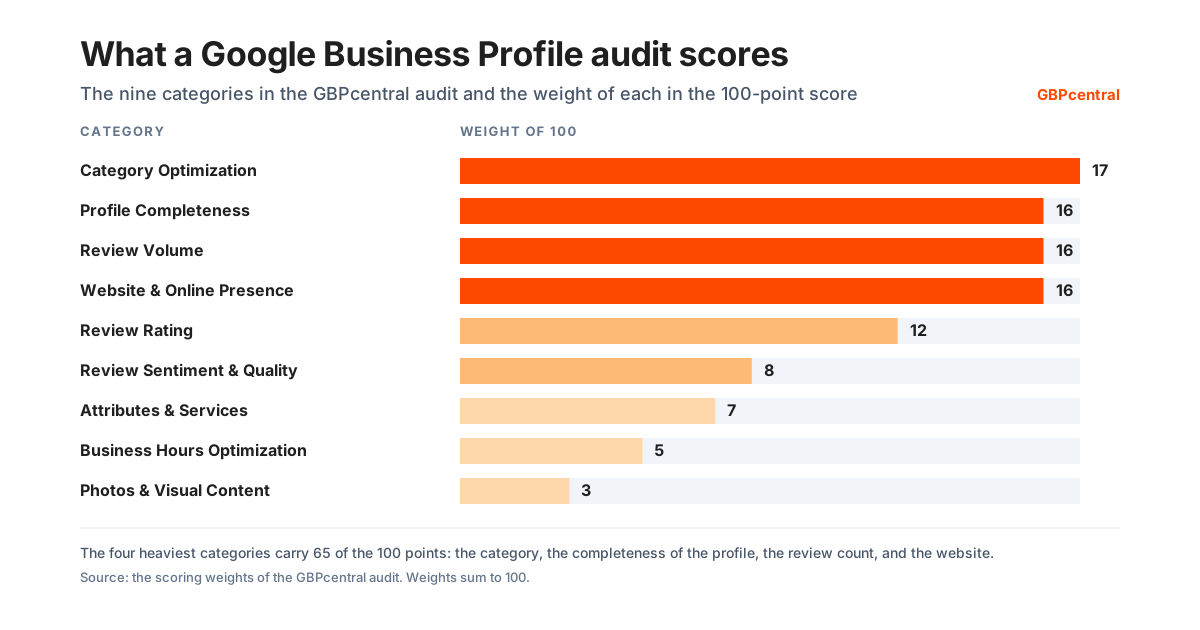
- Category Optimization: 17 of the 100 points.
- Profile Completeness: 16 of the 100 points.
- Review Volume: 16 of the 100 points.
- Website & Online Presence: 16 of the 100 points.
- Review Rating: 12 of the 100 points.
- Review Sentiment & Quality: 8 of the 100 points.
- Attributes & Services: 7 of the 100 points.
- Business Hours Optimization: 5 of the 100 points.
- Photos & Visual Content: 3 of the 100 points.
What the GBP audit found across 1,688 Google Business Profiles
The figures below are read from the audits themselves, the latest audit for each profile, and they update as new audits are run. The sample is the profiles people chose to audit, not a random sample of every business on Google.
- 1,688 profiles in 221 business categories, audited between March 28, 2026 and November 3, 2026: the average score is 72.7 of 100 and the median is 76.
- Website & Online Presence: average 53 of 100, the lowest of the nine; 543 profiles scored below 50.
- Attributes & Services: average 58.5 of 100; 583 profiles scored below 50.
- Review Volume: average 65.2 of 100; 378 profiles scored below 50.
- Category Optimization: average 72.2 of 100; 232 profiles scored below 50.
- Review Sentiment & Quality: average 74.5 of 100; 203 profiles scored below 50.
- Business Hours Optimization: average 80.3 of 100; 119 profiles scored below 50.
- Review Rating: average 84.9 of 100; 149 profiles scored below 50.
- Photos & Visual Content: average 88 of 100; 167 profiles scored below 50.
- Profile Completeness: average 91.3 of 100; 33 profiles scored below 50.
- 119 profiles (7%) had no regular hours published on the listing.
- 348 profiles (21%) had no website on the listing.
- 244 profiles (14%) had fewer than 10 reviews, and 784 (46%) had 100 or more; the average rating across the sample is 4.68.
- The audit flagged the business name against Google's naming guidelines on 172 profiles (10%).
- 458 profiles scored in the A range, 637 in the B range, 262 in the C range, 153 a D, and 178 an F.
What to check: your own profile against the nine categories, starting with the four heaviest. Run the free audit on any profile to see its score in each.
How often to audit the profile: a full audit each quarter, a quick check monthly.
How GBPcentral handles GBP management
GBPcentral handles GBP management as one platform covering the eight areas above. It is built on the official Google Business Profile API, for one location or a portfolio of them.
- Scheduling and calendar
- Draft, schedule, and auto-publish posts across every profile, with recurring series and a calendar that shows every queued post.
- AI drafting in your voice
- Post and review-reply drafts trained on your brand voice, with an approval step before anything goes out.
- Geo-grid rank tracking
- Scans the local pack across a grid around each location on a daily or weekly schedule, with competitor comparison and shareable reports.
- Review inbox
- Every review from every location in one inbox, synced from Google, with alerts and sentiment tracked over time.
- Health score and daily actions
- A daily health score for each profile and a prioritized to-do list built from rank, review, health, and analytics data.
- Analytics from Google
- Views, clicks, calls, directions, and search keywords straight from the Google Performance API, refreshed automatically.
- AEO check
- Audits the profile against what an answer engine can read from it and shows whether AI answers name the business, and who they name instead.
- Teams, groups, and white label
- Roles for the people who do the work, account groups for the locations, and on the Agency plan, your own logo, palette, and domain on what clients see.
Every core feature is included on every plan; plans differ by volume and capacity. Not ready to sign up? Run a free GBP audit on any profile first, no account needed.
Frequently asked GBP management questions
These GBP management questions cover what the work is, how often to do it, what it costs, and who should do it.
What is GBP management?
GBP management is the ongoing work of keeping a Google Business Profile accurate, active, and competitive on Google Search and Maps. It covers the listing details such as name, categories, hours, and services. It covers the posts and photos you publish and the reviews you answer. It covers the rankings you track, and the problems you catch early, such as public edits and suspensions. GBP is short for Google Business Profile, the free Google listing on Search and Maps.
What does GBP management include?
GBP management has eight areas of work. The first four are keeping the listing accurate, publishing posts, adding photos, and replying to reviews. The next four are tracking where the profile ranks, reading the performance report from Google, running a regular health check, and handling problems. Those problems are suspensions, requests to verify again, and duplicate listings. A business with several locations also has to decide who has access and keep the details the same at every location. Each area runs on its own schedule, from daily review replies to a full audit each quarter.
How often should a Google Business Profile be managed?
Reviews should be answered daily, or at least within a couple of days. A post each week, and a look at the photos customers have added, keeps the profile visibly active. Add new photos monthly, or weekly in a visual category such as a restaurant or a hotel. Once a month, read the performance report and confirm your hours, including upcoming holiday hours. Once a quarter, run a full audit of categories, services, attributes, photos, and who has access. Busy categories such as restaurants, healthcare, retail, and home services are worth checking more often.
What is the difference between GBP management software and a GBP management service?
Software gives you or your team the tools to do the work yourselves. It brings a scheduling calendar, rank tracking, review tools, bulk updates, and reporting into one place, for a monthly subscription. A managed service is an agency doing that work for you for a monthly fee. Software suits owners and marketers who want control at a lower cost. A service suits businesses with nobody available to do the work. In both cases the business itself should remain the Primary owner of the profile.
How much does GBP management cost?
Doing it yourself in the Google dashboard costs nothing in fees. The cost is the time to work through the daily, weekly, monthly, and quarterly tasks for each location. GBP management software such as GBPcentral starts at $49 per month, and new customers get a 14-day free trial on the Starter plan. Managed services are priced as monthly retainers set by each agency. They vary widely with the number of locations and the scope of work. An inaccurate or inactive profile costs more than any of those options, because it loses calls and visits without ever showing up as a bill.
Can one person manage multiple Google Business Profiles?
Yes. A single Google account can be an owner or manager on many profiles. One person or a small team can run dozens of locations with the right tools. The work scales when you keep one source of truth for each location and group locations by brand or client. Give people only the access their job needs. Publish posts to many locations at once, and track rankings for each location on its own rather than as an average.
What is a GBP manager?
The phrase has two meanings. In the access model Google uses for Business Profiles, a Manager is a role that can edit the profile. A Manager cannot add or remove users or remove the profile itself; those rights belong to Owners and the Primary owner. In everyday use, a GBP manager is the person or agency responsible for a profile, or the software used to run it. Whoever manages the profile day to day, the business itself should hold the Primary owner role.
Is GBP management the same as local SEO?
No. GBP management is one part of local SEO, the part that lives inside the Google listing itself. Local SEO also covers your website, your business details on other directories, reviews on other sites, and links from local sources. The profile is the piece Google shows in the map results, which is why this guide starts there. It works best alongside a sound website and consistent details across the web.
Do I still need to manage my profile once it is verified and complete?
Yes. A verified, complete profile is where the work starts. Google accepts edits suggested by the public and updates listings from its own data sources. Reviews arrive whether or not you answer them. Hours change with seasons and holidays, competitors keep posting, and a policy change can affect a profile that has not been touched in months. Regular checks catch these before your customers do.
Does managing a Google Business Profile affect how AI assistants describe a business?
Yes, in a way you can act on. Google says the same foundational SEO best practices apply to the AI features in Search, AI Overviews and AI Mode, as to Google Search overall, with no additional requirements to appear in them. Google's ranking page names relevance, distance, and prominence as the three factors. Relevance is how well the profile matches the search. Distance is how far the business is from the searcher. Prominence is how well known it is, including its reviews. A well managed profile gives those systems accurate, current material to work from. GBPcentral includes an AEO check that audits a profile against what an answer engine can read from it and shows whether AI answers name the business.
Is GBP management the same as Google My Business management?
Yes. Google Business Profile is the current name of the product. Google's own definition says it was formerly known as Google My Business. GMB management, Google My Business management, and GBP management describe the same work on the same listing. That work is keeping it accurate, active, and competitive on Google Search and Maps. Google's developer pages still use the earlier name for the Google My Business API. The listing, the rules, and the work are the same whichever name is used.
What does a GBP management service do, and what should it never do?
A management service is what Google calls a third party: an authorized agency that manages business information on a Business Profile for a business it does not own. Google's guidance says third parties might offer services to keep your profile up to date, provide customer insights, answer your questions, and respond to reviews. They often charge a fee even though the profile itself can be used at no charge. Google's third-party policies set four duties. They must inform you of all changes and edits to your profile. If they charge a management fee, they must let you know that Business Profile is a service provided at no extra cost. They must tell new customers that in writing before managing the profile, and show the fee on invoices. They must let you retain ownership or co-ownership of the profile at all times. And they must give you back exclusive control within 7 business days of notice if you end the relationship. Google also lists the warning signs of a bad one: a lack of transparency about your profile's performance, guarantees of placement on Google, and claims to work for Google. For that last one Google gives a test. Ask for the person's name and request that they email you from their @google.com address. If they cannot, Google says they likely do not work for Google or are acting in an unauthorized capacity. Two more warning signs are threats and charging more than the price you agreed to. Google says no third party can remove your business from Google or access your profile without your permission. Google says third parties cannot promise or directly influence your ranking on Google Search or Maps through any special means.
How long do profile edits take to appear?
Google reviews edits to a verified profile to check that they follow its guidelines. Google says edits usually take up to 10 minutes to review, but sometimes it can take up to 30 days. After you save, each edit shows as Accepted, Not approved, or Pending. Google might not approve a change if it cannot confirm its accuracy, and you might be able to appeal a rejected edit. Service area edits are a documented exception: if approved, they may take up to 48 hours to show. A change that has not appeared yet is either still pending review or not approved, and the edit status on the profile shows which.
Can Google change my profile without me?
Yes. Google says that to help keep a Business Profile accurate it gathers information from different sources, like user reports and licensed content. If sources report your profile information is incorrect or outdated, Google may update your profile. Google compiles profile information from publicly available information such as a business's own website, and from licensed data from third parties. It also uses users who contribute facts and content such as photos and reviews, and Google's own interactions with the place. When Google updates your profile, you get a notification and an alert in the Edit profile section. In the profile editor, blue text shows information changed by Google. You can review and manage those updates, although Google notes that you cannot manage every Google update through the profile. Customers can also post photo updates to your profile, which you cannot stop but can report. Watching for these changes is a large part of why the work is ongoing.
Was this guide helpful?
Google's documentation references used in this guide
- Guidelines for representing your business on Google
- Edit your Business Profile
- Understand Google updates on your Business Profile
- Manage your Business Profile photos and videos
- Create and manage posts on your Business Profile
- Understand your Business Profile performance and insights
- Tips to improve your local ranking on Google
- Manage your Business Profile owners and managers
- Fix suspended or disabled profiles
- Verify your business on Google
- Resolve duplicate profiles and ownership issues
- Edit your business hours
- Report inappropriate reviews on your Business Profile
- Create and manage business groups
- Tips for working with third parties to manage your Business Profile
- Business Profile third-party policies
- Understand what happens to your Business Profile edits
- Understand how Google sources and uses info in Business Profiles and local search results
- About photo updates from customers
- Manage your service areas for service-area and hybrid businesses
- Add or claim your Business Profile
- Get started with Google Business Profile
- Business eligibility and ownership guidelines
- About Google Business Profile and brand profile
- How to use the Business Profile APIs
- Manage your Business Profile on Google with the Gemini web app
- Manage your Profile Strength
- Complete your Business Profile on Google
- Manage your business category
- Manage your business address
- How to set Special hours
- About holidays on Google
- How to set More hours
- Mark your business as closed
- Mark your business as reopened
- Add a business opening date
- Manage your local business links
- Business links policies and guidelines
- Chat with customers from your Business Profile
- Manage your social media links
- Manage your Business Profile description
- Understand business summaries on Google Maps
- Manage your services on your Business Profile
- Manage your business attributes
- About product editor
- Showcase in-store products on Google Search and Maps
- About the menu editor
- Manage online ordering options
- Set up bookings through a provider
- Tips for business-specific photos on your Business Profile
- Business Profile photos and videos policy and posts content policy
- Manage advanced profile settings
- About automated calls and texts from Google to your business
- Create a bulk upload spreadsheet for Business Profiles
- Manage customer reviews
- Tips to get more reviews
- Create a Google link or QR code to request reviews
- About missing or delayed reviews
- Report negative review extortion scams on your Business Profile
- Business Profile restrictions for policy violations
- Appeal Business Profile content and profile restrictions
- Understand review scores for local places and businesses
- About third-party reviews
- About reviews for service businesses
- Move your reviews across Business Profiles
- Report inappropriate photos or videos on your Business Profile
- Prohibited and restricted content
- Connect your Business Profile to Google Analytics
- About popular times, wait times, and visit duration data
- Transfer primary ownership of a Business Profile
- Request ownership of a Business Profile
- Remove a Business Profile from your Google Account
- Request removal of a Business Profile from Google Search and Maps
- Help protect your Google Business Profile
- Help protect against fraudulent calls and texts
- Manage your notifications
- Verify your business with a video recording
- Overview of Google Business Profile policies
- All Business Profile policies and guidelines
- Manage business group owners and managers
- Bulk location management overview
- Verify Business Profiles in bulk
- Import and update Business Profiles in bulk
- Download your Business Profiles to a spreadsheet
- Understand your Business Profile status for bulk uploads
- Understand delays in bulk verification
- Overview for agencies
- Manage agency organizations
- Business Profile: Definition (Google Ads Help)
- AI features and your website (Google Search Central)
- Google Business Profile APIs
- Deprecation schedule, Google Business Profile APIs
- Get Listed on Google: Google Business Profile